
Boost your content management game with Cubox - Chrome Extension. The ultimate powerhouse for and efficient content management.
Explore a specific workflow
Explore annotation tools through the product profiles below. The collection groups applications around a shared task. Product scope can overlap, so compare the specific workflow each tool describes rather than the category name alone.
Identify the files, text or account connections your task needs. Confirm that the product accepts those inputs and offers controls for reviewing its work.
Test one representative task and inspect the result for accuracy and completeness. Record where manual corrections or extra tools are needed.
Boost your content management game with Cubox - Chrome Extension. The ultimate powerhouse for and efficient content management.

Fabric - Chrome Extension: Your Digital Sanctuary for Organizing Content. Save, organize, and find everything with ease, right from your browser.

ScreenSnap - Chrome Extension: The ultimate screen recorder with a privacy focus. Capture, edit, and share screens securely, protecting your data at every step.

Customize and classify documents.
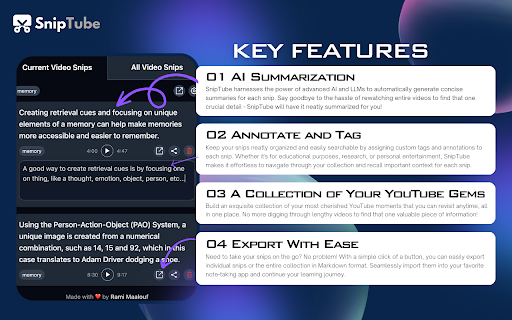
SnipTube Chrome Extension: Easily highlight and summarize YouTube videos in seconds, saving time and boosting productivity. Perfect for quick insights!

PDF Talk: Effortlessly manage, edit, and share your PDF documents online. Simplify your workflow with powerful, PDF tools—all in one place.

Capture and share screen recordings effortlessly with SimpleScreen—one-click recording, mic/webcam support, annotations, and video trimming for all your needs!

DataDep: Expert data collection & annotation consulting for superior neural network training. Boost your AI accuracy with our tailored services.

Datature is a complete AI vision platform that allows teams and enterprises to build computer vision applications without writing a single line of code. It offers a range of features including dataset management, annotation, training, and deployment.

Revolutionize your document interaction with PDF AI: Chat with any PDF for instant answers, enhanced productivity, and streamlined workflows.

SymbiotAI: Empowering collaboration between people and AI models to advance global development and create a brighter future.
FAQ
Practical answers to help you take the next step.
The collection groups applications around a shared task. Product scope can overlap, so compare the specific workflow each tool describes rather than the category name alone.
Identify the files, text or account connections your task needs. Confirm that the product accepts those inputs and offers controls for reviewing its work.
Test one representative task and inspect the result for accuracy and completeness. Record where manual corrections or extra tools are needed.
Choose one task with a clear success condition. Keep the input consistent, record the time spent reviewing and compare the complete workflow cost.
Boost your content management game with Cubox - Chrome Extension. The ultimate powerhouse for and efficient content management.
Read about Cubox - Chrome ExtensionFabric - Chrome Extension: Your Digital Sanctuary for Organizing Content. Save, organize, and find everything with ease, right from your browser.
Read about Fabric - Chrome ExtensionScreenSnap - Chrome Extension: The ultimate screen recorder with a privacy focus. Capture, edit, and share screens securely, protecting your data at every step.
Read about ScreenSnapCustomize and classify documents.
Read about Annotation Plugin - Chrome ExtensionSnipTube Chrome Extension: Easily highlight and summarize YouTube videos in seconds, saving time and boosting productivity. Perfect for quick insights!
Read about SnipTubePDF Talk: Effortlessly manage, edit, and share your PDF documents online. Simplify your workflow with powerful, PDF tools—all in one place.
Read about PDF Talk