AI Content Generator

Storyy

Storyy: AI-powered video scriptwriting & teleprompter—boost engagement, save time, and elevate storytelling

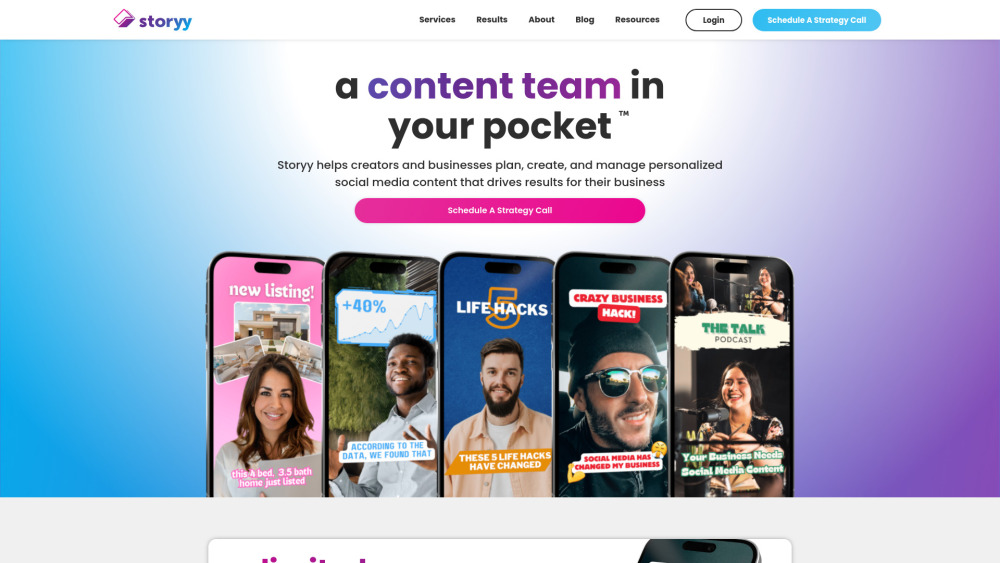
Storyy website preview

Storyy Website screenshot

What Is Storyy?

Storyy isn’t just another video tool—it’s your AI-powered creative partner, engineered for creators who demand both speed and authenticity. By blending generative AI with expert human oversight, Storyy transforms how you ideate, script, record, and refine video content—so every frame resonates, converts, and grows your audience. Smart Video Editing, Human-Crafted: Our editing team brings deep platform intuition—whether it’s TikTok’s rapid-fire pacing, Instagram Reels’ visual rhythm, or YouTube’s narrative depth. We don’t just cut clips—we shape stories that reflect *your* brand voice, boost watch time, and nurture loyal communities. AI Scriptwriting That Thinks With You: Beat blank-page fatigue with intelligent, customizable script generation. Storyy analyzes your niche, tone, and goals to deliver on-brand scripts—not generic templates—plus trending hooks, SEO-optimized captions, and A/B-ready variations for maximum engagement. Built-In Teleprompter, Studio-Ready: Film confidently with our seamless teleprompter experience—scrollable, adjustable, and synced to your pace. Use it solo on mobile, pair it with DSLR rigs, or integrate with professional hardware. No more stumbling over lines—just polished, authentic delivery, every time. Start creating smarter, not harder. Download the Storyy app today—and turn ideas into impact, one story at a time.

Storyy’s Core Features

AI Scriptwriting Engine

Intelligent Teleprompter Camera

Real-Time Team Collaboration Hub

End-to-End Project Dashboard

Pro-Level Video Editing Suite

Who Uses Storyy?

Solo Creators & Influencers

Social Media Managers

Marketing Teams & Agencies

Founders & Thought Leaders

Product source: Storyy official website. Check the provider for current plans, limits and availability.

FAQ

Storyy questions and answers

Product context and practical checks for evaluating Storyy.

What is Storyy used for?

Storyy: AI-powered video scriptwriting & teleprompter—boost engagement, save time, and elevate storytelling

How do I get started with Storyy?

Open the official Storyy website and identify the workflow that matches your task. Use a short shot with one subject and one camera movement. Keep the prompt and duration constant, then compare usable seconds and the number of regenerations.

Which capabilities are described for Storyy?

AI Scriptwriting EngineIntelligent Teleprompter CameraReal-Time Team Collaboration HubEnd-to-End Project DashboardPro-Level Video Editing Suite

What projects can I evaluate Storyy for?

Solo Creators & InfluencersSocial Media ManagersMarketing Teams & AgenciesFounders & Thought Leaders Storyy Support & Contact Information For help with billing, technical issues, or refunds, visit our official support portal: https://wordpress.com/contact-support/ About Storyy Storyy Company name: Storyy Inc. Storyy Company address: San Francisco, CA — operating globally. Learn our mission, values, and team: About Us (https://storyy.ai/about) Storyy Login Access your workspace instantly: https://app.storyy.ai/login Storyy Sign Up Join thousands of creators—get started free: https://app.storyy.ai/signup

What should I compare before choosing a Storyy plan?

Check Storyy’s current pricing page for included usage, renewal terms and any credit charges. Compare the cost of a usable result, including retries, rather than assuming that account registration includes free usage.

What inputs should I prepare for a Storyy trial?

Compare text prompts, reference frames, source footage and audio support. Check duration, aspect ratio and whether the tool lets you keep a subject consistent between shots.

How can I check the quality of a Storyy result?

Watch the entire clip for motion errors, distorted objects, changing identities, lip-sync problems and abrupt transitions. Inspect the downloaded file as well as the preview.

Which export options should I check in Storyy?

Check export resolution, frame rate, aspect ratio, audio tracks and watermark rules. A good preview is not a substitute for an export that fits your publishing channel.

What is a practical way to test Storyy against alternatives?

Use a short shot with one subject and one camera movement. Keep the prompt and duration constant, then compare usable seconds and the number of regenerations.

Where is the official Storyy website?

The website linked from this profile is https://storyy.co. Use the provider’s own documentation, account area and support channels to confirm current product details.

Visit Storyy