AI Video Generator

Snapcut.ai

Snapcut.ai: AI-powered video editing for viral shorts—boost engagement with smart cuts, pricing plans, real-user reviews & top alternatives. Try now!

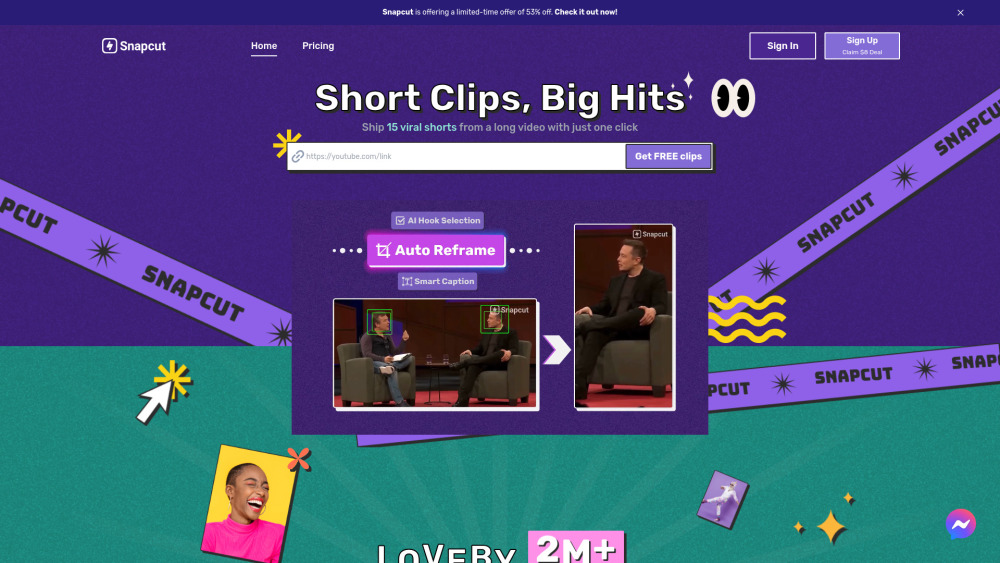
Snapcut.ai website preview

Snapcut.ai Website screenshot

What Is Snapcut.ai? — AI-Powered Short-Form Video Repurposing

Snapcut.ai is a next-generation AI video editor engineered specifically for creators, marketers, and educators who need to transform lengthy video content into high-performing, platform-optimized short clips—fast. Unlike traditional editors, Snapcut.ai doesn’t just trim footage—it intelligently interprets speech, emotion, pacing, and visual cues to identify *share-worthy moments*. Whether you're repackaging a 60-minute webinar, a podcast episode, or a product demo, Snapcut.ai auto-generates scroll-stopping TikTok clips, Instagram Reels, YouTube Shorts, and Facebook Shorts—with smart reframing, dynamic captions, and attention-grabbing hooks proven to increase watch time by up to 80%.

How Does Snapcut.ai Work?

Using Snapcut.ai takes under 60 seconds: upload your source video (MP4, MOV, or via URL from YouTube/Vimeo), select your target platform(s), and click “Generate.” The AI analyzes audio transcripts, facial expressions, speaker emphasis, background motion, and semantic relevance to curate the most engaging 15–60 second segments. You can then review, reorder, fine-tune timing, adjust captions, swap aspect ratios (9:16, 4:5, 1:1), and export in HD—all without manual timeline editing.

Key Capabilities of Snapcut.ai

Intelligent Scene Detection & Auto-Cutting

One-Click Multi-Platform Reframing (TikTok, Reels, Shorts, Stories)

Context-Aware Captions with Speaker Diarization & Emoji Integration

AI Hook Engine — Prioritizes openings with emotional spikes, rhetorical questions, or surprising statements

Who Uses Snapcut.ai?

Content teams scaling social output without hiring editors

Podcasters and educators expanding reach across vertical video platforms

E-commerce brands turning long-form demos into shoppable reels

Product source: Snapcut.ai official website. Check the provider for current plans, limits and availability.

FAQ

Snapcut.ai questions and answers

Product context and practical checks for evaluating Snapcut.ai.

What is Snapcut.ai used for?

Snapcut.ai: AI-powered video editing for viral shorts—boost engagement with smart cuts, pricing plans, real-user reviews & top alternatives. Try now!

How do I get started with Snapcut.ai?

Using Snapcut.ai takes under 60 seconds: upload your source video (MP4, MOV, or via URL from YouTube/Vimeo), select your target platform(s), and click “Generate.” The AI analyzes audio transcripts, facial expressions, speaker emphasis, background motion, and semantic relevance to curate the most engaging 15–60 second segments. You can then review, reorder, fine-tune timing, adjust captions, swap aspect ratios (9:16, 4:5, 1:1), and export in HD—all without manual timeline editing.

Which capabilities are described for Snapcut.ai?

Intelligent Scene Detection & Auto-CuttingOne-Click Multi-Platform Reframing (TikTok, Reels, Shorts, Stories)Context-Aware Captions with Speaker Diarization & Emoji IntegrationAI Hook Engine — Prioritizes openings with emotional spikes, rhetorical questions, or surprising statements

What projects can I evaluate Snapcut.ai for?

Content teams scaling social output without hiring editorsPodcasters and educators expanding reach across vertical video platformsE-commerce brands turning long-form demos into shoppable reels

How does Snapcut.ai handle onmic technology pte. ltd.?

About the Company Behind Snapcut.ai Snapcut.ai is developed by OnMic Technology Pte. Ltd., a Singapore-based AI startup focused on democratizing professional-grade video intelligence for creators worldwide.

What should I compare before choosing a Snapcut.ai plan?

Compare features, minutes, exports, and AI capabilities: https://www.snapcut.ai/pricing Confirm current prices and allowances on the provider’s website before purchasing.

What inputs should I prepare for a Snapcut.ai trial?

Compare text prompts, reference frames, source footage and audio support. Check duration, aspect ratio and whether the tool lets you keep a subject consistent between shots.

How can I check the quality of a Snapcut.ai result?

Watch the entire clip for motion errors, distorted objects, changing identities, lip-sync problems and abrupt transitions. Inspect the downloaded file as well as the preview.

Which export options should I check in Snapcut.ai?

Check export resolution, frame rate, aspect ratio, audio tracks and watermark rules. A good preview is not a substitute for an export that fits your publishing channel.

Where is the official Snapcut.ai website?

The website linked from this profile is https://. Use the provider’s own documentation, account area and support channels to confirm current product details.

Visit Snapcut.ai