AI Advertising Assistant

Motionbear.io

Motionbear.io: AI-powered transcription and subtitles in 40+ languages. Save hours with automatic speech recognition. Perfect for fast, accurate video captions!

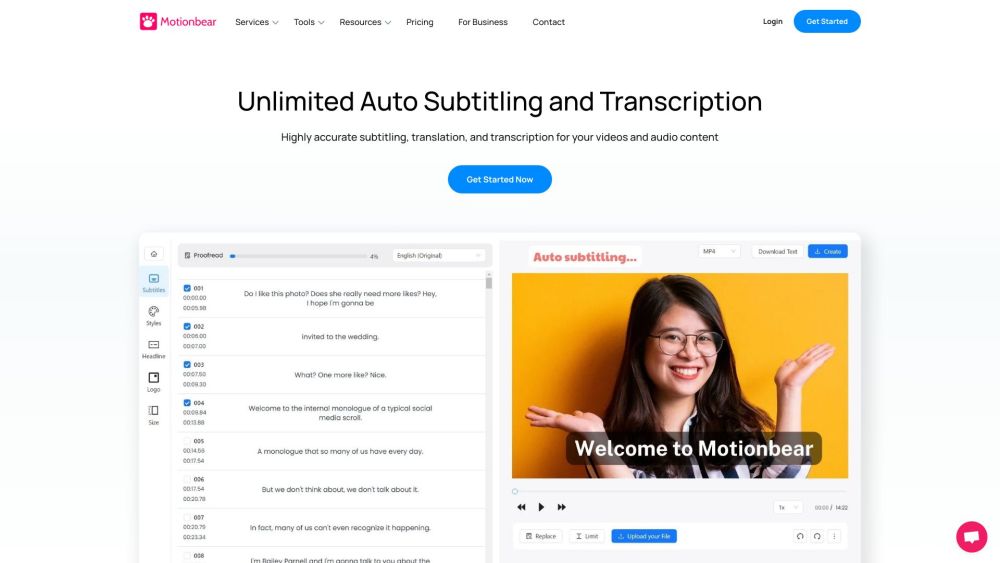
Motionbear.io website preview

motionbear.io Website screenshot

What is Motionbear.io?

Motionbear.io is an innovative online service that offers advanced AI-driven transcription and subtitle generation. By leveraging cutting-edge speech recognition technology, Motionbear.io efficiently transcribes video content, significantly reducing the time and effort required for manual transcription. Additionally, it provides subtitle and closed caption creation with support for translations in over 40 languages.

How to Use Motionbear.io?

Using Motionbear.io is straightforward. Start by uploading your video or audio file to the platform. The AI software will then automatically transcribe the content. Users have the option to generate subtitles or closed captions, which can be customized to reflect their brand identity. Motionbear.io supports a variety of file formats and prioritizes the privacy and security of your files.

Core Features of Motionbear.io

AI-driven transcription for videos, audio files, meetings, and podcasts

Rapid and efficient subtitle and closed caption generation

Customizable subtitle styling to align with brand guidelines

Translation of transcriptions and subtitles in over 40 languages

Unlimited uploads of files of any size and duration

Supports a wide range of file formats

Ensures privacy and security of your files and subtitles

Use Cases for Motionbear.io

Content creators looking to automate transcription and subtitle generation to enhance productivity

Businesses aiming to make video content accessible to a global audience through multilingual subtitles

Podcasters requiring accurate and quick transcriptions for easy reference and improved searchability

Product source: Motionbear.io official website. Check the provider for current plans, limits and availability.

FAQ

Motionbear.io questions and answers

Product context and practical checks for evaluating Motionbear.io.

What is Motionbear.io used for?

Motionbear.io: AI-powered transcription and subtitles in 40+ languages. Save hours with automatic speech recognition. Perfect for fast, accurate video captions!

How do I get started with Motionbear.io?

Using Motionbear.io is straightforward. Start by uploading your video or audio file to the platform. The AI software will then automatically transcribe the content. Users have the option to generate subtitles or closed captions, which can be customized to reflect their brand identity. Motionbear.io supports a variety of file formats and prioritizes the privacy and security of your files.

Which capabilities are described for Motionbear.io?

AI-driven transcription for videos, audio files, meetings, and podcastsRapid and efficient subtitle and closed caption generationCustomizable subtitle styling to align with brand guidelinesTranslation of transcriptions and subtitles in over 40 languagesUnlimited uploads of files of any size and durationSupports a wide range of file formatsEnsures privacy and security of your files and subtitles

What projects can I evaluate Motionbear.io for?

Content creators looking to automate transcription and subtitle generation to enhance productivityBusinesses aiming to make video content accessible to a global audience through multilingual subtitlesPodcasters requiring accurate and quick transcriptions for easy reference and improved searchability Motionbear.io Discord Join the Motionbear.io community on Discord: https://discord.gg/rvd4Hayeay. For more information, click here(/discord/rvd4hayeay). Motionbear.io Support Email & Customer Service Contact For customer service inquiries, reach out to Motionbear.io via email: [email protected]. Motionbear.io Login Access your Motionbear.io account here: https://vsub.io/login Motionbear.io Sign Up Create a new account on Motionbear.io: https://vsub.io/login Motionbear.io Pricing Find detailed pricing information for Motionbear.io: https://vsub.io/pricing Motionbear.io Twitter Follow Motionbear.io on Twitter for updates: https://twitter.com/MrBeast

What should I compare before choosing a Motionbear.io plan?

Find detailed pricing information for Motionbear.io: https://vsub.io/pricing Confirm current prices and allowances on the provider’s website before purchasing.

What inputs should I prepare for a Motionbear.io trial?

Compare text prompts, reference frames, source footage and audio support. Check duration, aspect ratio and whether the tool lets you keep a subject consistent between shots.

How can I check the quality of a Motionbear.io result?

Watch the entire clip for motion errors, distorted objects, changing identities, lip-sync problems and abrupt transitions. Inspect the downloaded file as well as the preview.

Which export options should I check in Motionbear.io?

Check export resolution, frame rate, aspect ratio, audio tracks and watermark rules. A good preview is not a substitute for an export that fits your publishing channel.

What is a practical way to test Motionbear.io against alternatives?

Use a short shot with one subject and one camera movement. Keep the prompt and duration constant, then compare usable seconds and the number of regenerations.

Where is the official Motionbear.io website?

The website linked from this profile is https://vsub.io. Use the provider’s own documentation, account area and support channels to confirm current product details.

Visit Motionbear.io