AI Response Generator

Conversational User Manuals

Boost customer experience and ease support with 'Conversational User Manuals'. QR codes offer instant answers, media guides, and cross-selling opportunities.

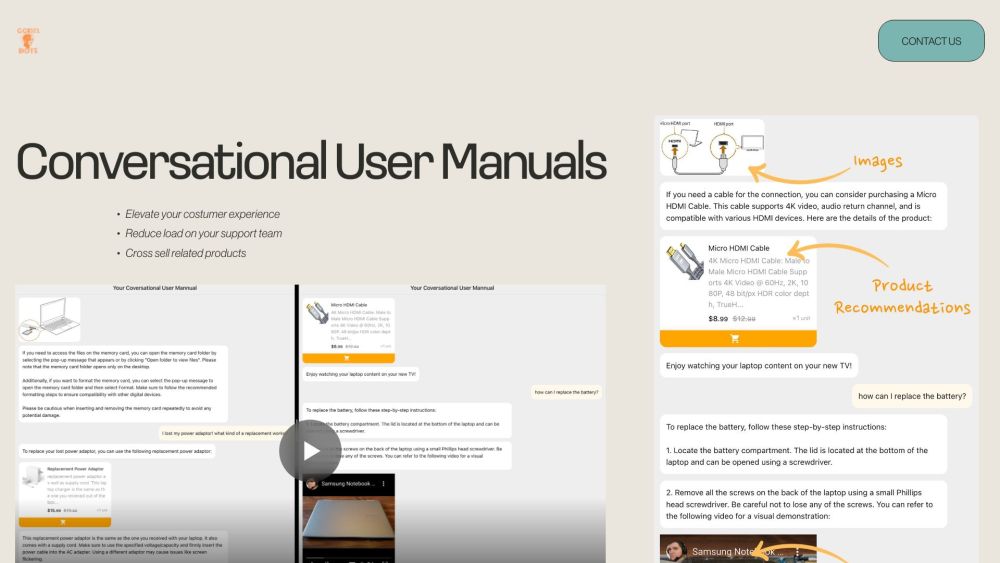
Conversational User Manuals website preview

Conversational User Manuals Website screenshot

Discover Conversational User Manuals

Enhance your customer interaction by integrating a QR code on your product or packaging. Customers can scan this code to instantly access detailed answers to their queries, enriched with visuals, videos, and tailored product suggestions. This innovation not only boosts user satisfaction but also minimizes the burden on your support team while promoting related items.

Using Conversational User Manuals Effectively

To implement this solution, simply upload your existing documentation, Q&A, video content, and product catalog. Place the generated QR code prominently on your product or packaging. When customers scan the code, they receive thorough explanations and multimedia support. This interaction can also highlight additional products that complement their purchase.

Key Features of Conversational User Manuals

Detailed Textual Responses

Visual Guides and Images

Instructional Videos

Customized Product Recommendations

Product source: Conversational User Manuals official website. Check the provider for current plans, limits and availability.

FAQ

Conversational User Manuals questions and answers

Product context and practical checks for evaluating Conversational User Manuals.

What is Conversational User Manuals used for?

Boost customer experience and ease support with 'Conversational User Manuals'. QR codes offer instant answers, media guides, and cross-selling opportunities.

How do I get started with Conversational User Manuals?

Open the official Conversational User Manuals website and identify the workflow that matches your task. Choose a small reproducible bug with an existing failing check. Measure whether the tool fixes the cause, preserves behavior and produces a reviewable change.

Which capabilities are described for Conversational User Manuals?

Detailed Textual ResponsesVisual Guides and ImagesInstructional VideosCustomized Product Recommendations

What should I compare before choosing a Conversational User Manuals plan?

Check Conversational User Manuals’s current pricing page for included usage, renewal terms and any credit charges. Compare the cost of a usable result, including retries, rather than assuming that account registration includes free usage.

What inputs should I prepare for a Conversational User Manuals trial?

Compare repository access, context limits, supported languages and tool permissions. Check whether the assistant can read relevant files and run your existing checks.

How can I check the quality of a Conversational User Manuals result?

Review the diff, run tests and inspect error handling and dependency changes. Generated code should meet the same review standard as a human contribution.

Which export options should I check in Conversational User Manuals?

Prefer changes you can inspect and keep in version control. Check whether code, tests and configuration can be exported without depending on a hosted preview.

What is a practical way to test Conversational User Manuals against alternatives?

Choose a small reproducible bug with an existing failing check. Measure whether the tool fixes the cause, preserves behavior and produces a reviewable change.

What should I review before uploading material to Conversational User Manuals?

Read the provider’s rules on access, retention, deletion and use of uploaded material. Start with a non-confidential sample that you have permission to use.

Where is the official Conversational User Manuals website?

The website linked from this profile is https://godelbots.com. Use the provider’s own documentation, account area and support channels to confirm current product details.

Visit Conversational User Manuals