AI Content Detector

Clarity

Clarity delivers balanced news by showcasing diverse political perspectives, ensuring you stay informed with unbiased views from all sides.

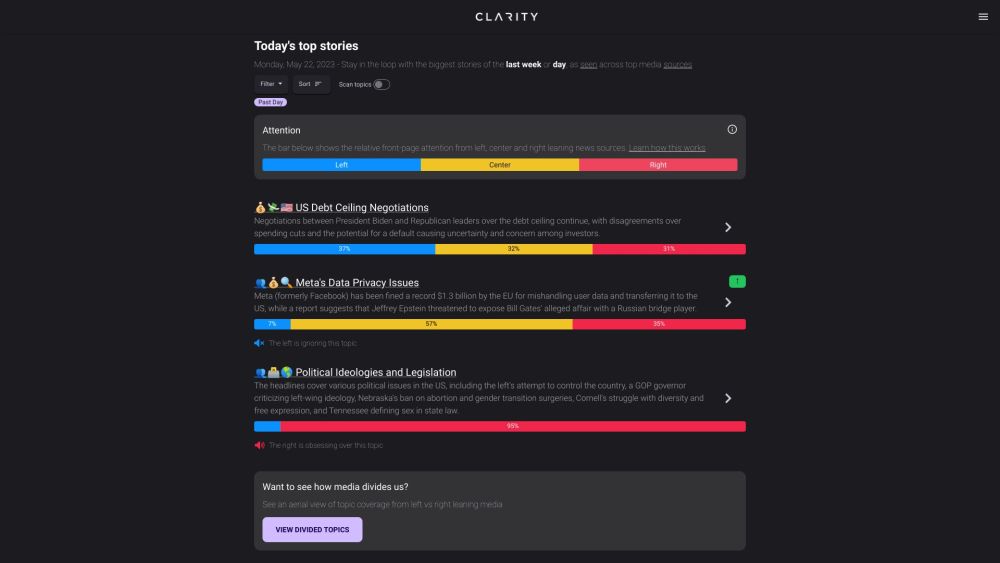
Clarity website preview

Clarity Website screenshot

Understanding Clarity

Clarity is an innovative platform that delivers a broad perspective on the news, curating top stories from a diverse array of media outlets across the political spectrum, including left, center, and right-leaning sources.

Getting Started with Clarity

To begin using Clarity, simply head over to the website and check out the homepage. Here, you'll discover a curated list of the day's or week's most talked-about stories, categorized by the level of attention they receive from various media outlets. You have the flexibility to filter and organize these topics according to your interests. Furthermore, you can delve into divided topics over time to observe how media coverage shifts, helping you uncover emerging trends. Clarity is designed to reduce bias and provide a well-rounded view of the news.

Key Features of Clarity

1. Comprehensive News Aggregation: Clarity gathers and displays the most important news stories from a range of political viewpoints. 2. Media Attention Insights: The platform tracks the prominence given to different stories by left, center, and right-leaning outlets, offering valuable insights into media focus. 3. Customizable News Experience: Users can tailor their news feed by filtering and sorting content based on their personal preferences. 4. Historical Coverage Analysis: Clarity allows users to track the evolution of media coverage over time, identifying new and developing stories in the process.

Use Cases for Clarity

1. Stay Informed: Clarity enables users to stay updated on top news from multiple political perspectives, minimizing the influence of bias. 2. Analyze Media Bias: Users can better understand the media landscape by examining how different outlets allocate attention to various topics. 3. Monitor News Trends: With the divided topics over time feature, users can follow the progression of news coverage and spot emerging stories. 4. Foster Balanced Views: Clarity encourages users to engage with news from all sides, promoting a more nuanced and balanced understanding of current events.

Product source: Clarity official website. Check the provider for current plans, limits and availability.

FAQ

Clarity questions and answers

Product context and practical checks for evaluating Clarity.

What is Clarity used for?

Clarity delivers balanced news by showcasing diverse political perspectives, ensuring you stay informed with unbiased views from all sides.

How do I get started with Clarity?

To begin using Clarity, simply head over to the website and check out the homepage. Here, you'll discover a curated list of the day's or week's most talked-about stories, categorized by the level of attention they receive from various media outlets. You have the flexibility to filter and organize these topics according to your interests. Furthermore, you can delve into divided topics over time to observe how media coverage shifts, helping you uncover emerging trends. Clarity is designed to reduce bias and provide a well-rounded view of the news.

Which capabilities are described for Clarity?

1. Comprehensive News Aggregation: Clarity gathers and displays the most important news stories from a range of political viewpoints. 2. Media Attention Insights: The platform tracks the prominence given to different stories by left, center, and right-leaning outlets, offering valuable insights into media focus. 3. Customizable News Experience: Users can tailor their news feed by filtering and sorting content based on their personal preferences. 4. Historical Coverage Analysis: Clarity allows users to track the evolution of media coverage over time, identifying new and developing stories in the process.

What projects can I evaluate Clarity for?

1. Stay Informed: Clarity enables users to stay updated on top news from multiple political perspectives, minimizing the influence of bias. 2. Analyze Media Bias: Users can better understand the media landscape by examining how different outlets allocate attention to various topics. 3. Monitor News Trends: With the divided topics over time feature, users can follow the progression of news coverage and spot emerging stories. 4. Foster Balanced Views: Clarity encourages users to engage with news from all sides, promoting a more nuanced and balanced understanding of current events. About Clarity Clarity is brought to you by Clarity Company, dedicated to providing unbiased and comprehensive news perspectives. For more information, visit the about us page (https://useclarity.com/why-we-are-here).

What should I compare before choosing a Clarity plan?

Check Clarity’s current pricing page for included usage, renewal terms and any credit charges. Compare the cost of a usable result, including retries, rather than assuming that account registration includes free usage.

What inputs should I prepare for a Clarity trial?

Identify the files, text or account connections your task needs. Confirm that the product accepts those inputs and offers controls for reviewing its work.

How can I check the quality of a Clarity result?

Test one representative task and inspect the result for accuracy and completeness. Record where manual corrections or extra tools are needed.

Which export options should I check in Clarity?

Check export formats, integrations and whether you can keep using your work outside the service. Test a real export before committing to a longer plan.

What is a practical way to test Clarity against alternatives?

Choose one task with a clear success condition. Keep the input consistent, record the time spent reviewing and compare the complete workflow cost.

Where is the official Clarity website?

The website linked from this profile is https://useclarity.com. Use the provider’s own documentation, account area and support channels to confirm current product details.

Visit Clarity