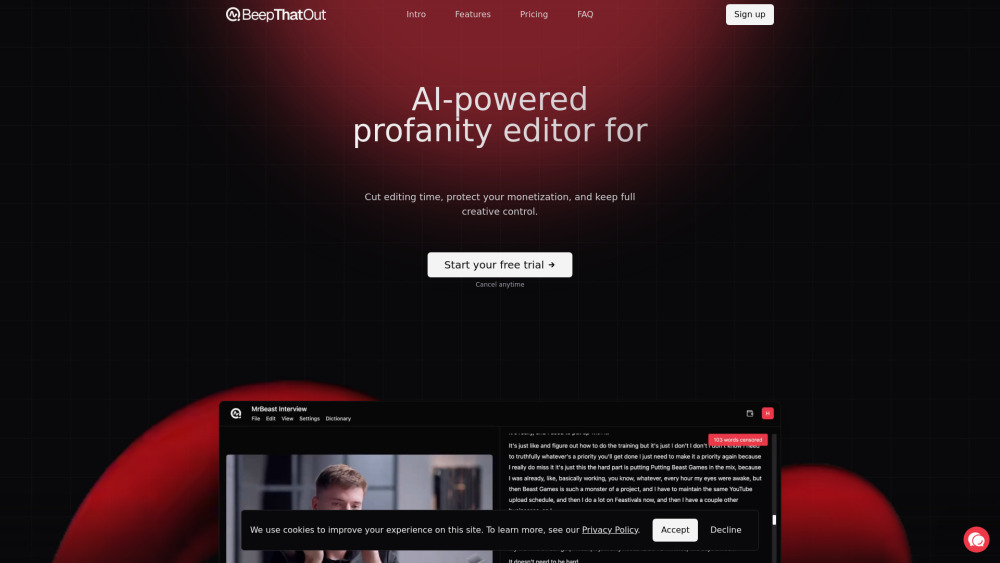
BeepThatOut: AI Profanity Editor for Clean, Pro Content
BeepThatOut: AI-powered web tool that instantly detects & replaces profanity—keeping your content clean, professional, and audience-ready.


Introducing BeepThatOut: AI-Powered Profanity Editing, Redefined
BeepThatOut is the world’s first browser-native AI profanity editor engineered exclusively for modern audio and video creators. Designed from the ground up for YouTubers, podcasters, educators, and brand-safe content teams, it transforms messy raw files into polished, monetization-ready media — without sacrificing creative intent or workflow continuity.
How BeepThatOut Streamlines Your Editing Workflow
Upload your video or audio file in seconds — BeepThatOut instantly transcribes speech, pinpoints profanities with contextual accuracy, and maps every word to its precise timeline location. From there, you’re in full command: select sensitivity levels, toggle language-specific filters, swap beep tones, adjust duration and fade, correct transcription errors on-the-fly, and preview changes in real time. Export directly as editable project files (XML, FCPXML, EDL) for Adobe Premiere Pro, DaVinci Resolve, or Final Cut Pro — or download a fully rendered, platform-optimized output ready for upload.
Why BeepThatOut Stands Apart
Precision AI Detection — Not Just Keyword Matching
Fully Customizable Censor Effects: Beep, Mute, Hum, or Your Own Sound
Seamless Editor Integration — Round-trip editing supported
Auto-Generated & Editable Subtitles (.srt, .vtt, WebVTT)
50+ Language Support — Including regional dialects and mixed-language speech
Scalable Processing — Handles ultra-long-form content (up to 10 hours, 20GB)
Real-Time Transcript Editor — Click-to-correct timing, spelling, and tagging
Personalized Profanity Dictionary — Add industry terms, inside jokes, or client-specific exclusions
Who Benefits Most from BeepThatOut?
YouTubers maintaining AdSense eligibility while preserving authenticity and engagement.
Podcast networks enforcing consistent brand guidelines across dozens of shows.
Educational creators producing classroom-safe materials without manual scrubbing.
Marketing agencies delivering sponsor-compliant edits faster — and with full auditability.
Accessibility teams generating accurate, time-synced captions alongside clean audio.
Frequently Asked Questions
-
What makes BeepThatOut different from generic audio editors?
-
How does your AI understand context — not just swear words?
-
Can I undo or re-edit censored segments after export?
-
Do custom sounds retain volume consistency with my original audio?
-
Can subtitles be styled or exported in platform-specific formats (e.g., YouTube, TikTok)?
-
Are cloud uploads encrypted end-to-end?
-
Does BeepThatOut support voice isolation or background noise reduction?
-
Can I set default preferences for recurring projects or team members?
-
Is offline mode or local processing available?
-
How often are language models updated for slang, neologisms, and cultural shifts?
-
Do you offer team plans with centralized billing and usage analytics?
-
What happens to my uploaded files after processing completes?
-
Can I integrate BeepThatOut into my existing CI/CD or publishing pipeline?
-
Do you provide API access for enterprise automation?
-
Where can I find tutorials, keyboard shortcuts, and pro tips?
-
Support & Contact Information
Reach our dedicated support team at [email protected]. For instant help, use the live chat icon in the bottom-right corner of the app. All inquiries receive a response within 2 business hours — guaranteed.
-
About BeepThatOut
BeepThatOut is developed by TYY Labs — a creator-first AI infrastructure company headquartered in Berlin and San Francisco. We build tools that empower authenticity, not constrain it.
-
Get Started — No Installation Required
Start editing in-browser instantly: https://app.beepthatout.com/auth/register?phid=0197d4ca-efce-7143-8b84-de1f23a08cf7
-
Free Trial — Full Access, Zero Restrictions
Try BeepThatOut risk-free for 7 days — all features unlocked, no credit card required. Cancel anytime before your trial ends, and keep your processed files. Start your trial now →
Quick Reference FAQ
What is BeepThatOut?
BeepThatOut is a secure, zero-install AI tool that intelligently identifies and replaces profanities in spoken audio — preserving natural pacing, emotional tone, and narrative flow. It’s built for creators who refuse to choose between professionalism and personality.
How does BeepThatOut work?
Using proprietary multimodal AI, BeepThatOut analyzes acoustic features, linguistic patterns, and speaker intent — not just isolated words. It then generates frame-accurate edit points, applies customizable audio replacements, and syncs everything to your transcript. Every step is editable, reversible, and exportable.
Why should I choose BeepThatOut over manual editing?
Because editing profanity manually takes 3–8x longer than recording the original content. BeepThatOut cuts that time to under 90 seconds — while delivering higher consistency, better accessibility compliance, and richer metadata for analytics and repurposing.
Can I review or edit censored sections before finalizing?
Absolutely. Our timeline-based editor lets you zoom into millisecond-level precision, drag adjustment handles, mute/unmute segments, toggle visual waveform overlays, and even A/B compare original vs. censored audio — all in one interface.
Can I choose how the censorship sounds?
Yes — and it’s intuitive. Choose from 12 curated sound profiles (including retro synth, cartoon boing, vinyl scratch), adjust pitch/duration/fade, or upload your own WAV/MP3 file. Volume normalization ensures seamless blending — no ducking or clipping.
Do you support subtitle export or caption generation?
Yes — with intelligent formatting. Export timed .srt, .vtt, or plain-text transcripts. Customize line breaks, character limits per line, and speaker labels. Auto-correct common ASR errors using our contextual suggestion engine.
What file formats do you support?
Full compatibility with MP4, MOV, AVI, MKV, WEBM, MP3, WAV, FLAC, AAC, M4A, OGG, and AIFF. HDR, Dolby Atmos, and multi-track audio are preserved during analysis — only the cleaned audio stream is exported unless otherwise specified.
What languages do you support?
52 languages — including low-resource variants like Nigerian Pidgin, Swiss German, and Haitian Creole — with ongoing expansion driven by creator feedback. Our models are trained on diverse accents, code-switching, and colloquial speech patterns.
Can I upload long videos or batch process multiple files?
Yes. Upload single files up to 10 hours or 20GB. Queue unlimited projects simultaneously — each runs independently with progress tracking. Ideal for seasonal podcast drops, lecture series, or influencer content calendars.
How long does it take to process a file?
Typical turnaround: ~1.5 minutes per hour of audio. Creator-tier users benefit from priority queueing and GPU-accelerated inference — reducing latency by up to 60% during peak hours.
Can I keep editing in Adobe Premiere Pro or other video editors after using BeepThatOut?
Yes — and it’s seamless. Export native XML (Premiere), FCPXML (Final Cut), or EDL (Resolve). Includes embedded metadata, clip naming conventions, and timecode mapping — so your edit history, effects, and color grading remain intact.
Is my data private and secure?
100%. Files are encrypted in transit (TLS 1.3) and at rest (AES-256). Audio is automatically deleted within 24 hours of processing completion unless you opt-in to archive for reuse. We never train models on your content.
How does pricing work?
Two transparent tiers: Hobby (7 hrs/mo) and Creator (30 hrs/mo), both with annual billing discounts. Top-up hours never expire. Enterprise plans include SSO, audit logs, SLA guarantees, and white-glove onboarding.
What happens if I use all my included hours?
Your account auto-queues new uploads until your next billing cycle — or you can instantly purchase additional hours (€1.99/hr) with one click. Unused subscription hours roll over — no expiration.
Can I try BeepThatOut for free?
Yes — 7 days, full access, no payment details needed. You’ll get 5 free processing hours to test long-form files, multilingual content, and round-trip editing. No hidden limits. No watermark.
Is it easy to cancel if I change my mind?
One-click cancellation — anytime. Your access continues through the end of your current billing period. No emails, no calls, no hoops. Just log in and click “Cancel Subscription” in Settings.
How can I contact you?
We’re here for you: Live chat (in-app), email at [email protected], or join our creator community on Discord — where product updates, beta invites, and expert workflows are shared weekly.