AI Email Assistant

Wyndy

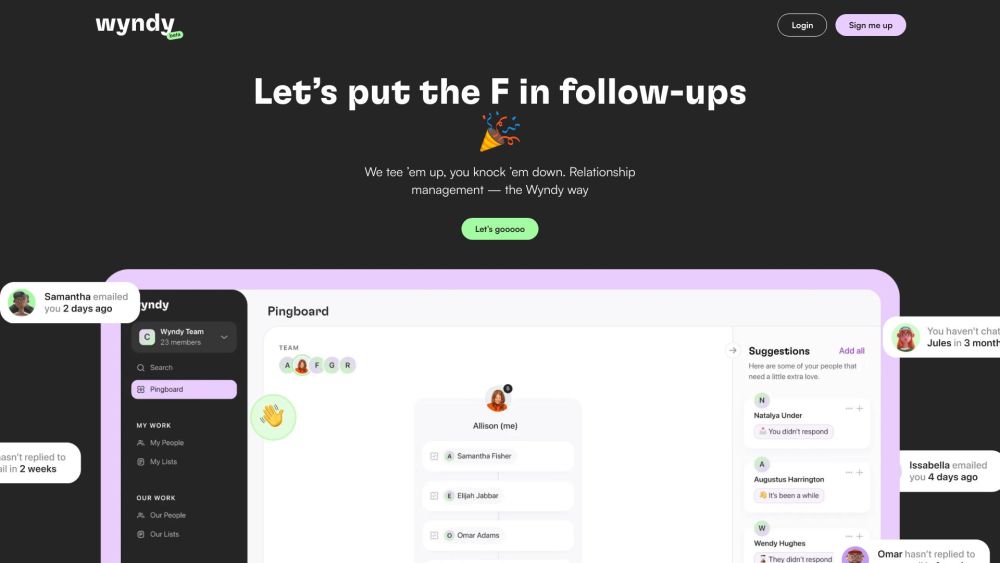
Stay connected effortlessly with Wyndy! Manage contacts, schedule follow-ups, and stay on top of tasks with our intuitive Pingboard. Make every connection count.

Wyndy website preview

Wyndy Website screenshot

What is Wyndy?

Wyndy is a comprehensive relationship management platform designed to help users efficiently manage their contacts and follow-ups. It features a daily Pingboard that refreshes regularly, enabling users to concentrate on high-priority tasks and nurture productive relationships.

How to use Wyndy?

Using Wyndy is simple and intuitive. Here’s how you can get started: 1. Register for Wyndy with your Gmail account. 2. Integrate your Gmail accounts to consolidate all your emails. 3. Wyndy will automatically generate your contact list and import their email histories. 4. The Pingboard displays a prioritized list for daily follow-ups. 5. Utilize interactive lists in the Pingboard to manage additional tasks. 6. Leverage the AI assistant to swiftly and effectively draft emails.

Wyndy's Core Features

Pingboard for prioritized follow-ups

AI assistant for drafting emails

Multiple inbox integration

Contact management

Interactive task lists

Wyndy's Use Cases

Maintaining connections with contacts

Efficiently managing follow-ups and tasks

Enhancing productivity and organization

Streamlining email communications

Product source: Wyndy official website. Check the provider for current plans, limits and availability.

FAQ

Wyndy questions and answers

Product context and practical checks for evaluating Wyndy.

What is Wyndy used for?

Stay connected effortlessly with Wyndy! Manage contacts, schedule follow-ups, and stay on top of tasks with our intuitive Pingboard. Make every connection count.

How do I get started with Wyndy?

Using Wyndy is simple and intuitive. Here’s how you can get started: 1. Register for Wyndy with your Gmail account. 2. Integrate your Gmail accounts to consolidate all your emails. 3. Wyndy will automatically generate your contact list and import their email histories. 4. The Pingboard displays a prioritized list for daily follow-ups. 5. Utilize interactive lists in the Pingboard to manage additional tasks. 6. Leverage the AI assistant to swiftly and effectively draft emails.

Which capabilities are described for Wyndy?

Pingboard for prioritized follow-upsAI assistant for drafting emailsMultiple inbox integrationContact managementInteractive task lists

What projects can I evaluate Wyndy for?

Maintaining connections with contactsEfficiently managing follow-ups and tasksEnhancing productivity and organizationStreamlining email communications Wyndy Company Company Name: Wyndy Wyndy Facebook Follow us on Facebook: https://www.facebook.com/CopperInc/Wyndy Linkedin Connect with us on LinkedIn: https://www.linkedin.com/company/copper-incWyndy Twitter Follow us on Twitter: https://twitter.com/CopperIncWyndy Instagram Check us out on Instagram: https://www.instagram.com/copper.crm/

What should I compare before choosing a Wyndy plan?

Check Wyndy’s current pricing page for included usage, renewal terms and any credit charges. Compare the cost of a usable result, including retries, rather than assuming that account registration includes free usage.

What inputs should I prepare for a Wyndy trial?

Identify the files, text or account connections your task needs. Confirm that the product accepts those inputs and offers controls for reviewing its work.

How can I check the quality of a Wyndy result?

Test one representative task and inspect the result for accuracy and completeness. Record where manual corrections or extra tools are needed.

Which export options should I check in Wyndy?

Check export formats, integrations and whether you can keep using your work outside the service. Test a real export before committing to a longer plan.

What is a practical way to test Wyndy against alternatives?

Choose one task with a clear success condition. Keep the input consistent, record the time spent reviewing and compare the complete workflow cost.

Where is the official Wyndy website?

The website linked from this profile is https://heydola.com/. Use the provider’s own documentation, account area and support channels to confirm current product details.

Visit Wyndy