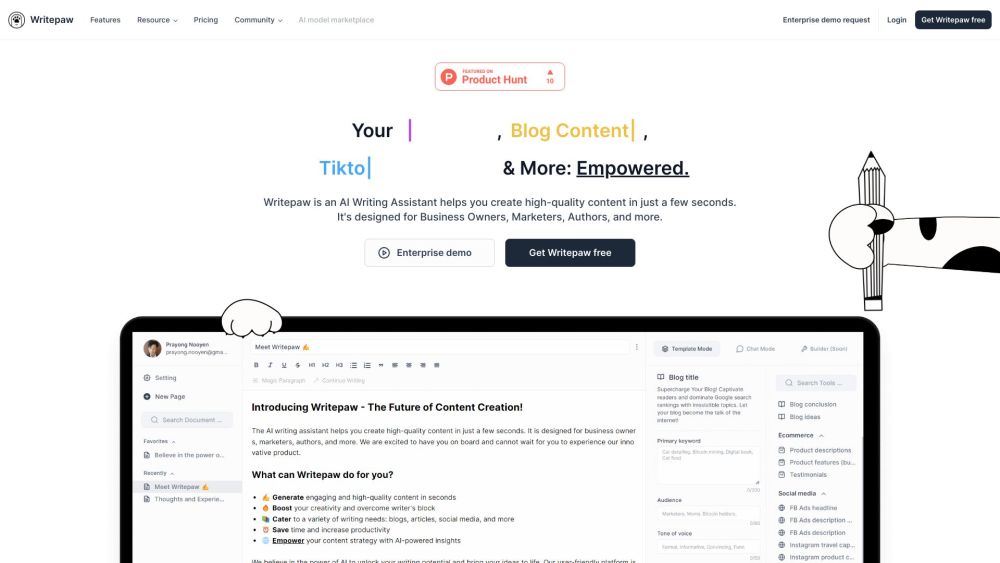
 Introducing Writepaw, the AI Writing Assistant that revolutionizes content creation. With Writepaw, users can effortlessly generate high-quality content in a matter of seconds, making it an ideal tool for business owners, marketers, authors, and more.
Maximizing Writepaw's Potential
Harnessing the power of Writepaw is simple. By logging into the website, users gain access to the AI Writing Assistant, where they can leverage prompt templates or craft their own, resulting in unique content creation. Writepaw excels in generating ideas, optimizing content, and facilitating various writing tasks across a multitude of use cases.
Key Features of Writepaw
- AI prompt templates for sparking unique ideas
- SEO-optimized product description creation
- Tailored social media content for marketers
- Custom prompt template design
- Engaging conversation with AI in chat mode
- Writing governance for business representation (coming soon)
Diverse Applications of Writepaw
Writepaw caters to a wide range of content creation needs, including:
- Crafting content for businesses
- Generating digital marketing material
- Drafting book manuscripts
- Writing blog posts and articles
- Creating engaging social media posts and captions
Connect with Writepaw
For support, inquiries, or refunds, reach out to Writepaw via email at [email protected]
Access Writepaw by visiting: http://app.writepaw.com
Explore Writepaw's pricing options: https://writepaw.com/#price
Stay updated with Writepaw on social media:
- Facebook: https://www.facebook.com/WritepawHQ/
- Twitter: https://twitter.com/WritepawHQ
Frequently Asked Questions about Writepaw
What is Writepaw?
Writepaw is an advanced AI Writing Assistant designed to streamline high-quality content creation for business owners, marketers, authors, and more.
How to use Writepaw?
Utilize Writepaw by logging into the website and accessing the AI Writing Assistant. Whether utilizing prompt templates or custom designs, users can create unique content with ease.
Who can benefit from using Writepaw?
Writepaw's AI Writing Assistant is tailored for business owners, marketers, authors, and anyone seeking efficient high-quality content creation.
How does Writepaw generate unique content?
Writepaw employs AI prompt templates and sophisticated algorithms to generate unique content ideas, enhancing creativity and saving time for users.
Can I customize Writepaw for my specific needs?
Yes, users can design their own prompt templates to tailor Writepaw to their team's specific content creation requirements, covering newsletters, emails, content marketing, UX copy, and more.
What languages does Writepaw support?
Writepaw supports 38+ languages, enabling users to generate content in their preferred language.
Unleash the potential of Writepaw and experience a new era of rapid, high-quality content creation.
Title: Writepaw: AI Assistant for Rapid, High-Quality Content Creation
Writepaw: Your New AI Writing Assistant
Introducing Writepaw, the AI Writing Assistant that revolutionizes content creation. With Writepaw, users can effortlessly generate high-quality content in a matter of seconds, making it an ideal tool for business owners, marketers, authors, and more.
Maximizing Writepaw's Potential
Harnessing the power of Writepaw is simple. By logging into the website, users gain access to the AI Writing Assistant, where they can leverage prompt templates or craft their own, resulting in unique content creation. Writepaw excels in generating ideas, optimizing content, and facilitating various writing tasks across a multitude of use cases.
Key Features of Writepaw
- AI prompt templates for sparking unique ideas
- SEO-optimized product description creation
- Tailored social media content for marketers
- Custom prompt template design
- Engaging conversation with AI in chat mode
- Writing governance for business representation (coming soon)
Diverse Applications of Writepaw
Writepaw caters to a wide range of content creation needs, including:
- Crafting content for businesses
- Generating digital marketing material
- Drafting book manuscripts
- Writing blog posts and articles
- Creating engaging social media posts and captions
Connect with Writepaw
For support, inquiries, or refunds, reach out to Writepaw via email at [email protected]
Access Writepaw by visiting: http://app.writepaw.com
Explore Writepaw's pricing options: https://writepaw.com/#price
Stay updated with Writepaw on social media:
- Facebook: https://www.facebook.com/WritepawHQ/
- Twitter: https://twitter.com/WritepawHQ
Frequently Asked Questions about Writepaw
What is Writepaw?
Writepaw is an advanced AI Writing Assistant designed to streamline high-quality content creation for business owners, marketers, authors, and more.
How to use Writepaw?
Utilize Writepaw by logging into the website and accessing the AI Writing Assistant. Whether utilizing prompt templates or custom designs, users can create unique content with ease.
Who can benefit from using Writepaw?
Writepaw's AI Writing Assistant is tailored for business owners, marketers, authors, and anyone seeking efficient high-quality content creation.
How does Writepaw generate unique content?
Writepaw employs AI prompt templates and sophisticated algorithms to generate unique content ideas, enhancing creativity and saving time for users.
Can I customize Writepaw for my specific needs?
Yes, users can design their own prompt templates to tailor Writepaw to their team's specific content creation requirements, covering newsletters, emails, content marketing, UX copy, and more.
What languages does Writepaw support?
Writepaw supports 38+ languages, enabling users to generate content in their preferred language.
Unleash the potential of Writepaw and experience a new era of rapid, high-quality content creation.
Introducing Writepaw, the AI Writing Assistant that revolutionizes content creation. With Writepaw, users can effortlessly generate high-quality content in a matter of seconds, making it an ideal tool for business owners, marketers, authors, and more.
Maximizing Writepaw's Potential
Harnessing the power of Writepaw is simple. By logging into the website, users gain access to the AI Writing Assistant, where they can leverage prompt templates or craft their own, resulting in unique content creation. Writepaw excels in generating ideas, optimizing content, and facilitating various writing tasks across a multitude of use cases.
Key Features of Writepaw
- AI prompt templates for sparking unique ideas
- SEO-optimized product description creation
- Tailored social media content for marketers
- Custom prompt template design
- Engaging conversation with AI in chat mode
- Writing governance for business representation (coming soon)
Diverse Applications of Writepaw
Writepaw caters to a wide range of content creation needs, including:
- Crafting content for businesses
- Generating digital marketing material
- Drafting book manuscripts
- Writing blog posts and articles
- Creating engaging social media posts and captions
Connect with Writepaw
For support, inquiries, or refunds, reach out to Writepaw via email at [email protected]
Access Writepaw by visiting: http://app.writepaw.com
Explore Writepaw's pricing options: https://writepaw.com/#price
Stay updated with Writepaw on social media:
- Facebook: https://www.facebook.com/WritepawHQ/
- Twitter: https://twitter.com/WritepawHQ
Frequently Asked Questions about Writepaw
What is Writepaw?
Writepaw is an advanced AI Writing Assistant designed to streamline high-quality content creation for business owners, marketers, authors, and more.
How to use Writepaw?
Utilize Writepaw by logging into the website and accessing the AI Writing Assistant. Whether utilizing prompt templates or custom designs, users can create unique content with ease.
Who can benefit from using Writepaw?
Writepaw's AI Writing Assistant is tailored for business owners, marketers, authors, and anyone seeking efficient high-quality content creation.
How does Writepaw generate unique content?
Writepaw employs AI prompt templates and sophisticated algorithms to generate unique content ideas, enhancing creativity and saving time for users.
Can I customize Writepaw for my specific needs?
Yes, users can design their own prompt templates to tailor Writepaw to their team's specific content creation requirements, covering newsletters, emails, content marketing, UX copy, and more.
What languages does Writepaw support?
Writepaw supports 38+ languages, enabling users to generate content in their preferred language.
Unleash the potential of Writepaw and experience a new era of rapid, high-quality content creation.Product source: Writepaw official website. Check the provider for current plans, limits and availability.