Writing Assistants

Wordz - Chrome Extension

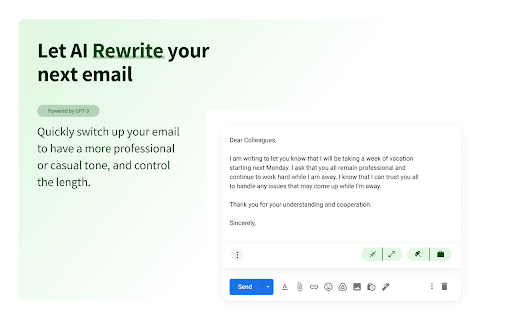
Supercharge your email productivity with Wordz - a powerful Chrome extension that helps you breeze through your inbox. Get more done in less time!

Wordz - Chrome Extension website preview

Wordz - Chrome Extension Website screenshot

Wordz - Chrome Extension: Boost Email Productivity

Introducing Wordz - the ultimate email assistant available on the Google Chrome extension store. Powered by GPT-3, Wordz aims to enhance your email writing efficiency and boost your productivity.

How Wordz Enhances Email Writing Efficiency

With Wordz, you can quickly write well-articulated emails by choosing from a range of writing styles and correcting errors. Whether you need a casual or professional tone, Wordz has got you covered.

Core Features of Wordz Chrome Extension

Powered by GPT-3

Wordz utilizes the power of GPT-3, an advanced language model, to provide you with intelligent suggestions and improve your email writing experience.

Multiple Writing Styles

Choose from a variety of writing styles offered by Wordz, including casual, professional, long text, and short text. Tailor your emails to suit different requirements and create impactful messages.

Error Identification and Correction

Wordz not only helps you craft well-written emails but also identifies and corrects errors. Say goodbye to typos and grammar mistakes with this handy chrome extension.

Use Cases for Wordz Chrome Extension

Crafting Internal Team Emails

Wordz simplifies the process of crafting internal team emails. Whether you need to communicate important updates or share project details, Wordz ensures your message is clear and professional.

Creating Professional External Emails and Business Documents

Elevate your communication with clients and partners by using Wordz to create professional external emails and business documents. Impress with your writing skills and leave a lasting impression.

Product source: Wordz - Chrome Extension official website. Check the provider for current plans, limits and availability.

FAQ

Wordz - Chrome Extension questions and answers

Product context and practical checks for evaluating Wordz - Chrome Extension.

What is Wordz - Chrome Extension used for?

Supercharge your email productivity with Wordz - a powerful Chrome extension that helps you breeze through your inbox. Get more done in less time!

How do I get started with Wordz - Chrome Extension?

Open the official Wordz - Chrome Extension website and identify the workflow that matches your task. Use a real brief and a short source document. Compare factual accuracy, structure and editing time rather than accepting the longest or most confident draft.

Which capabilities are described for Wordz - Chrome Extension?

Powered by GPT-3Wordz utilizes the power of GPT-3, an advanced language model, to provide you with intelligent suggestions and improve your email writing experience.Multiple Writing StylesChoose from a variety of writing styles offered by Wordz, including casual, professional, long text, and short text. Tailor your emails to suit different requirements and create impactful messages.Error Identification and CorrectionWordz not only helps you craft well-written emails but also identifies and corrects errors. Say goodbye to typos and grammar mistakes with this handy chrome extension.

What projects can I evaluate Wordz - Chrome Extension for?

Crafting Internal Team EmailsWordz simplifies the process of crafting internal team emails. Whether you need to communicate important updates or share project details, Wordz ensures your message is clear and professional.Creating Professional External Emails and Business DocumentsElevate your communication with clients and partners by using Wordz to create professional external emails and business documents. Impress with your writing skills and leave a lasting impression.

What should I compare before choosing a Wordz - Chrome Extension plan?

Check Wordz - Chrome Extension’s current pricing page for included usage, renewal terms and any credit charges. Compare the cost of a usable result, including retries, rather than assuming that account registration includes free usage.

What inputs should I prepare for a Wordz - Chrome Extension trial?

Compare support for source documents, style instructions, outlines and length limits. Check whether citations link to real material rather than merely looking like references.

How can I check the quality of a Wordz - Chrome Extension result?

Verify names, dates, quotations and factual claims against the original sources. Edit tone, remove repetition and make sure the text answers the intended reader’s question.

Which export options should I check in Wordz - Chrome Extension?

Check export to plain text, Markdown, documents or your publishing system. Formatting, headings and working links matter when moving a draft into production.

What is a practical way to test Wordz - Chrome Extension against alternatives?

Use a real brief and a short source document. Compare factual accuracy, structure and editing time rather than accepting the longest or most confident draft.

Where is the official Wordz - Chrome Extension website?

The website linked from this profile is https://chromewebstore.google.com/detail/wordz/pdgampdcdleegdfmfelkdmdojbjfnkbk. Use the provider’s own documentation, account area and support channels to confirm current product details.

Visit Wordz - Chrome Extension