Introducing Weavy: Where Creative Craft Meets AI Orchestration
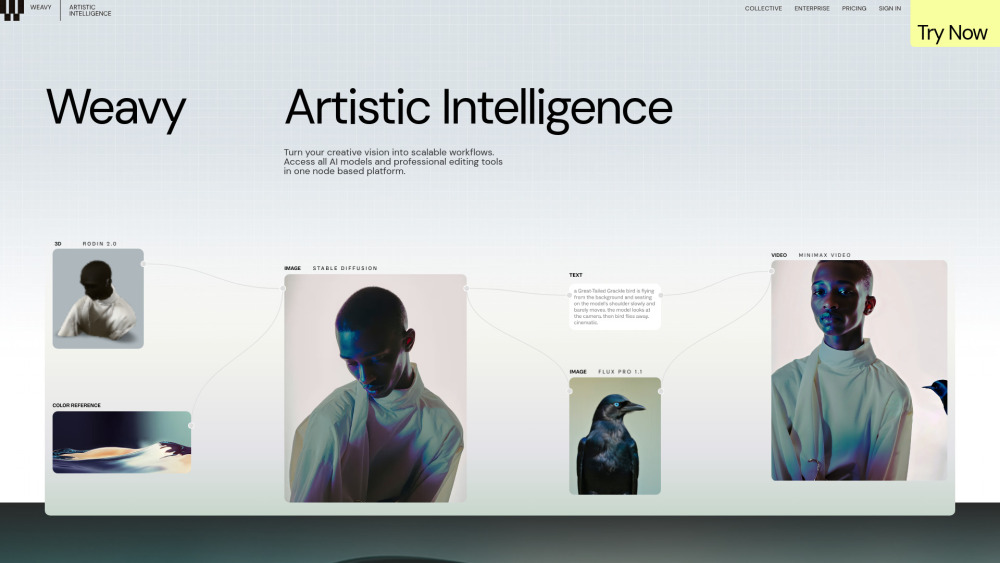
Weavy redefines creative production by merging intuitive node-based workflow design with cutting-edge generative AI — all built for designers, artists, motion creators, and visual strategists. Unlike traditional AI tools that offer isolated prompts or presets, Weavy functions as a unified *design operating system*: a canvas where AI models, pixel-perfect editing utilities, and procedural logic converge. It’s engineered not just to generate outputs, but to encode artistic intent — turning intuition into repeatable, collaborative, and production-ready “design machines.” This is Artistic Intelligence in action: human judgment amplified, not replaced.
How Weavy Empowers Creative Workflows
At its core, Weavy operates like a visual programming environment — each node represents either an AI model, a transformation operator, or a compositional control. Users drag, connect, and parameterize nodes to construct end-to-end pipelines: from concept sketch → structured prompt engineering → multi-model generation → precise inpainting → relighting → export-ready asset. With native support for layers, alpha channels, depth maps, and blend modes, every stage remains editable and inspectable. For teams, App Mode auto-generates clean, role-specific interfaces from complex workflows — letting non-technical collaborators trigger curated AI actions without exposing underlying complexity.
Weavy’s Foundational Capabilities
Visual Node Graph Interface
Native Integration of 18+ State-of-the-Art AI Models — including GPT-4o, Stable Diffusion 3.5, Runway Gen-4, Google Imagen 3, Veo 3, Recraft V3, Kling, Flux Pro, Ideogram 2.0, Luma Ray, Minimax ABAB 6.5, Tencent Hunyuan, and Huawei Pangu
Design Machine Architecture — enabling versioned, named, and shareable workflow blueprints that execute consistently across sessions and team members
Artistic Intelligence Framework — prioritizing controllability, repeatability, and craft-first iteration over black-box generation
Granular Composition Controls — full layer stack management, typography integration, non-destructive blending, and real-time preview fidelity
App Mode — automatic UI abstraction for workflow distribution, ideal for client handoffs or internal tooling
Collaborative Workflow Sharing — with commenting, branching, and permission-aware publishing
Commercial-Grade Licensing — all outputs are fully owned by the creator, with no hidden royalties or usage restrictions
Flexible Credit System — top-up credits available via web dashboard or API, with transparent per-model cost visibility
Versioned Workflow History — accessible for paid tiers to audit, revert, or replicate past iterations
Team-Centric Infrastructure — shared credit pools, admin dashboards, custom role permissions, and centralized billing
Enterprise-Ready Extensions — dedicated API endpoints, SSO integration, custom model onboarding, and SLA-backed support
Dedicated Onboarding — live workshops, certified training paths, and priority technical consultation for enterprise clients
Real-World Applications of Weavy
Translating mood boards and rough sketches into production-grade asset pipelines.
Building brand-compliant generative systems for marketing campaigns, social content, and product visualization.
Multi-pass compositing — combining AI-generated elements with existing assets while preserving lighting, perspective, and material integrity.
Advanced matte and alpha refinement for VFX-ready outputs and AR-ready transparency.
Executing specialized AI techniques — such as ControlNet-guided pose consistency, camera-angle lock, dynamic relighting across object categories, Wan LoRA-driven rotation/inflation, and cross-model ensemble generation.
Scaling creative output for agencies, studios, and in-house design teams — without sacrificing quality or brand voice.
Product source: Weavy official website. Check the provider for current plans, limits and availability.
FAQ
Weavy questions and answers
Product context and practical checks for evaluating Weavy.
What is Weavy used for?
Weavy: A node-based AI design platform empowering creative pros to build, iterate, and ship visuals—fast, flexible, and fully controllable.
How do I get started with Weavy?
At its core, Weavy operates like a visual programming environment — each node represents either an AI model, a transformation operator, or a compositional control. Users drag, connect, and parameterize nodes to construct end-to-end pipelines: from concept sketch → structured prompt engineering → multi-model generation → precise inpainting → relighting → export-ready asset. With native support for layers, alpha channels, depth maps, and blend modes, every stage remains editable and inspectable. For teams, App Mode auto-generates clean, role-specific interfaces from complex workflows — letting non-technical collaborators trigger curated AI actions without exposing underlying complexity.
Which capabilities are described for Weavy?
Visual Node Graph InterfaceNative Integration of 18+ State-of-the-Art AI Models — including GPT-4o, Stable Diffusion 3.5, Runway Gen-4, Google Imagen 3, Veo 3, Recraft V3, Kling, Flux Pro, Ideogram 2.0, Luma Ray, Minimax ABAB 6.5, Tencent Hunyuan, and Huawei PanguPrecision Editing Toolkit — featuring Z-depth extraction, semantic mask refinement, photorealistic relighting (human & product), structure-aware outpainting, painter-style brush controls, channel isolation, image description synthesis, and AI-powered upscalingDesign Machine Architecture — enabling versioned, named, and shareable workflow blueprints that execute consistently across sessions and team membersArtistic Intelligence Framework — prioritizing controllability, repeatability, and craft-first iteration over black-box generationGranular Composition Controls — full layer stack management, typography integration, non-destructive blending, and real-time preview fidelityApp Mode — automatic UI abstraction for workflow distribution, ideal for client handoffs or internal toolingCollaborative Workflow Sharing — with commenting, branching, and permission-aware publishingCommercial-Grade Licensing — all outputs are fully owned by the creator, with no hidden royalties or usage restrictionsFlexible Credit System — top-up credits available via web dashboard or API, with transparent per-model cost visibilityVersioned Workflow History — accessible for paid tiers to audit, revert, or replicate past iterationsTeam-Centric Infrastructure — shared credit pools, admin dashboards, custom role permissions, and centralized billingEnterprise-Ready Extensions — dedicated API endpoints, SSO integration, custom model onboarding, and SLA-backed supportDedicated Onboarding — live workshops, certified training paths, and priority technical consultation for enterprise clients
What projects can I evaluate Weavy for?
Translating mood boards and rough sketches into production-grade asset pipelines.Building brand-compliant generative systems for marketing campaigns, social content, and product visualization.Multi-pass compositing — combining AI-generated elements with existing assets while preserving lighting, perspective, and material integrity.Advanced matte and alpha refinement for VFX-ready outputs and AR-ready transparency.Executing specialized AI techniques — such as ControlNet-guided pose consistency, camera-angle lock, dynamic relighting across object categories, Wan LoRA-driven rotation/inflation, and cross-model ensemble generation.Scaling creative output for agencies, studios, and in-house design teams — without sacrificing quality or brand voice.
What should I compare before choosing a Weavy plan?
Check Weavy’s current pricing page for included usage, renewal terms and any credit charges. Compare the cost of a usable result, including retries, rather than assuming that account registration includes free usage.
What inputs should I prepare for a Weavy trial?
Look for text prompts, image references, masks or sketches as appropriate. Compare composition control, supported upload types and the ability to revise a selected area.
How can I check the quality of a Weavy result?
Inspect text, hands, edges, reflections and repeated objects at full size. Check that important product or brand details survive editing.
Which export options should I check in Weavy?
Compare pixel dimensions, transparency, file formats and any enlargement options. Confirm that the downloaded result works in your design or publishing software.
What is a practical way to test Weavy against alternatives?
Prepare a brief with a subject, composition, lighting and required output size. Test a first generation and a targeted revision to see how much control you retain.
Where is the official Weavy website?
The website linked from this profile is https://weavy.ai. Use the provider’s own documentation, account area and support channels to confirm current product details.