AI Content Generator

VisionMorpher

Transform images effortlessly with VisionMorpher! This AI-powered tool fills and enhances your visuals using simple text prompts for results.

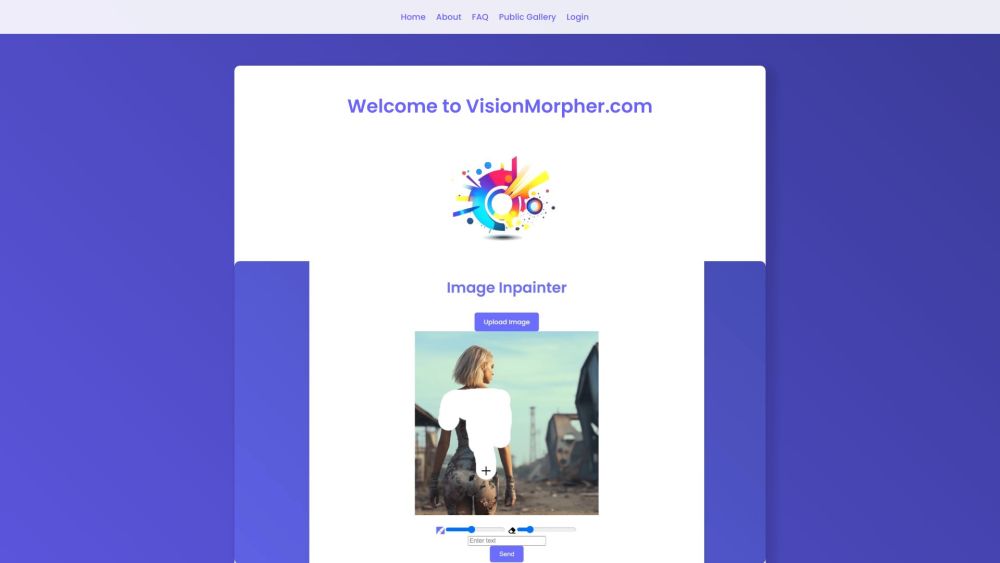
VisionMorpher website preview

VisionMorpher Website screenshot

Introducing VisionMorpher

VisionMorpher is a groundbreaking AI-powered tool designed to transform images using simple text prompts. This innovative image filler simplifies the editing process, making it effortless to create stunning visuals without the need for manual alterations.

Using VisionMorpher

Using VisionMorpher is straightforward. Upload your image to the platform, then enter text prompts to guide the AI in modifying the image. Whether you want to create new elements, add, remove, or replace parts of the image, the AI processes your instructions and delivers the transformed image in seconds.

Key Features of VisionMorpher

1. AI-driven generative image modification 2. Seamless image upload and editing 3. User-friendly and interactive interface 4. Ability to create, add, remove, or replace image elements using text prompts 5. High-quality, professional results

Applications of VisionMorpher

1. Transforming personal photos into artistic creations 2. Effortlessly adding or removing objects from images 3. Crafting unique visual content for websites or social media platforms 4. Generating abstract and surreal visual effects 5. Enhancing and modifying images for professional projects

  • About VisionMorpher

    VisionMorpher is a product of AIRobin Solutions.

    For more details, visit the About Us page.

  • Login to VisionMorpher

    Access your account here: VisionMorpher Login

Product source: VisionMorpher official website. Check the provider for current plans, limits and availability.

FAQ

VisionMorpher questions and answers

Product context and practical checks for evaluating VisionMorpher.

What is VisionMorpher used for?

Transform images effortlessly with VisionMorpher! This AI-powered tool fills and enhances your visuals using simple text prompts for results.

How do I get started with VisionMorpher?

Open the official VisionMorpher website and identify the workflow that matches your task. Prepare a brief with a subject, composition, lighting and required output size. Test a first generation and a targeted revision to see how much control you retain.

Which capabilities are described for VisionMorpher?

1. AI-driven generative image modification 2. Seamless image upload and editing 3. User-friendly and interactive interface 4. Ability to create, add, remove, or replace image elements using text prompts 5. High-quality, professional results

What projects can I evaluate VisionMorpher for?

1. Transforming personal photos into artistic creations 2. Effortlessly adding or removing objects from images 3. Crafting unique visual content for websites or social media platforms 4. Generating abstract and surreal visual effects 5. Enhancing and modifying images for professional projects About VisionMorpher VisionMorpher is a product of AIRobin Solutions. For more details, visit the About Us page. Login to VisionMorpher Access your account here: VisionMorpher Login

What should I compare before choosing a VisionMorpher plan?

Check VisionMorpher’s current pricing page for included usage, renewal terms and any credit charges. Compare the cost of a usable result, including retries, rather than assuming that account registration includes free usage.

What inputs should I prepare for a VisionMorpher trial?

Look for text prompts, image references, masks or sketches as appropriate. Compare composition control, supported upload types and the ability to revise a selected area.

How can I check the quality of a VisionMorpher result?

Inspect text, hands, edges, reflections and repeated objects at full size. Check that important product or brand details survive editing.

Which export options should I check in VisionMorpher?

Compare pixel dimensions, transparency, file formats and any enlargement options. Confirm that the downloaded result works in your design or publishing software.

What is a practical way to test VisionMorpher against alternatives?

Prepare a brief with a subject, composition, lighting and required output size. Test a first generation and a targeted revision to see how much control you retain.

Where is the official VisionMorpher website?

The website linked from this profile is https://visionmorpher.com. Use the provider’s own documentation, account area and support channels to confirm current product details.

Visit VisionMorpher