Summarizer

VidIntel - Chrome Extension

Supercharge your YouTube experience with VidIntel - an AI-driven Chrome extension that enhances your engagement on YouTube like never before.

VidIntel - Chrome Extension website preview

VidIntel - Chrome Extension Website screenshot

Introducing VidIntel - Chrome Extension: AI YouTube Interaction Tool

VidIntel is an innovative Chrome extension that revolutionizes the way you engage with YouTube videos. Powered by advanced artificial intelligence, it offers a wide range of features to enhance your video viewing experience.

Explore the Power of VidIntel

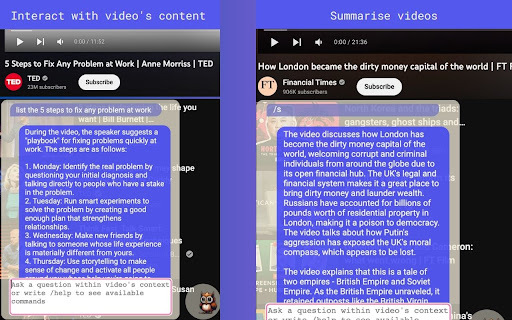
Want to make the most out of your YouTube videos? VidIntel makes it easy. Simply paste the YouTube video link into the extension, and you're ready to go. Whether you want to ask questions, request summaries, or search for spoken keywords, VidIntel has got you covered.

Key Features of VidIntel AI Chrome Extension

AI-Powered Video Interaction

VidIntel utilizes cutting-edge AI technology to enable seamless interaction with YouTube videos. Get real-time insights, ask questions, and explore video content like never before.

Questioning Capabilities

With VidIntel, you can ask questions directly related to the video content. The AI-powered system analyzes the video and provides accurate answers, making learning and research more efficient.

Summarization Tool

VidIntel's summarization tool allows you to quickly grasp the main points of a video. Save time by getting concise summaries, enabling you to understand the key takeaways without watching the entire video.

Keyword Search Feature

Looking for specific information within a video? VidIntel's keyword search feature enables you to find spoken keywords instantly. Simply enter the keyword, and the extension will locate and display the relevant sections of the video.

Unlock the Potential of VidIntel AI Chrome Extension

Enhance Video Learning Experience

VidIntel enriches your video learning experience by providing a comprehensive set of tools to interact with YouTube content. Dive deeper into educational videos, ask questions, and gain a better understanding of the topics that interest you.

Research Video Content Efficiently

For researchers and content creators, VidIntel is an invaluable tool. Save time and effort by extracting key information from videos, conducting in-depth analyses, and efficiently gathering data for your projects.

Product source: VidIntel - Chrome Extension official website. Check the provider for current plans, limits and availability.

FAQ

VidIntel - Chrome Extension questions and answers

Product context and practical checks for evaluating VidIntel - Chrome Extension.

What is VidIntel - Chrome Extension used for?

Supercharge your YouTube experience with VidIntel - an AI-driven Chrome extension that enhances your engagement on YouTube like never before.

How do I get started with VidIntel - Chrome Extension?

Open the official VidIntel - Chrome Extension website and identify the workflow that matches your task. Choose one task with a clear success condition. Keep the input consistent, record the time spent reviewing and compare the complete workflow cost.

Which capabilities are described for VidIntel - Chrome Extension?

AI-Powered Video Interaction VidIntel utilizes cutting-edge AI technology to enable seamless interaction with YouTube videos. Get real-time insights, ask questions, and explore video content like never before. Questioning Capabilities With VidIntel, you can ask questions directly related to the video content. The AI-powered system analyzes the video and provides accurate answers, making learning and research more efficient. Summarization Tool VidIntel's summarization tool allows you to quickly grasp the main points of a video. Save time by getting concise summaries, enabling you to understand the key takeaways without watching the entire video. Keyword Search Feature Looking for specific information within a video? VidIntel's keyword search feature enables you to find spoken keywords instantly. Simply enter the keyword, and the extension will locate and display the relevant sections of the video.

What should I compare before choosing a VidIntel - Chrome Extension plan?

Check VidIntel - Chrome Extension’s current pricing page for included usage, renewal terms and any credit charges. Compare the cost of a usable result, including retries, rather than assuming that account registration includes free usage.

What inputs should I prepare for a VidIntel - Chrome Extension trial?

Identify the files, text or account connections your task needs. Confirm that the product accepts those inputs and offers controls for reviewing its work.

How can I check the quality of a VidIntel - Chrome Extension result?

Test one representative task and inspect the result for accuracy and completeness. Record where manual corrections or extra tools are needed.

Which export options should I check in VidIntel - Chrome Extension?

Check export formats, integrations and whether you can keep using your work outside the service. Test a real export before committing to a longer plan.

What is a practical way to test VidIntel - Chrome Extension against alternatives?

Choose one task with a clear success condition. Keep the input consistent, record the time spent reviewing and compare the complete workflow cost.

What should I review before uploading material to VidIntel - Chrome Extension?

Read the provider’s rules on access, retention, deletion and use of uploaded material. Start with a non-confidential sample that you have permission to use.

Where is the official VidIntel - Chrome Extension website?

The website linked from this profile is https://chromewebstore.google.com/detail/owlie-youtube-assistant/bfgonahdcbgiamjgenobcjbngblgidjg. Use the provider’s own documentation, account area and support channels to confirm current product details.

Visit VidIntel - Chrome Extension