AI Content Generator

VideoGen - AI Video Generator

Create videos in minutes with VideoGen - AI Video Generator. Swift, easy, and AI-powered for video creation.

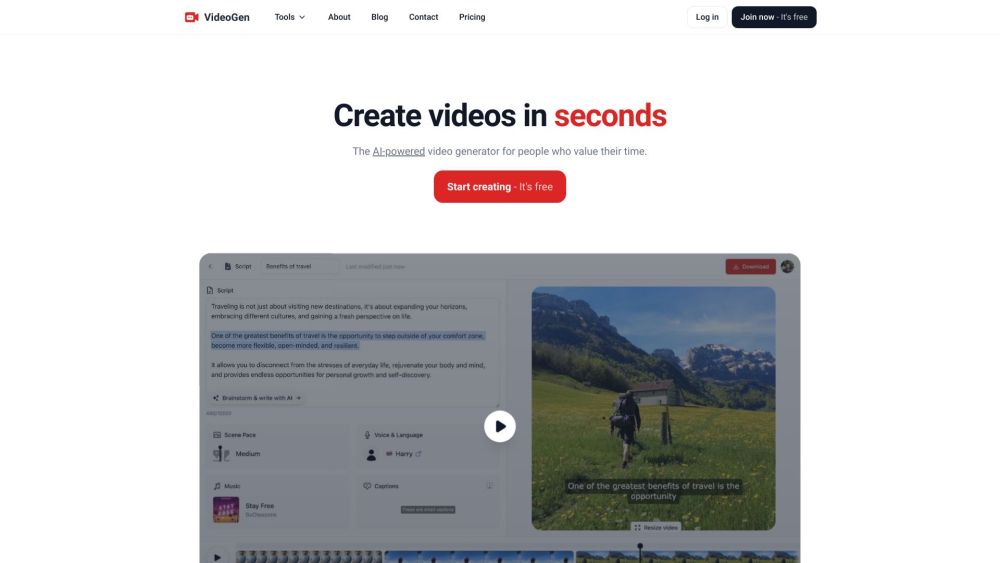
VideoGen - AI Video Generator website preview
html

VideoGen - AI Video Generator Website screenshot

What is VideoGen - AI Video Generator?

VideoGen is a revolutionary AI-powered tool designed to help users create videos swiftly and effortlessly.

How to Use VideoGen - AI Video Generator?

Using VideoGen is simple: input your concept, and the AI assists you in brainstorming, scripting, narrating, sourcing relevant clips, and editing. The video editor is designed for speed and user-friendliness, featuring keyboard shortcuts and drag-and-drop capabilities.

VideoGen - AI Video Generator's Core Features

AI-Driven Video Creation

Advanced Text-to-Speech with Realistic AI Voices

Efficient Video Editing Interface

Access to Millions of Royalty-Free Assets

VideoGen - AI Video Generator's Use Cases

Content Creation for Social Media

Enhancing Business Marketing Strategies

Educational and Nonprofit Video Adaptations

  • VideoGen - AI Video Generator Support Email & Customer Service Contact

    For more information, visit our contact page.

  • VideoGen - AI Video Generator Company

    VideoGen, LLC is the company behind this innovative tool. Learn more at our about page.

  • VideoGen - AI Video Generator Login

    Access your account here.

  • VideoGen - AI Video Generator Sign Up

    Create a new account here.

  • VideoGen - AI Video Generator Pricing

    View our pricing plans here.

  • VideoGen - AI Video Generator Facebook

    Follow us on Facebook here.

  • VideoGen - AI Video Generator YouTube

    Subscribe to our YouTube channel here.

  • VideoGen - AI Video Generator Twitter

    Follow us on Twitter here.

  • VideoGen - AI Video Generator Instagram

    Connect with us on Instagram here.

Product source: VideoGen - AI Video Generator official website. Check the provider for current plans, limits and availability.

FAQ

VideoGen - AI Video Generator questions and answers

Product context and practical checks for evaluating VideoGen - AI Video Generator.

What is VideoGen - AI Video Generator used for?

Create videos in minutes with VideoGen - AI Video Generator. Swift, easy, and AI-powered for video creation.

How do I get started with VideoGen - AI Video Generator?

Using VideoGen is simple: input your concept, and the AI assists you in brainstorming, scripting, narrating, sourcing relevant clips, and editing. The video editor is designed for speed and user-friendliness, featuring keyboard shortcuts and drag-and-drop capabilities.

Which capabilities are described for VideoGen - AI Video Generator?

AI-Driven Video CreationAdvanced Text-to-Speech with Realistic AI VoicesEfficient Video Editing InterfaceAccess to Millions of Royalty-Free Assets

What projects can I evaluate VideoGen - AI Video Generator for?

Content Creation for Social MediaEnhancing Business Marketing StrategiesEducational and Nonprofit Video Adaptations VideoGen - AI Video Generator Support Email & Customer Service Contact For more information, visit our contact page. VideoGen - AI Video Generator Company VideoGen, LLC is the company behind this innovative tool. Learn more at our about page. VideoGen - AI Video Generator Login Access your account here. VideoGen - AI Video Generator Sign Up Create a new account here. VideoGen - AI Video Generator Pricing View our pricing plans here. VideoGen - AI Video Generator Facebook Follow us on Facebook here. VideoGen - AI Video Generator YouTube Subscribe to our YouTube channel here. VideoGen - AI Video Generator Twitter Follow us on Twitter here. VideoGen - AI Video Generator Instagram Connect with us on Instagram here.

What should I compare before choosing a VideoGen - AI Video Generator plan?

View our pricing plans here. Confirm current prices and allowances on the provider’s website before purchasing.

What inputs should I prepare for a VideoGen - AI Video Generator trial?

Compare text prompts, reference frames, source footage and audio support. Check duration, aspect ratio and whether the tool lets you keep a subject consistent between shots.

How can I check the quality of a VideoGen - AI Video Generator result?

Watch the entire clip for motion errors, distorted objects, changing identities, lip-sync problems and abrupt transitions. Inspect the downloaded file as well as the preview.

Which export options should I check in VideoGen - AI Video Generator?

Check export resolution, frame rate, aspect ratio, audio tracks and watermark rules. A good preview is not a substitute for an export that fits your publishing channel.

What is a practical way to test VideoGen - AI Video Generator against alternatives?

Use a short shot with one subject and one camera movement. Keep the prompt and duration constant, then compare usable seconds and the number of regenerations.

Where is the official VideoGen - AI Video Generator website?

The website linked from this profile is https://videogen.io. Use the provider’s own documentation, account area and support channels to confirm current product details.

Visit VideoGen - AI Video Generator