AI Video Generator

Video Translator - Chrome Extension

Break language barriers with Video Translator - Chrome Extension. Powered by AI, effortlessly translate videos for global audiences. #language #translation

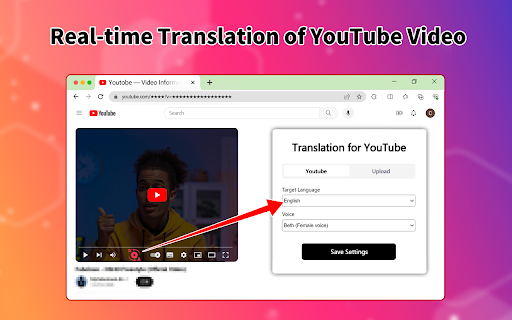
Video Translator - Chrome Extension website preview

Video Translator - Chrome Extension Website screenshot

Introducing Video Translator - Chrome Extension: AI-powered Video Translation

Unlock the power of AI with Video Translator, a Chrome extension that revolutionizes video translation. With cutting-edge technology, it enables you to effortlessly translate videos into over 21 languages with an impressive accuracy rate of 99%.

Simplicity at Your Fingertips

Using Video Translator is a breeze. Just paste the video URL, select your desired target language, and within seconds, witness the magic of instant translation.

Key Features of Video Translator - Chrome Extension

AI-powered Video Translation

Experience the future of video translation with our state-of-the-art AI technology. Say goodbye to language barriers and explore a global audience for your videos.

Translation in 21+ Languages

Reach a wider audience by translating your videos into more than 21 languages. Expand your horizons and connect with viewers from around the world.

Unparalleled Accuracy

Trust in the precision of our translation engine, delivering an accuracy rate of 99%. Your message will resonate flawlessly with every viewer, regardless of the language they speak.

Unlock the Potential of Video Translator - Chrome Extension

Endless Possibilities for Video Translation

Video Translator caters to a wide range of use cases, empowering various industries to break language barriers:

  • E-learning courses

  • Instructional videos

  • Product demonstrations

  • Customer testimonials

  • Promotional campaigns

  • Sales pitch videos

  • Education videos

  • Employee & customer training videos

  • International marketing videos

Product source: Video Translator - Chrome Extension official website. Check the provider for current plans, limits and availability.

FAQ

Video Translator - Chrome Extension questions and answers

Product context and practical checks for evaluating Video Translator - Chrome Extension.

What is Video Translator - Chrome Extension used for?

Break language barriers with Video Translator - Chrome Extension. Powered by AI, effortlessly translate videos for global audiences. #language #translation

How do I get started with Video Translator - Chrome Extension?

Open the official Video Translator - Chrome Extension website and identify the workflow that matches your task. Use a short shot with one subject and one camera movement. Keep the prompt and duration constant, then compare usable seconds and the number of regenerations.

Which capabilities are described for Video Translator - Chrome Extension?

AI-powered Video TranslationExperience the future of video translation with our state-of-the-art AI technology. Say goodbye to language barriers and explore a global audience for your videos.Translation in 21+ LanguagesReach a wider audience by translating your videos into more than 21 languages. Expand your horizons and connect with viewers from around the world.Unparalleled AccuracyTrust in the precision of our translation engine, delivering an accuracy rate of 99%. Your message will resonate flawlessly with every viewer, regardless of the language they speak.

What should I compare before choosing a Video Translator - Chrome Extension plan?

Check Video Translator - Chrome Extension’s current pricing page for included usage, renewal terms and any credit charges. Compare the cost of a usable result, including retries, rather than assuming that account registration includes free usage.

What inputs should I prepare for a Video Translator - Chrome Extension trial?

Compare text prompts, reference frames, source footage and audio support. Check duration, aspect ratio and whether the tool lets you keep a subject consistent between shots.

How can I check the quality of a Video Translator - Chrome Extension result?

Watch the entire clip for motion errors, distorted objects, changing identities, lip-sync problems and abrupt transitions. Inspect the downloaded file as well as the preview.

Which export options should I check in Video Translator - Chrome Extension?

Check export resolution, frame rate, aspect ratio, audio tracks and watermark rules. A good preview is not a substitute for an export that fits your publishing channel.

What is a practical way to test Video Translator - Chrome Extension against alternatives?

Use a short shot with one subject and one camera movement. Keep the prompt and duration constant, then compare usable seconds and the number of regenerations.

What should I review before uploading material to Video Translator - Chrome Extension?

Read the provider’s rules on access, retention, deletion and use of uploaded material. Start with a non-confidential sample that you have permission to use.

Where is the official Video Translator - Chrome Extension website?

The website linked from this profile is https://chromewebstore.google.com/detail/video-translator-translat/ofhkcffhkdhjpnpplihikdpkcpailpnc. Use the provider’s own documentation, account area and support channels to confirm current product details.

Visit Video Translator - Chrome Extension