AI Content Generator

VidAI - Chrome Extension

Enhance your YouTube experience with VidAI - an AI-powered Chrome Extension that takes your content to the next level.

VidAI - Chrome Extension website preview

VidAI - Chrome Extension Website screenshot

Introducing VidAI - Chrome Extension: AI YouTube Enhancement

Take your YouTube content creation to the next level with VidAI - an innovative Chrome extension powered by artificial intelligence. With VidAI, you can effortlessly enhance your video titles, boost SEO, and streamline translation, all with the click of a button.

How to Harness the Power of VidAI

Getting started with VidAI is a breeze. Simply sign up on our website and upload your videos. Our advanced AI algorithms will automatically analyze your content and provide intelligent enhancements tailored to your specific needs.

Unleashing VidAI's Cutting-Edge Features

Enhance Video Titles

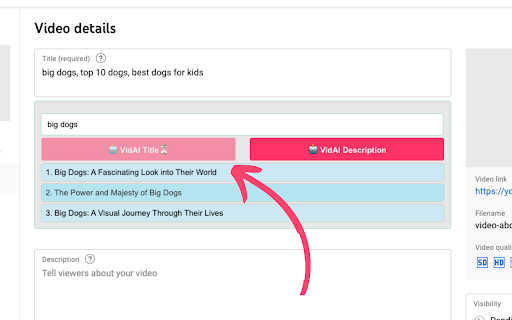
With VidAI, you can transform ordinary video titles into attention-grabbing headlines that captivate your audience. Our AI technology analyzes keywords, trends, and audience preferences to suggest compelling titles that boost engagement and drive more views.

Boost SEO

Enhancing your video's SEO is crucial for increasing visibility and attracting organic traffic. VidAI helps you optimize your video descriptions, tags, and metadata with AI-driven suggestions, ensuring your content gets discovered by the right audience.

Streamline Translation

Expand your reach and connect with a global audience effortlessly. VidAI streamlines the translation process by automatically generating accurate and localized subtitles. Break language barriers and make your content accessible to viewers around the world.

Unlocking VidAI's Versatility

Boosting Video Engagement through Improved Titles

By leveraging VidAI's powerful title enhancement capabilities, you can significantly improve your video's engagement metrics. Craft compelling titles that pique curiosity, increase click-through rates, and keep viewers hooked from start to finish.

Reaching a Global Audience with Efficient Translations

Expanding your content's reach beyond borders is made effortless with VidAI's streamlined translation feature. Break language barriers, connect with viewers worldwide, and elevate your channel's global impact.

Product source: VidAI - Chrome Extension official website. Check the provider for current plans, limits and availability.

FAQ

VidAI - Chrome Extension questions and answers

Product context and practical checks for evaluating VidAI - Chrome Extension.

What is VidAI - Chrome Extension used for?

Enhance your YouTube experience with VidAI - an AI-powered Chrome Extension that takes your content to the next level.

How do I get started with VidAI - Chrome Extension?

Getting started with VidAI is a breeze. Simply sign up on our website and upload your videos. Our advanced AI algorithms will automatically analyze your content and provide intelligent enhancements tailored to your specific needs.

Which capabilities are described for VidAI - Chrome Extension?

Enhance Video TitlesWith VidAI, you can transform ordinary video titles into attention-grabbing headlines that captivate your audience. Our AI technology analyzes keywords, trends, and audience preferences to suggest compelling titles that boost engagement and drive more views.Boost SEOEnhancing your video's SEO is crucial for increasing visibility and attracting organic traffic. VidAI helps you optimize your video descriptions, tags, and metadata with AI-driven suggestions, ensuring your content gets discovered by the right audience.Streamline TranslationExpand your reach and connect with a global audience effortlessly. VidAI streamlines the translation process by automatically generating accurate and localized subtitles. Break language barriers and make your content accessible to viewers around the world.

What should I compare before choosing a VidAI - Chrome Extension plan?

Check VidAI - Chrome Extension’s current pricing page for included usage, renewal terms and any credit charges. Compare the cost of a usable result, including retries, rather than assuming that account registration includes free usage.

What inputs should I prepare for a VidAI - Chrome Extension trial?

Compare support for source documents, style instructions, outlines and length limits. Check whether citations link to real material rather than merely looking like references.

How can I check the quality of a VidAI - Chrome Extension result?

Verify names, dates, quotations and factual claims against the original sources. Edit tone, remove repetition and make sure the text answers the intended reader’s question.

Which export options should I check in VidAI - Chrome Extension?

Check export to plain text, Markdown, documents or your publishing system. Formatting, headings and working links matter when moving a draft into production.

What is a practical way to test VidAI - Chrome Extension against alternatives?

Use a real brief and a short source document. Compare factual accuracy, structure and editing time rather than accepting the longest or most confident draft.

What should I review before uploading material to VidAI - Chrome Extension?

Read the provider’s rules on access, retention, deletion and use of uploaded material. Start with a non-confidential sample that you have permission to use.

Where is the official VidAI - Chrome Extension website?

The website linked from this profile is https://chromewebstore.google.com/detail/vidai/hphfliggkgombflhagnibkclkllpbkpk. Use the provider’s own documentation, account area and support channels to confirm current product details.

Visit VidAI - Chrome Extension