Table of contents
UPDF AI : Summarize, Translate, Explain, Mind-Map & Image Chat
UPDF AI: GPT-powered PDF assistant for summarizing, translating, explaining, mind-mapping & image chat—works in-app (Win/macOS/iOS/Android) or online.
Directory : AI Blog Writer, Translate, Copywriting, Paraphraser, Writing Assistants, AI Content Generator, AI Email Writer, AI Code Assistant, AI Accounting Assistant, Research Tool, AI Business Ideas Generator, AI Consulting Assistant, Sales Assistant, Domain Name Generator, AI Advertising Assistant, AI Analytics Assistant, AI Reply Assistant, AI Email Assistant, AI Response Generator, AI Grammar Checker, AI Chatbot, AI Cooking Assistant, AI Recipe Assistant, Homework Helper, AI Knowledge Base, AI Knowledge Management, AI Education Assistant, AI PDF, AI Productivity Tools, AI Notes Assistant, AI Mind Mapping, AI Document Extraction, AI Documents Assistant, AI Files Assistant
What Is UPDF AI?
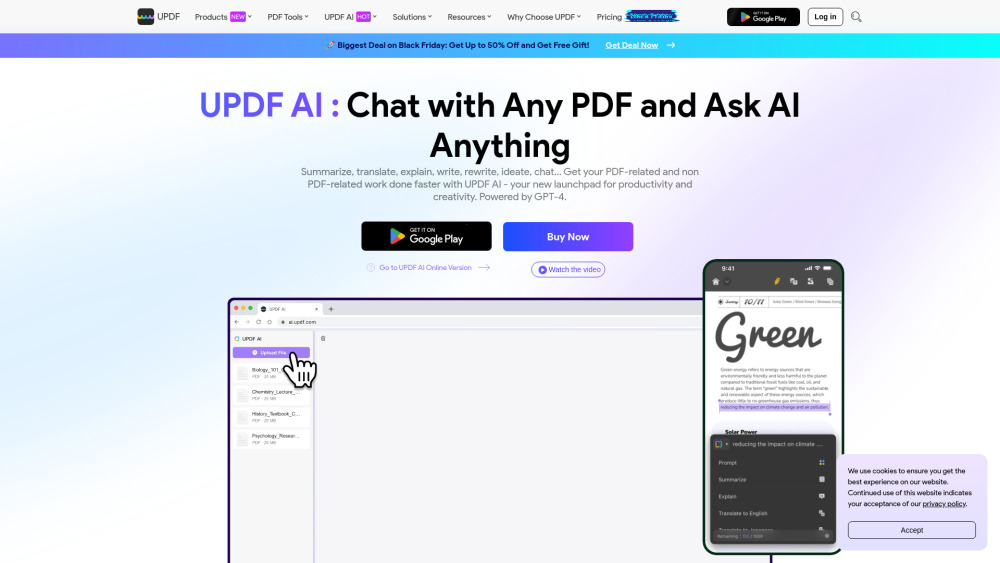
UPDF AI is an intelligent, all-in-one PDF companion powered by advanced large language models. It goes beyond basic reading — enabling users to instantly summarize dense documents, translate multilingual PDFs with pixel-perfect layout fidelity, clarify technical jargon or ambiguous passages, transform linear text into visual mind maps, and even analyze diagrams or screenshots via conversational image chat.
How to Get Started with UPDF AI
Access UPDF AI in seconds: create a free account and launch the desktop app on Windows or macOS, or use the mobile version on iOS and Android. Prefer browser-based convenience? The web-powered UPDF AI requires zero downloads — just sign in and start interacting with your PDFs and images from any device.
Core Capabilities of UPDF AI
Summarize massive PDFs — even 1,000+ pages — in under a minute, with key insights preserved as concise, actionable bullet points.
Translate entire PDFs into 30+ languages while retaining fonts, tables, headers, and page structure — no reformatting needed.
Explain complex concepts on demand: highlight any phrase, paragraph, or section and receive plain-language breakdowns tailored to your expertise level.
Auto-generate hierarchical, editable mind maps from PDF content — ideal for studying, planning, or knowledge mapping.
Upload charts, schematics, handwritten notes, or product images and ask natural-language questions — get instant, context-aware answers.
Go beyond documents: engage in open-ended AI conversations — research topics, draft emails, brainstorm ideas, or troubleshoot problems — all within the same interface.
Real-World Applications
Accelerate academic work: condense peer-reviewed journals, theses, or conference proceedings in seconds.
Maintain legal precision: translate bilingual contracts or compliance documents without compromising formatting or clause positioning.
Demystify technical documentation: clarify engineering specs, API references, or regulatory guidelines with one-click explanations.
Boost learning retention: convert dense textbooks, lecture slides, or training manuals into interactive, navigable mind maps.
Interpret visuals intelligently: upload circuit diagrams, anatomical illustrations, or architectural blueprints and query their components, functions, or errors.
Extend productivity: use UPDF AI as your on-demand co-pilot for writing, coding help, language practice, or daily task management.
Frequently Asked Questions
-
What exactly is UPDF AI?
-
Is there a free tier or trial for UPDF AI?
-
Which devices and operating systems support UPDF AI?
-
How does UPDF AI differ from Adobe Acrobat’s AI features?
-
Why choose UPDF AI over standalone tools like ChatPDF or DocuAsk?
-
Where can I find official resources, tutorials, or support for UPDF AI?
-
Support & Contact Information
For assistance, refunds, or technical inquiries, visit our Contact Us page.
-
About UPDF AI
UPDF AI is developed by Wondershare Technology Co., Ltd., a global leader in productivity software.
Registered address: 10F, Tower A, Zhongguancun Software Park II, Haidian District, Beijing, China.
Learn more about our mission, values, and team on the About Us page.
-
UPDF AI Login
Sign in to your AI workspace at: https://ai.updf.com
-
UPDF AI Sign Up
Create your free account in under 30 seconds: https://ai.updf.com/
FAQ from UPDF AI
What is UPDF AI?
UPDF AI is a next-generation, GPT-integrated assistant built directly into the UPDF ecosystem. Designed specifically for document intelligence, it delivers five core superpowers: summarization, layout-aware translation, contextual explanation, visual mind-mapping, and multimodal image chat — all within a single, secure, cross-platform experience.
How do I start using UPDF AI?
It’s simple: register for a free UPDF account, then choose your preferred access method — download the native app (Windows/macOS/iOS/Android) for full PDF editing + AI capabilities, or jump straight into the lightweight web version at ai.updf.com for pure AI interaction.
What is UPDF with AI?
UPDF with AI refers to the seamless fusion of UPDF’s industry-leading PDF toolkit and a purpose-built large language model. Unlike bolt-on AI plugins, this integration enables deep document understanding — from OCR-processed scans to annotated legal contracts — supporting tasks like multi-page translation, semantic summarization, structured knowledge extraction, and visual reasoning across text and images.
Does UPDF offer a free trial for its AI assistant?
Yes — all registered users receive immediate, unrestricted access to UPDF AI’s full feature set at no cost. No credit card required. No time limits. No hidden paywalls on core AI functions.
Which platforms are supported by the AI Assistant?
UPDF AI runs natively on Windows 10/11, macOS 12+, iOS 15+, and Android 9+. The cloud-based version works flawlessly in Chrome, Edge, Safari, and Firefox — making AI-powered PDF intelligence truly platform-agnostic.
How does UPDF AI Assistant compare to Adobe Acrobat AI?
UPDF AI outperforms Adobe Acrobat AI in three critical dimensions: ✅ Scale: Handles PDFs up to 2GB and unlimited pages (vs. Adobe’s 100MB / 600-page cap). ✅ Intelligence: Supports OCR-enabled analysis of scanned documents and interprets handwritten annotations. ✅ Localization: Translates between 30+ languages — including low-resource and right-to-left scripts — with layout preservation, unlike Adobe’s English-only AI mode.
How does the AI Assistant compare to tools such as ChatPDF for engaging and chatting with PDFs?
UPDF AI redefines PDF interaction with a dual-mode architecture: 🔹 Ask PDF Mode: Focused Q&A on uploaded documents — with citation-backed answers and source highlighting. 🔹 Chat Mode: Open-domain AI conversation — no document required. Plus, exclusive capabilities: page-specific summarization/translation, one-click mind map export (PNG/SVG), multilingual image comprehension, and direct integration with UPDF’s annotation, redaction, and collaboration tools.
How can I learn more about UPDF with AI?
Explore official guides, video walkthroughs, and best practices on our About Us page. Need help? Reach our support team at Contact Us. Log in now: https://ai.updf.com Start free: https://ai.updf.com/