AI Content Generator

Try it on AI

Try it on AI is an online platform that uses AI technology to create professional headshots and portraits. It offers a cost-effective and time-efficient alternative to traditional photography studios, allowing users to generate high-quality AI Headshots for various purposes such as LinkedIn profiles, acting portfolios, and dating profile pictures.

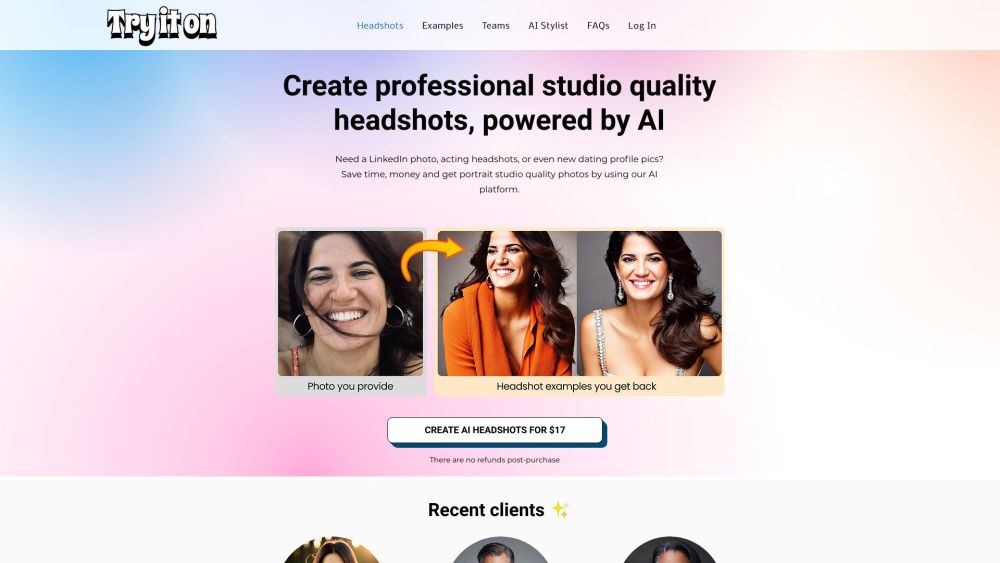
Try it on AI website preview

Try it on AI Website screenshot

What is Try it on AI?

Try it on AI is a cutting-edge online platform that leverages AI technology to produce professional-grade headshots and portraits. It provides an affordable and efficient alternative to traditional photography studios, enabling users to create high-quality AI Headshots for various purposes, including LinkedIn profiles, acting portfolios, and dating profiles.

How to use Try it on AI?

Using Try it on AI is simple: upload a minimum of 10 selfies to the platform. The AI system then analyzes and processes these images, delivering AI Headshots typically within a few hours. In some instances, headshots can be ready in just one hour, depending on the system's workload. To achieve the best results, users should adhere to the provided photo submission guidelines. Moreover, the magic wand feature allows users to quickly enhance their favorite headshot with an AI fix. For an additional $10, users can opt for a human editor to further refine their portraits.

Try it on AI's Core Features

The core features of Try it on AI include:

  • AI-powered headshot generation: Employing advanced AI technology to produce professional-quality headshots and portraits.
  • Fast turnaround time: Users receive their AI Headshots within a few hours, sometimes in as little as one hour.
  • Cost-effective solution: A more economical option compared to traditional photography studios, saving both time and money.
  • Variety of styles: A broad range of styles and images to suit diverse preferences and requirements.
  • Optional human touch: For an extra fee, users can have a human editor touch up their favorite portrait.

Try it on AI's Use Cases

Try it on AI is ideal for:

  • LinkedIn profile photos: Creating professional headshots specifically for LinkedIn profiles.
  • Acting and modeling portfolios: Helping actors and models generate impressive portraits for their portfolios.
  • Dating profile pictures: Enhancing dating profiles with high-quality, attractive portraits.
  • Web and social media marketing: Producing eye-catching portraits for web and social media marketing materials.

Product source: Try it on AI official website. Check the provider for current plans, limits and availability.

FAQ

Try it on AI questions and answers

Product context and practical checks for evaluating Try it on AI.

What is Try it on AI used for?

Try it on AI is an online platform that uses AI technology to create professional headshots and portraits. It offers a cost-effective and time-efficient alternative to traditional photography studios, allowing users to generate high-quality AI Headshots for various purposes such as LinkedIn profiles, acting portfolios, and dating profile pictures.

How do I get started with Try it on AI?

Using Try it on AI is simple: upload a minimum of 10 selfies to the platform. The AI system then analyzes and processes these images, delivering AI Headshots typically within a few hours. In some instances, headshots can be ready in just one hour, depending on the system's workload. To achieve the best results, users should adhere to the provided photo submission guidelines. Moreover, the magic wand feature allows users to quickly enhance their favorite headshot with an AI fix. For an additional $10, users can opt for a human editor to further refine their portraits.

Which capabilities are described for Try it on AI?

The core features of Try it on AI include: AI-powered headshot generation: Employing advanced AI technology to produce professional-quality headshots and portraits. Fast turnaround time: Users receive their AI Headshots within a few hours, sometimes in as little as one hour. Cost-effective solution: A more economical option compared to traditional photography studios, saving both time and money. Variety of styles: A broad range of styles and images to suit diverse preferences and requirements. Optional human touch: For an extra fee, users can have a human editor touch up their favorite portrait.

What projects can I evaluate Try it on AI for?

Try it on AI is ideal for: LinkedIn profile photos: Creating professional headshots specifically for LinkedIn profiles. Acting and modeling portfolios: Helping actors and models generate impressive portraits for their portfolios. Dating profile pictures: Enhancing dating profiles with high-quality, attractive portraits. Web and social media marketing: Producing eye-catching portraits for web and social media marketing materials. Try it on AI LoginTry it on AI Login Link: http://studio.tryitonai.com/login Try it on AI YouTubeTry it on AI YouTube Link: https://www.youtube.com/@tryitonai Try it on AI TikTokTry it on AI TikTok Link: https://www.tiktok.com/@tryitonai Try it on AI LinkedInTry it on AI LinkedIn Link: https://www.linkedin.com/company/tryitonai/ Try it on AI InstagramTry it on AI Instagram Link: https://www.instagram.com/tryitonai

What should I compare before choosing a Try it on AI plan?

Check Try it on AI’s current pricing page for included usage, renewal terms and any credit charges. Compare the cost of a usable result, including retries, rather than assuming that account registration includes free usage.

What inputs should I prepare for a Try it on AI trial?

Look for text prompts, image references, masks or sketches as appropriate. Compare composition control, supported upload types and the ability to revise a selected area.

How can I check the quality of a Try it on AI result?

Inspect text, hands, edges, reflections and repeated objects at full size. Check that important product or brand details survive editing.

Which export options should I check in Try it on AI?

Compare pixel dimensions, transparency, file formats and any enlargement options. Confirm that the downloaded result works in your design or publishing software.

What is a practical way to test Try it on AI against alternatives?

Prepare a brief with a subject, composition, lighting and required output size. Test a first generation and a targeted revision to see how much control you retain.

Where is the official Try it on AI website?

The website linked from this profile is https://www.tryitonai.com. Use the provider’s own documentation, account area and support channels to confirm current product details.

Visit Try it on AI