Table of contents
Toolsmart Free Humanize AI : 8 Modes, No Sign-Up, Ad-Free & Fluent
Toolsmart Free Humanize AI turns stiff AI text into natural, human-sounding content—8 rewrite modes, zero sign-up, no ads. Free & fluent!
Directory : AI Rewriter, AI Writing Assistants, AI Writing, AI Copywriting, AI Paraphraser, AI Proofreading, AI Spell Check
Introducing Toolsmart Free Humanize AI — Your Instant Bridge to Human-Sounding Content
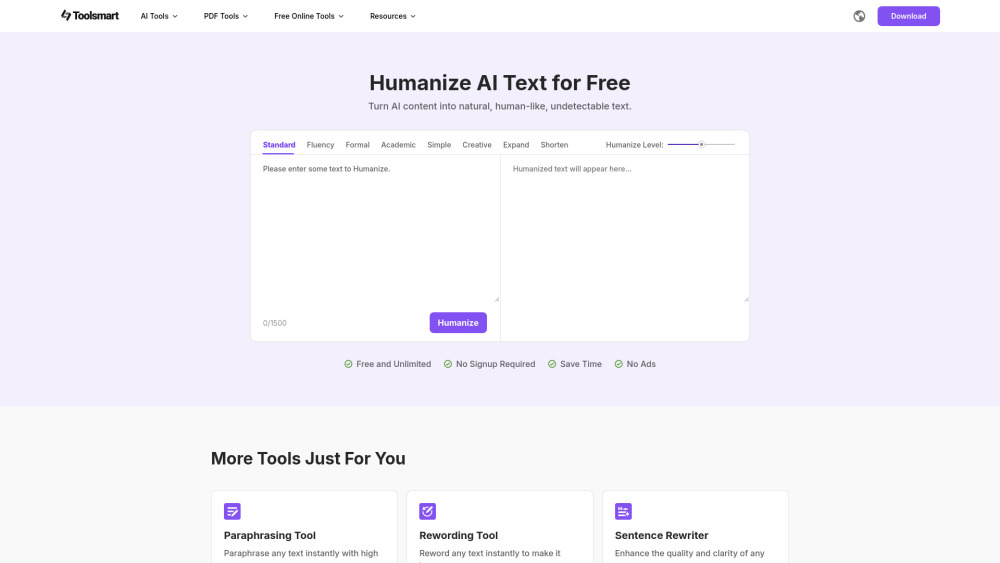
AI writes fast—but rarely *feels* human. Toolsmart Free Humanize AI solves that in one click: no installation, no account, no paywall. Just paste, pick a mode, and transform stiff, synthetic text into fluent, authentic, audience-ready writing—every time. Why it stands out: ✔️ Truly free forever — no trial limits, no feature gates, no “premium-only” modes ✔️ Zero friction — no email, no password, no pop-ups or banners ✔️ Engineered for fluency — not just synonym-swapping, but context-aware rewriting that respects voice, intent, and nuance ✔️ Built for real workflows — whether you're refining LLM drafts, polishing student submissions, or upgrading chatbot replies Core Advantages at a Glance: 1. Natural Flow Rewriting — Reconstructs sentences for rhythm, coherence, and conversational ease—without distorting meaning or sacrificing accuracy. 2. 8 Precision-Tuned Modes — From Academic (citation-ready clarity) to Creative (vivid, expressive language), each mode adapts grammar, diction, pacing, and tone purposefully. 3. Granular Humanize Control — Slide from subtle refinement (Light Polish) to full stylistic reinvention (Deep Humanize)—tailor transformation intensity to your needs. 4. Unrestricted Access — Process up to 1500 words per session, anytime, on any device—no caps, no tracking, no fine print. Who benefits most? • Content creators tired of sounding “AI-generated” • Students submitting AI-assisted essays with confidence • Marketers humanizing product pages and email sequences • Developers refining LLM outputs for customer-facing interfaces • Educators, freelancers, and non-native writers seeking polished, natural expression Real-World Impact: Turn robotic blog intros into engaging hooks. Elevate AI-drafted whitepapers into authoritative narratives. Convert clunky support replies into empathetic, on-brand communication. Toolsmart Free Humanize AI doesn’t replace your voice—it amplifies it.
How to Humanize Text in Under 30 Seconds
1. Open & Paste Go directly to toolsmart.ai/humanize — no redirects, no sign-in walls. Paste your AI-generated or draft text into the clean, distraction-free editor. 2. Select Your Mode Choose the ideal style: Fluency (for smooth readability), Formal (for professional correspondence), Simple (for accessibility), Expand (to add depth), or any of the other six — all instantly available. 3. Tune the Humanize Level Adjust the slider: left for light edits (preserving structure), right for bold rewrites (prioritizing naturalness over literal fidelity). 4. Click “Humanize” Our lightweight, client-side processing delivers results in under 2 seconds — no server delays, no waiting. 5. Review, Edit, Export Read the output side-by-side with your original. Tweak manually if needed—or copy, download, or share with one click.
What Makes Toolsmart Free Humanize AI Different?
Fluency-First Rewriting Engine — Not Just Grammar Fixes
Unlike basic paraphrasers, our model understands cadence, emphasis, and implied tone—delivering prose that reads like it was written by a thoughtful, experienced communicator.Eight Purpose-Built Modes — Not One-Size-Fits-All
Each mode applies distinct linguistic rules: Academic tightens logic and avoids contractions; Creative introduces metaphor and variation; Shorten trims redundancy without losing impact — giving you editorial control, not automation.Privacy by Default — Your Words Stay Yours
No text is stored, logged, or shared. Processing happens locally in your browser. No cookies. No analytics. Just secure, silent, ethical AI.Truly Free — No Hidden Costs, No Compromises
No watermarked outputs. No forced attribution. No usage throttling. No “upgrade to unlock.” Just open, use, and trust — every single time.Where You’ll Use It Most
Bloggers & SEO Writers
Humanize AI turns AI outlines into relatable, story-driven posts — boosting dwell time and reducing bounce rates.Students & Researchers
Transform AI-assisted research summaries into cohesive, academically appropriate writing — without triggering detection tools.E-commerce & SaaS Teams
Refresh generic product descriptions into benefit-focused, emotionally resonant copy that converts.Frequently Asked Questions
-
What kinds of content work best with Humanize AI?
-
Is there really no sign-up required?
-
Does Humanize AI store or train on my input?
-
Can I use it for creative fiction or storytelling?
-
Is the interface mobile-responsive?
-
Support & Contact
For questions or feedback, reach us at [email protected]. Visit our Contact Page for live response times and troubleshooting guides.
-
About Toolsmart
Toolsmart Free Humanize AI is developed by WPS SOFTWARE PTE. LTD., a Singapore-based technology company focused on ethical, accessible AI tools.
Registered Address: 6 Raffles Quay #14-06, Singapore (048580)
Learn more about our mission and values: About WPS Software
-
Login & Account Access
Toolsmart Free Humanize AI requires no login. There is no user account system — it’s intentionally built for instant, anonymous use. If you ever see a login prompt, you’re not on the official site.
-
Sign Up — Not Needed
There is no sign-up process. No email capture. No newsletter opt-in. Just go to toolsmart.ai/humanize and begin.
FAQ from Toolsmart Free Humanize AI
What is Toolsmart Free Humanize AI?
It’s the simplest, most reliable way to make AI-written content sound authentically human — without subscriptions, sign-ups, or compromises. Designed for speed, privacy, and precision, it helps writers, learners, and teams communicate with clarity and confidence.
How to use Toolsmart Free Humanize AI?
1. Navigate to toolsmart.ai/humanize 2. Paste your text (up to 1500 words) 3. Pick a mode — e.g., Fluency for general polish, Academic for formal rigor 4. Adjust the “Humanize Level” slider based on how transformative you’d like the rewrite 5. Click “Humanize” → review → copy → publish
What types of text can I improve with Humanize AI?
Essays, landing page copy, technical documentation, social media captions, academic abstracts, email newsletters, script outlines, UX microcopy, and even code comments — if it’s written in English and meant for people, Humanize AI enhances it.
Can I try Humanize AI for free?
Absolutely — and permanently. There are no trials, tiers, or time limits. Every feature — all 8 modes, full polishing control, and unlimited sessions — is 100% free, now and always.
Is my data safe with Humanize AI?
Yes. Your text never leaves your browser. No data is sent to servers, saved, or used for training. We don’t track usage, install cookies, or require permissions. Privacy isn’t an option — it’s foundational.
Can Humanize AI help with creative writing?
Yes — especially with the Creative and Expand modes. It helps vary sentence structure, enrich imagery, soften exposition, and introduce rhetorical flow — all while honoring your original voice and narrative intent.
Can I use Humanize AI on mobile devices?
Yes. Fully responsive design works flawlessly on iOS and Android. Paste, select, humanize, and copy — whether you’re on a phone, tablet, or desktop. No app download needed.