AI Content Generator

Synthesia

Synthesia is an AI Video Generator and AI Video Creator platform that allows users to create professional videos without the need for microphones, cameras, or actors. It utilizes AI avatars and voiceovers in over 120 languages to synthesize engaging videos.

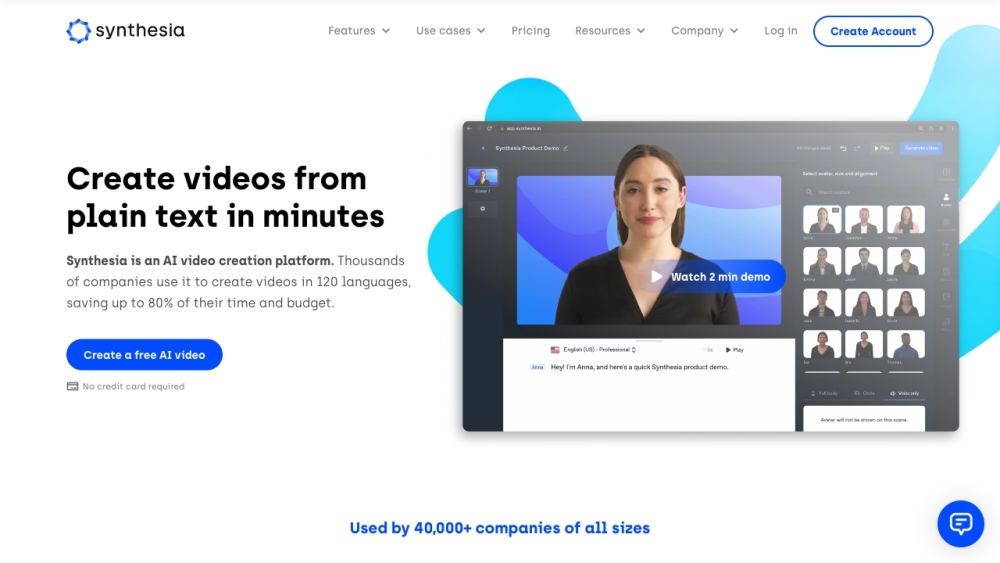
Synthesia website preview

Synthesia Website screenshot

What is Synthesia?

Synthesia is a cutting-edge AI Video Generator platform that empowers users to craft professional-grade videos effortlessly. By leveraging AI avatars and voiceovers available in over 120 languages, it eliminates the need for traditional video production tools like microphones and cameras.

How to use Synthesia?

Using Synthesia is straightforward: start by creating your script, then customize the video with AI avatars and voiceovers. Collaborate with your team if necessary, and once complete, you can share, download, or embed the video. The platform also supports seamless updates and integrates well with other tools to enhance your video creation experience.

Synthesia's Core Features

AI Avatars: Select from over 140 diverse AI avatars for your videos

AI Voices: Utilize AI voices in more than 120 languages and accents

Video Templates: Access over 60 pre-designed templates for quick video production

Custom AI Avatars: Create personalized AI avatars to tailor your videos

Synthesia's Use Cases

Learning & Development: Produce training videos with AI avatars and voiceovers

Sales Enablement: Develop compelling sales training videos for your team

Information Security: Create detailed training videos on information security protocols

Customer Service: Transform knowledge base articles into engaging video tutorials

Marketing: Generate how-to guides and product videos to boost your marketing efforts

Product source: Synthesia official website. Check the provider for current plans, limits and availability.

FAQ

Synthesia questions and answers

Product context and practical checks for evaluating Synthesia.

What is Synthesia used for?

Synthesia is an AI Video Generator and AI Video Creator platform that allows users to create professional videos without the need for microphones, cameras, or actors. It utilizes AI avatars and voiceovers in over 120 languages to synthesize engaging videos.

How do I get started with Synthesia?

Using Synthesia is straightforward: start by creating your script, then customize the video with AI avatars and voiceovers. Collaborate with your team if necessary, and once complete, you can share, download, or embed the video. The platform also supports seamless updates and integrates well with other tools to enhance your video creation experience.

Which capabilities are described for Synthesia?

AI Avatars: Select from over 140 diverse AI avatars for your videosAI Voices: Utilize AI voices in more than 120 languages and accentsVideo Templates: Access over 60 pre-designed templates for quick video productionCustom AI Avatars: Create personalized AI avatars to tailor your videos

What projects can I evaluate Synthesia for?

Learning & Development: Produce training videos with AI avatars and voiceoversSales Enablement: Develop compelling sales training videos for your teamInformation Security: Create detailed training videos on information security protocolsCustomer Service: Transform knowledge base articles into engaging video tutorialsMarketing: Generate how-to guides and product videos to boost your marketing efforts Synthesia Support Email & Customer Service Contact & Refund Information Contact Synthesia support via email at [email protected]. For more contact details, visit the contact us page. Synthesia Company Information Company Name: Synthesia Ltd. Address: Kent House, 14-17 Market Place, London, W1W 8AJ, United Kingdom. Learn more about Synthesia on the about us page. Synthesia Login Access the platform at https://app.synthesia.io/#/login. Synthesia Sign Up Sign up for Synthesia at https://www.synthesia.io/pricing. Synthesia Pricing Check out pricing details at https://www.synthesia.io/pricing. Synthesia YouTube Visit the Synthesia YouTube channel: https://www.youtube.com/channel/UC0Rqs6pyPoGaMT5HFMFdslgSynthesia LinkedIn Follow Synthesia on LinkedIn: https://www.linkedin.com/company/synthesia-technologies/Synthesia Twitter Follow Synthesia on Twitter: https://twitter.com/synthesiaio?lang=en

What should I compare before choosing a Synthesia plan?

Check out pricing details at https://www.synthesia.io/pricing. Confirm current prices and allowances on the provider’s website before purchasing.

What inputs should I prepare for a Synthesia trial?

Compare text prompts, reference frames, source footage and audio support. Check duration, aspect ratio and whether the tool lets you keep a subject consistent between shots.

How can I check the quality of a Synthesia result?

Watch the entire clip for motion errors, distorted objects, changing identities, lip-sync problems and abrupt transitions. Inspect the downloaded file as well as the preview.

Which export options should I check in Synthesia?

Check export resolution, frame rate, aspect ratio, audio tracks and watermark rules. A good preview is not a substitute for an export that fits your publishing channel.

What is a practical way to test Synthesia against alternatives?

Use a short shot with one subject and one camera movement. Keep the prompt and duration constant, then compare usable seconds and the number of regenerations.

Where is the official Synthesia website?

The website linked from this profile is https://www.synthesia.io. Use the provider’s own documentation, account area and support channels to confirm current product details.

Visit Synthesia