Stagewise : AI Dev Agents for Visual UI Editing with Prompts

Stagewise: Build UIs visually—prompt-driven AI dev agents edit designs in real time. No code, just results.

Visit Website
Stagewise : AI Dev Agents for Visual UI Editing with Prompts
Directory : AI Code Assistant, AI Developer Tools, AI Agent, AI Design Assistant

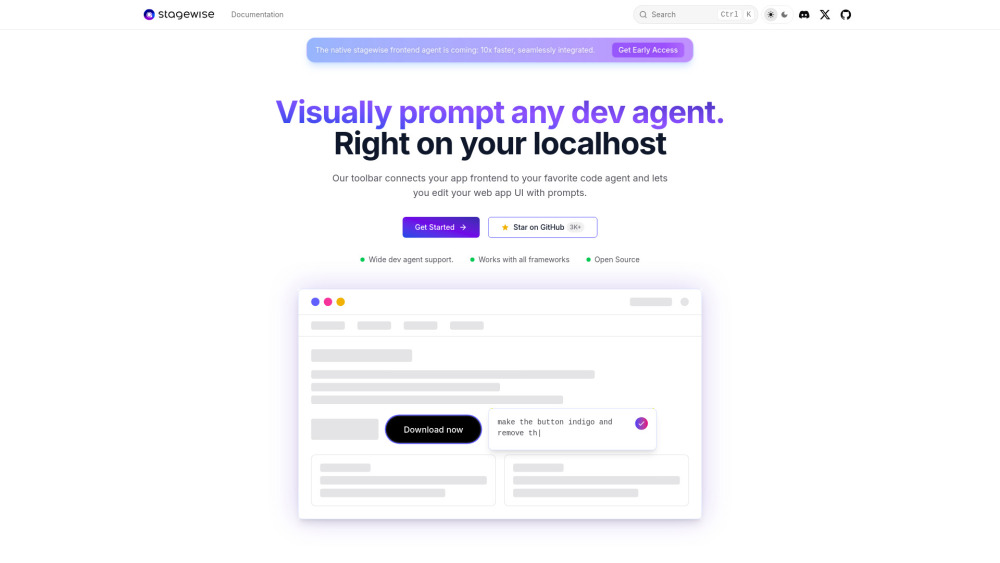
stagewise Website screenshot

Introducing Stagewise: AI Dev Agents for Visual UI Editing with Prompts

Stagewise redefines frontend development by embedding intelligent, stage-aware AI agents directly into your dev workflow—transforming how you iterate on UIs. Instead of switching between browser, editor, and chat interface, Stagewise bridges them in real time: it captures live DOM structure, visual context (including annotated screenshots), component hierarchy, and runtime metadata, then delivers this rich, actionable context to your chosen AI coding assistant. The result? Natural-language UI edits—“Make this button larger and match the brand purple”—that translate accurately into framework-native code. Built for modern stacks, it works natively with React, Vue, Svelte, Angular, Next.js, and Nuxt—no wrappers, no abstractions, just precise, contextual AI assistance where you build.

Getting Started with Stagewise

Launch Stagewise in under a minute: install the official extension from VS Code or Cursor Marketplace, then inject the lightweight dev toolbar into your application using either an AI-guided command (e.g., Ctrl+Shift+P → “Stagewise: Setup Toolbar”) or a one-line script snippet. Once active in dev mode, the floating toolbar appears on hover—click any element to open a prompt interface preloaded with its full context. No configuration required to begin; advanced customization (like custom prompt templates or framework-specific rules) is available via stagewise.config.ts.

Why Stagewise Stands Out

Stage-Aware AI Editing

Real-time visual + structural context sent to AI: DOM snapshots, CSS computed styles, React/Vue props, and element-level screenshots

Framework-agnostic integration—no runtime overhead, zero bundler plugins, and no production footprint

Native support for Cursor, GitHub Copilot, Windsurf, Cline, Roo Code, and Trae—with extensible adapter architecture

One-click setup with AI-assisted scaffolding—or fully manual, transparent control

Live, collaborative commenting: annotate elements directly in-browser and sync notes to your IDE

Configurable prompt engineering layer—tune output style, enforce accessibility rules, or enforce design system tokens

Dev-only injection: never bundled, never shipped—100% invisible in production builds

Real-World Impact

Edit UIs intuitively—even when inheriting legacy or unfamiliar codebases.

Accelerate handoff: designers describe changes in plain language; developers execute them instantly and correctly.

Reduce context-switching fatigue and cognitive load during rapid prototyping or A/B testing iterations.

Democratize UI iteration—empower product managers, QA engineers, and junior devs to propose and preview changes safely.

Frequently Asked Questions

What makes Stagewise “stage-aware”?

Which AI assistants does Stagewise work with out of the box?

How does Stagewise ensure edits stay framework-compliant?

Is Stagewise open source and free to use?

  • Join the Stagewise Community

    Connect with early adopters, share prompt recipes, and shape the future of AI-augmented UI development: https://discord.gg/gkdGsDYaKA. For deeper community discussions, visit our Discord hub.

  • Need Help? We’re Here

    Reach our support team at [email protected]. For urgent issues, refunds, or enterprise onboarding, visit our Contact page.

  • About Stagewise

    Stagewise is developed by tiq UG (haftungsbeschränkt), a Berlin-based engineering studio focused on human-centered AI tooling for developers.

  • Follow Our Journey

    Get updates, demos, and behind-the-scenes insights on X: https://x.com/stagewise_io

  • Explore & Contribute

    View source, report issues, or submit enhancements on GitHub: https://github.com/stagewise-io/stagewise

FAQ from Stagewise

What makes Stagewise “stage-aware”?

Stagewise operates exclusively in development mode and understands *where* and *how* UI elements exist—not just as static HTML, but as live, framework-managed components with props, state, and lifecycle context. It captures this “stage” information before sending prompts to AI, enabling edits that respect architectural boundaries and runtime behavior.

Which AI assistants does Stagewise work with out of the box?

Stagewise ships with native integrations for Cursor, GitHub Copilot, Windsurf, Cline, Roo Code, and Trae. Its open adapter API lets teams plug in custom LLM endpoints or internal coding agents—ensuring flexibility without lock-in.

How does Stagewise ensure edits stay framework-compliant?

By injecting framework-specific context (e.g., React hooks usage, Vue composition API patterns, Svelte reactivity rules) alongside each prompt, Stagewise guides AI outputs to generate syntactically and semantically correct code—verified through optional local linting and type-checking hooks.

Is Stagewise open source and free to use?

Yes—Stagewise is fully open source (MIT licensed) and free for individuals, startups, and enterprises. Optional premium tiers may offer advanced governance features, team analytics, and priority support—but core visual UI editing with AI prompts remains free forever.