Text-to-Speech

SpeechGen.io

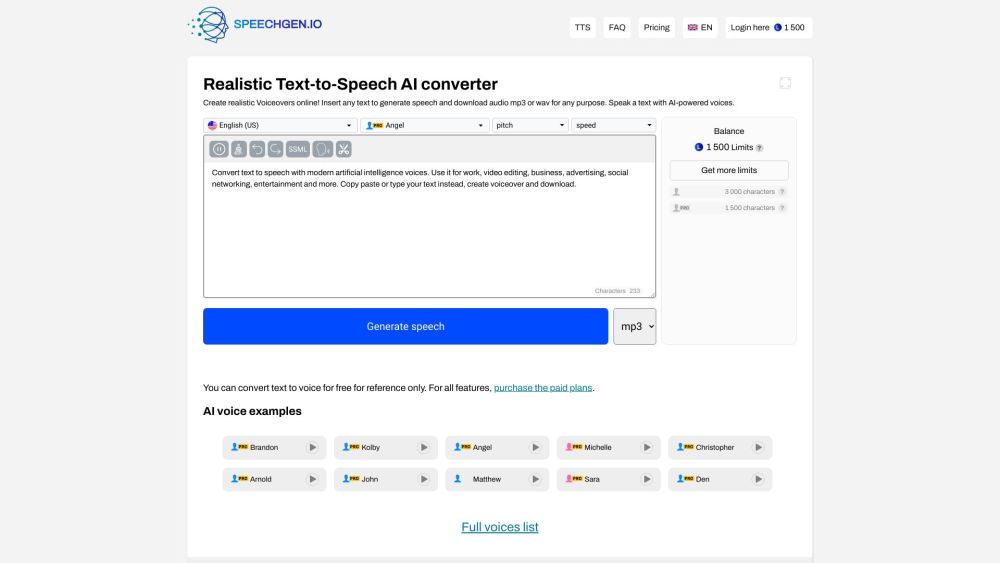
SpeechGen.io is a realistic Text-to-Speech converter and AI voice generator website. It allows users to input text and generate high-quality voiceovers in MP3 or WAV format. The generated voices are powered by AI technology, providing natural-sounding speech with an American English accent. Users can use the generated audio for various purposes such as videos, business presentations, social media content, advertisements, e-learning materials, and more.

SpeechGen.io website preview

SpeechGen.io Website screenshot

What is SpeechGen.io?

SpeechGen.io is a cutting-edge platform for Text-to-Speech conversion and AI voice generation. It enables users to transform text into lifelike voiceovers in MP3 or WAV formats. Utilizing advanced AI technology, SpeechGen.io delivers natural-sounding speech in an American English accent. These generated voiceovers are ideal for various applications including videos, business presentations, social media content, advertisements, educational materials, and more.

How to use SpeechGen.io?

Using SpeechGen.io is simple and straightforward. Enter your text into the text input field, then click the 'generate' button to convert the text to speech. Once the audio is generated, it can be downloaded in either MP3 or WAV format. Users can also customize voice attributes like speed, pitch, stress, pronunciation, intonation, emphasis, and pauses. For more sophisticated voice control, the platform supports SSML (Speech Synthesis Markup Language).

SpeechGen.io's Core Features

Realistic Text-to-Speech conversion

AI-powered voices with an American English accent

Downloadable audio files in MP3 or WAV format

Customizable voice settings (speed, pitch, stress, etc.)

SSML support for advanced voice control

Commercial use permitted

Support for multi-voice editor and dialogues

Affordable pricing plans

SpeechGen.io's Use Cases

Voiceovers for videos (YouTube, TikTok, Instagram, etc.)

E-learning materials (language learning, instructional videos)

Advertising (video ads, promotional content)

Announcements in public spaces (airports, bus stations, parks)

Podcasts (audio content for platforms like iTunes, Spotify)

Voiceovers for mobile apps and desktop software

Reading and proofreading essays

Presentations (PowerPoint, slideshows)

Document reading (text-to-speech functionality)

Book reading (ebooks with natural voices)

Welcome audio messages for websites

Online article reading (text-to-speech feature)

Voicemail greeting creation

Reading fairy tales aloud to children

Creative uses like meme creation

Maximizing content reach with audio versions

Product source: SpeechGen.io official website. Check the provider for current plans, limits and availability.

FAQ

SpeechGen.io questions and answers

Product context and practical checks for evaluating SpeechGen.io.

What is SpeechGen.io used for?

SpeechGen.io is a realistic Text-to-Speech converter and AI voice generator website. It allows users to input text and generate high-quality voiceovers in MP3 or WAV format. The generated voices are powered by AI technology, providing natural-sounding speech with an American English accent. Users can use the generated audio for various purposes such as videos, business presentations, social media content, advertisements, e-learning materials, and more.

How do I get started with SpeechGen.io?

Using SpeechGen.io is simple and straightforward. Enter your text into the text input field, then click the 'generate' button to convert the text to speech. Once the audio is generated, it can be downloaded in either MP3 or WAV format. Users can also customize voice attributes like speed, pitch, stress, pronunciation, intonation, emphasis, and pauses. For more sophisticated voice control, the platform supports SSML (Speech Synthesis Markup Language).

Which capabilities are described for SpeechGen.io?

Realistic Text-to-Speech conversionAI-powered voices with an American English accentDownloadable audio files in MP3 or WAV formatCustomizable voice settings (speed, pitch, stress, etc.)SSML support for advanced voice controlCommercial use permittedSupport for multi-voice editor and dialoguesAffordable pricing plans

What projects can I evaluate SpeechGen.io for?

Voiceovers for videos (YouTube, TikTok, Instagram, etc.)E-learning materials (language learning, instructional videos)Advertising (video ads, promotional content)Announcements in public spaces (airports, bus stations, parks)Podcasts (audio content for platforms like iTunes, Spotify)Voiceovers for mobile apps and desktop softwareReading and proofreading essaysPresentations (PowerPoint, slideshows)Document reading (text-to-speech functionality)Book reading (ebooks with natural voices)Welcome audio messages for websitesOnline article reading (text-to-speech feature)Voicemail greeting creationReading fairy tales aloud to childrenCreative uses like meme creationMaximizing content reach with audio versions SpeechGen.io Support Email & Customer Service For more contact information, visit the contact us page SpeechGen.io Login Log in to SpeechGen.io: Login here SpeechGen.io Pricing View pricing plans: Pricing details SpeechGen.io Facebook Follow us on Facebook: SpeechGen Facebook SpeechGen.io YouTube Subscribe to our YouTube channel: SpeechGen YouTube SpeechGen.io Twitter Follow us on Twitter: SpeechGen Twitter SpeechGen.io GitHub Explore our GitHub: SpeechGen GitHub

What should I compare before choosing a SpeechGen.io plan?

View pricing plans: Pricing details Confirm current prices and allowances on the provider’s website before purchasing.

What inputs should I prepare for a SpeechGen.io trial?

Compare text prompts, reference frames, source footage and audio support. Check duration, aspect ratio and whether the tool lets you keep a subject consistent between shots.

How can I check the quality of a SpeechGen.io result?

Watch the entire clip for motion errors, distorted objects, changing identities, lip-sync problems and abrupt transitions. Inspect the downloaded file as well as the preview.

Which export options should I check in SpeechGen.io?

Check export resolution, frame rate, aspect ratio, audio tracks and watermark rules. A good preview is not a substitute for an export that fits your publishing channel.

What is a practical way to test SpeechGen.io against alternatives?

Use a short shot with one subject and one camera movement. Keep the prompt and duration constant, then compare usable seconds and the number of regenerations.

Where is the official SpeechGen.io website?

The website linked from this profile is https://www.promptdodo.com. Use the provider’s own documentation, account area and support channels to confirm current product details.

Visit SpeechGen.io