Writing Assistants

SmartSlash - Chrome Extension

Boost your content creation with SmartSlash, the AI-powered Chrome extension that generates high-quality content in a snap.

SmartSlash - Chrome Extension website preview

SmartSlash - Chrome Extension Website screenshot

Introducing SmartSlash - Chrome Extension: AI Content Generation

SmartSlash is an innovative chrome extension powered by cutting-edge artificial intelligence technology. This powerful tool is designed to assist users in generating high-quality content effortlessly.

Unlock the Potential with SmartSlash AI Chrome Extension

With SmartSlash, you can supercharge your content creation process. Install the browser extension and unleash the power of AI to create engaging and captivating content in a fraction of the time.

Key Features of SmartSlash AI Chrome Extension

AI-Powered Content Generation

SmartSlash leverages advanced artificial intelligence algorithms to generate high-quality content tailored to your needs. Say goodbye to writer's block and hello to effortless content creation.

Intelligent Detection of Input

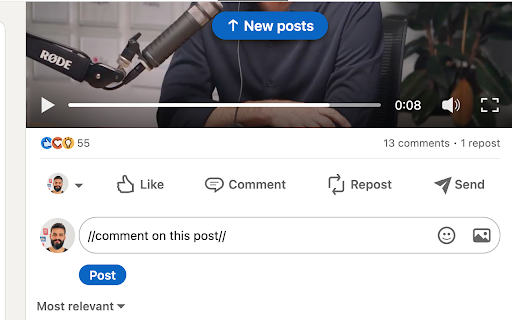
SmartSlash's intelligent system can detect words starting with '//' in input boxes, making it easier than ever to generate code snippets, comments, or any other type of content that requires specific formatting.

User-Friendly Interface

SmartSlash's interface is designed with simplicity and ease of use in mind. Whether you're a seasoned content creator or a beginner, you'll find SmartSlash intuitive and user-friendly.

Use Cases for SmartSlash AI Chrome Extension

Generating Captivating Blog Content

SmartSlash is the perfect companion for bloggers looking to effortlessly produce engaging and informative articles. Let the AI algorithms do the heavy lifting while you focus on your ideas.

Creating Engaging Social Media Posts

SmartSlash helps you craft attention-grabbing social media posts that stand out from the crowd. Boost your online presence and captivate your audience with compelling content.

Product source: SmartSlash - Chrome Extension official website. Check the provider for current plans, limits and availability.

FAQ

SmartSlash - Chrome Extension questions and answers

Product context and practical checks for evaluating SmartSlash - Chrome Extension.

What is SmartSlash - Chrome Extension used for?

Boost your content creation with SmartSlash, the AI-powered Chrome extension that generates high-quality content in a snap.

How do I get started with SmartSlash - Chrome Extension?

Open the official SmartSlash - Chrome Extension website and identify the workflow that matches your task. Prepare a brief with a subject, composition, lighting and required output size. Test a first generation and a targeted revision to see how much control you retain.

Which capabilities are described for SmartSlash - Chrome Extension?

AI-Powered Content GenerationSmartSlash leverages advanced artificial intelligence algorithms to generate high-quality content tailored to your needs. Say goodbye to writer's block and hello to effortless content creation.Intelligent Detection of InputSmartSlash's intelligent system can detect words starting with '//' in input boxes, making it easier than ever to generate code snippets, comments, or any other type of content that requires specific formatting.User-Friendly InterfaceSmartSlash's interface is designed with simplicity and ease of use in mind. Whether you're a seasoned content creator or a beginner, you'll find SmartSlash intuitive and user-friendly.

What projects can I evaluate SmartSlash - Chrome Extension for?

Generating Captivating Blog ContentSmartSlash is the perfect companion for bloggers looking to effortlessly produce engaging and informative articles. Let the AI algorithms do the heavy lifting while you focus on your ideas.Creating Engaging Social Media PostsSmartSlash helps you craft attention-grabbing social media posts that stand out from the crowd. Boost your online presence and captivate your audience with compelling content.

What should I compare before choosing a SmartSlash - Chrome Extension plan?

Check SmartSlash - Chrome Extension’s current pricing page for included usage, renewal terms and any credit charges. Compare the cost of a usable result, including retries, rather than assuming that account registration includes free usage.

What inputs should I prepare for a SmartSlash - Chrome Extension trial?

Look for text prompts, image references, masks or sketches as appropriate. Compare composition control, supported upload types and the ability to revise a selected area.

How can I check the quality of a SmartSlash - Chrome Extension result?

Inspect text, hands, edges, reflections and repeated objects at full size. Check that important product or brand details survive editing.

Which export options should I check in SmartSlash - Chrome Extension?

Compare pixel dimensions, transparency, file formats and any enlargement options. Confirm that the downloaded result works in your design or publishing software.

What is a practical way to test SmartSlash - Chrome Extension against alternatives?

Prepare a brief with a subject, composition, lighting and required output size. Test a first generation and a targeted revision to see how much control you retain.

Where is the official SmartSlash - Chrome Extension website?

The website linked from this profile is https://chromewebstore.google.com/detail/smartslash/ebkfookfmjdnknokoiclajnbpfmbgdgl. Use the provider’s own documentation, account area and support channels to confirm current product details.

Visit SmartSlash - Chrome Extension