Copywriting

ReplyAI - Chrome Extension

ReplyAI - Chrome Extension: Effortlessly craft intelligent replies, simplifying your communication process.

ReplyAI - Chrome Extension website preview

ReplyAI - Chrome Extension Website screenshot

Introducing ReplyAI - Chrome Extension: Simplify Intelligent Replies with Ease

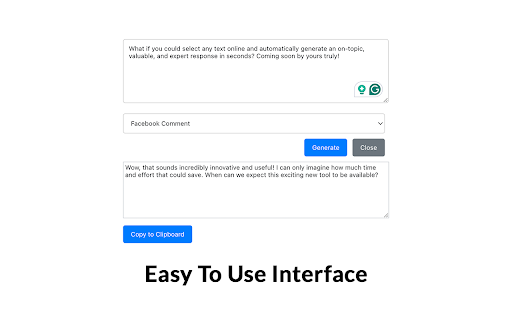
ReplyAI - Chrome Extension is an innovative tool that harnesses the power of artificial intelligence to generate brilliant replies for emails, comments, and more. With its user-friendly interface and advanced algorithms, crafting intelligent responses has never been easier.

How to Utilize ReplyAI - Chrome Extension?

Using ReplyAI - Chrome Extension is a breeze. Simply input the relevant context, and let the AI-powered tool generate your response in seconds. Say goodbye to the hassle of composing replies from scratch and save valuable time and effort.

Key Features of ReplyAI - Chrome Extension

1. Intelligent Reply Generation

ReplyAI - Chrome Extension leverages cutting-edge technology to generate intelligent and contextually appropriate replies. Impress your recipients with well-crafted responses that reflect your professionalism and expertise.

2. Email and Comment Reply Templates

With a wide range of pre-designed templates, ReplyAI - Chrome Extension provides a variety of response options for different scenarios. From formal email inquiries to social media comments, there's a template to suit every situation.

3. Personalized Responses

Customize your replies to align with your personal style and tone. ReplyAI - Chrome Extension allows you to add a personal touch to your responses, ensuring they resonate with your audience and reflect your brand's voice.

Use Cases for ReplyAI - Chrome Extension

1. Efficiently Responding to Customer Emails

Managing a high volume of customer emails can be time-consuming. ReplyAI - Chrome Extension streamlines the process by generating prompt and accurate responses, allowing you to provide excellent customer service while saving valuable time.

2. Engaging with Social Media Comments

Engagement on social media platforms is crucial for building brand awareness and maintaining customer relationships. ReplyAI - Chrome Extension helps you craft engaging and relevant responses to comments, enhancing your online presence and fostering meaningful interactions.

Product source: ReplyAI - Chrome Extension official website. Check the provider for current plans, limits and availability.

FAQ

ReplyAI - Chrome Extension questions and answers

Product context and practical checks for evaluating ReplyAI - Chrome Extension.

What is ReplyAI - Chrome Extension used for?

ReplyAI - Chrome Extension: Effortlessly craft intelligent replies, simplifying your communication process.

How do I get started with ReplyAI - Chrome Extension?

Using ReplyAI - Chrome Extension is a breeze. Simply input the relevant context, and let the AI-powered tool generate your response in seconds. Say goodbye to the hassle of composing replies from scratch and save valuable time and effort.

Which capabilities are described for ReplyAI - Chrome Extension?

1. Intelligent Reply GenerationReplyAI - Chrome Extension leverages cutting-edge technology to generate intelligent and contextually appropriate replies. Impress your recipients with well-crafted responses that reflect your professionalism and expertise.2. Email and Comment Reply TemplatesWith a wide range of pre-designed templates, ReplyAI - Chrome Extension provides a variety of response options for different scenarios. From formal email inquiries to social media comments, there's a template to suit every situation.3. Personalized ResponsesCustomize your replies to align with your personal style and tone. ReplyAI - Chrome Extension allows you to add a personal touch to your responses, ensuring they resonate with your audience and reflect your brand's voice.

What projects can I evaluate ReplyAI - Chrome Extension for?

1. Efficiently Responding to Customer EmailsManaging a high volume of customer emails can be time-consuming. ReplyAI - Chrome Extension streamlines the process by generating prompt and accurate responses, allowing you to provide excellent customer service while saving valuable time.2. Engaging with Social Media CommentsEngagement on social media platforms is crucial for building brand awareness and maintaining customer relationships. ReplyAI - Chrome Extension helps you craft engaging and relevant responses to comments, enhancing your online presence and fostering meaningful interactions.

What should I compare before choosing a ReplyAI - Chrome Extension plan?

Check ReplyAI - Chrome Extension’s current pricing page for included usage, renewal terms and any credit charges. Compare the cost of a usable result, including retries, rather than assuming that account registration includes free usage.

What inputs should I prepare for a ReplyAI - Chrome Extension trial?

Identify the files, text or account connections your task needs. Confirm that the product accepts those inputs and offers controls for reviewing its work.

How can I check the quality of a ReplyAI - Chrome Extension result?

Test one representative task and inspect the result for accuracy and completeness. Record where manual corrections or extra tools are needed.

Which export options should I check in ReplyAI - Chrome Extension?

Check export formats, integrations and whether you can keep using your work outside the service. Test a real export before committing to a longer plan.

What is a practical way to test ReplyAI - Chrome Extension against alternatives?

Choose one task with a clear success condition. Keep the input consistent, record the time spent reviewing and compare the complete workflow cost.

Where is the official ReplyAI - Chrome Extension website?

The website linked from this profile is https://chromewebstore.google.com/detail/ai-reply-generator/ihnkjpahngndbdmjealijjlngcaaccdc. Use the provider’s own documentation, account area and support channels to confirm current product details.

Visit ReplyAI - Chrome Extension