Text&ampWriting

Reeroll

Create scroll-stopping videos fast with Reeroll AI. Pick a template, customize via chat, and publish to TikTok, Reels & Shorts

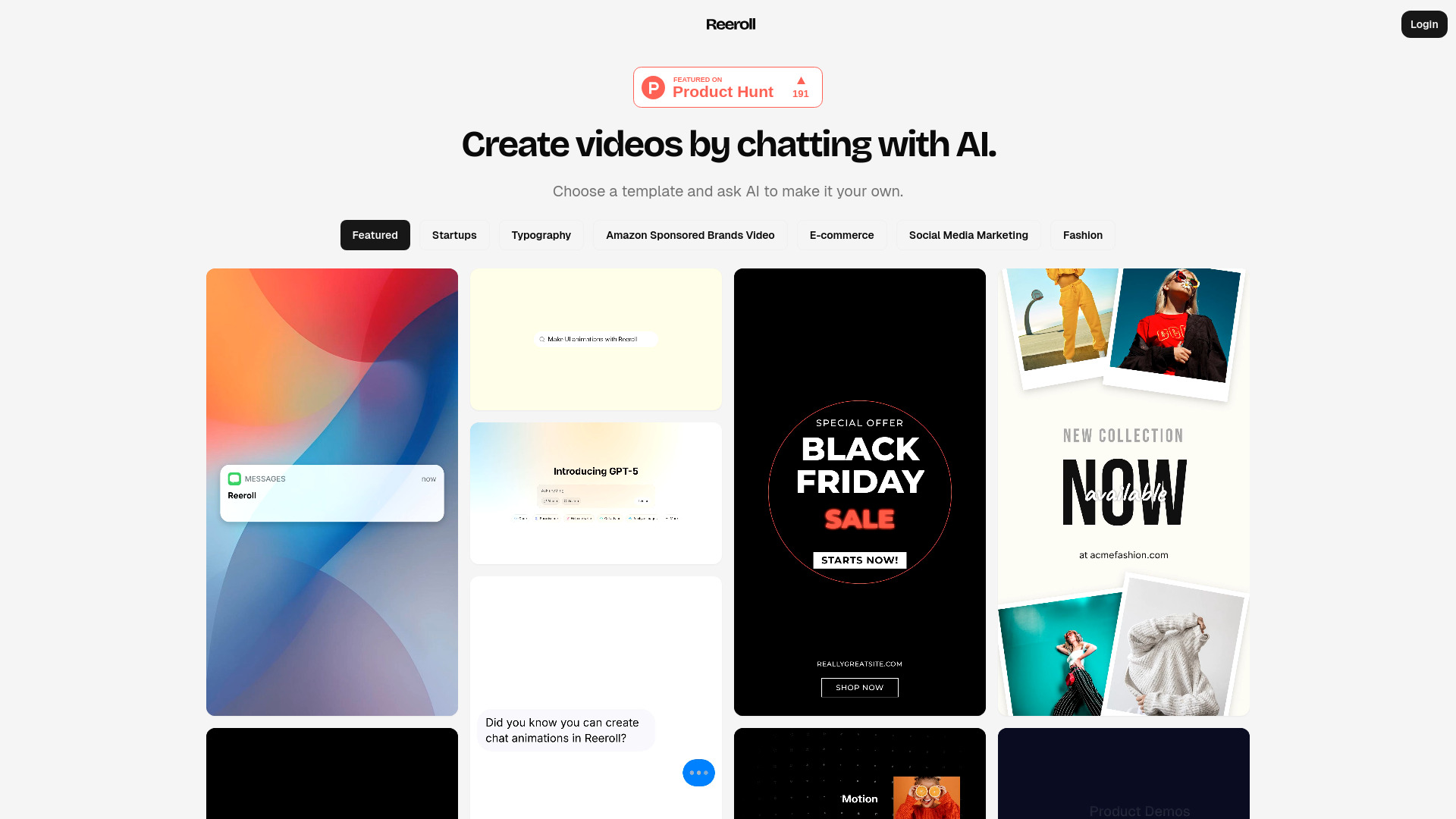
Reeroll website preview

What is Reeroll?

Reeroll is an AI video editor built to simplify the creation of short-form content for TikTok, Instagram Reels, and YouTube Shorts. Instead of relying on complicated editing workflows, the platform lets users shape their videos through a conversational interface. Creators can start with a template, bring in their own media, and describe the changes they want in everyday language. This approach makes video production more approachable for beginners while helping experienced marketers work more efficiently. By combining customizable layouts with AI-assisted editing, Reeroll offers a practical way to turn content ideas into videos for social media campaigns, product promotions, and everyday publishing.

How to Use Reeroll

Getting started with Reeroll follows a straightforward workflow. First, choose a video template that matches your message, visual style, and intended platform. Next, add the materials you want to include, such as product photos, existing footage, logos, and relevant links. Once your assets are in place, use the chat interface to explain how the video should look and feel. You might request a different opening, shorter scenes, updated text overlays, or a change in music. Rather than searching through editing menus, you guide the process by describing the result you want.

After the initial version is ready, review the video and refine it through additional instructions. Pay attention to the opening hook, readability of on-screen text, pacing, and placement of important brand elements. Reeroll's AI-assisted workflow helps reduce repetitive editing work, leaving more time to focus on the message. Whether the goal is a TikTok product introduction, an Instagram Reel, or a YouTube Short, reviewing the final result against your chosen platform's requirements helps keep the content clear and suitable for publication.

Key Features of Reeroll

  • Conversational AI Video Editing: Make edits by explaining what you need in natural language. Reeroll's chat-based approach provides an alternative to traditional timeline editing, helping users adjust their videos without having to learn a large collection of technical controls.
  • Ready-to-Customize Video Templates: Begin with a professionally designed structure rather than building every scene from scratch. Templates provide a starting point for arranging visuals and messaging, making it easier to establish a consistent style across short-form content.
  • Flexible Media and Brand Assets: Bring images, video clips, logos, music, and relevant links into your creative workflow. Combining your own materials with AI-assisted customization helps turn a general template into a video that reflects your brand and campaign goals.
  • Short-Form Platform Formatting: Create content with the viewing habits of TikTok, Instagram Reels, and YouTube Shorts audiences in mind. Platform-oriented formatting helps users prepare videos with suitable proportions, timing, and visual placement for mobile-first viewing.
  • Fast Revisions and Creative Variations: Refine a draft through follow-up chat instructions instead of repeatedly navigating complex menus. This makes it easier to explore different openings, adjust text, or develop alternative versions of the same concept for separate audiences.

Together, these features support a more streamlined video production process. Reeroll is particularly relevant for creators and teams that need repeatable workflows while retaining control over their content's message, presentation, and brand identity.

Why Choose Reeroll?

Short-form video often requires a balance between frequent publishing and thoughtful production. Reeroll addresses this challenge by making editing more accessible through templates and conversational controls. Beginners can focus on communicating an idea rather than mastering editing software, while marketing teams can spend less time on repetitive adjustments. For social media managers, entrepreneurs, and small businesses, this workflow can help make regular video creation more manageable without requiring every project to begin with a blank canvas.

The main appeal of Reeroll is the ability to direct edits using familiar language. Instead of translating a creative idea into a series of manual operations, users can describe the changes they want and review the resulting draft. This encourages experimentation: an opening can be shortened, a message clarified, or a visual sequence revised as the concept develops. Templates also provide a consistent foundation across projects. As with any AI-assisted creative tool, reviewing the final video remains important to confirm accuracy, visual quality, and alignment with the intended audience.

Use Cases and Applications

Reeroll can support a range of social media and marketing workflows. Independent creators can use it to develop short videos for TikTok, Instagram Reels, and YouTube Shorts while maintaining a recognizable visual style. Online stores can combine product images and demonstration clips into concise promotional videos. Marketing teams can develop variations of an advertisement, changing the opening message, featured benefits, or call to action to explore different creative approaches. A reusable template-based workflow is especially useful when multiple videos share similar branding or campaign objectives.

Small businesses and entrepreneurs can also use Reeroll to explain services, introduce offers, and share brand updates in a compact format. Content marketers can reshape selected ideas or footage from longer material into shorter social posts. Educational creators can organize a single concept into a focused visual lesson, while agencies can adapt a core campaign message for different clients or channels. Across these applications, the value lies in simplifying production so users can devote more attention to useful information, clear storytelling, and audience relevance.

Product source: Reeroll official website. Check the provider for current plans, limits and availability.

FAQ

Reeroll questions and answers

Product context and practical checks for evaluating Reeroll.

What is Reeroll used for?

Create scroll-stopping videos fast with Reeroll AI. Pick a template, customize via chat, and publish to TikTok, Reels & Shorts

How do I get started with Reeroll?

Getting started with Reeroll follows a straightforward workflow. First, choose a video template that matches your message, visual style, and intended platform. Next, add the materials you want to include, such as product photos, existing footage, logos, and relevant links. Once your assets are in place, use the chat interface to explain how the video should look and feel. You might request a different opening, shorter scenes, updated text overlays, or a change in music. Rather than searching through editing menus, you guide the process by describing the result you want.After the initial version is ready, review the video and refine it through additional instructions. Pay attention to the opening hook, readability of on-screen text, pacing, and placement of important brand elements. Reeroll's AI-assisted workflow helps reduce repetitive editing work, leaving more time to focus on the message. Whether the goal is a TikTok product introduction, an Instagram Reel, or a YouTube Short, reviewing the final result against your chosen platform's requirements helps keep the content clear and suitable for publication.

Which capabilities are described for Reeroll?

Conversational AI Video Editing: Make edits by explaining what you need in natural language. Reeroll's chat-based approach provides an alternative to traditional timeline editing, helping users adjust their videos without having to learn a large collection of technical controls. Ready-to-Customize Video Templates: Begin with a professionally designed structure rather than building every scene from scratch. Templates provide a starting point for arranging visuals and messaging, making it easier to establish a consistent style across short-form content. Flexible Media and Brand Assets: Bring images, video clips, logos, music, and relevant links into your creative workflow. Combining your own materials with AI-assisted customization helps turn a general template into a video that reflects your brand and campaign goals. Short-Form Platform Formatting: Create content with the viewing habits of TikTok, Instagram Reels, and YouTube Shorts audiences in mind. Platform-oriented formatting helps users prepare videos with suitable proportions, timing, and visual placement for mobile-first viewing. Fast Revisions and Creative Variations: Refine a draft through follow-up chat instructions instead of repeatedly navigating complex menus. This makes it easier to explore different openings, adjust text, or develop alternative versions of the same concept for separate audiences. Together, these features support a more streamlined video production process. Reeroll is particularly relevant for creators and teams that need repeatable workflows while retaining control over their content's message, presentation, and brand identity.

What projects can I evaluate Reeroll for?

Reeroll can support a range of social media and marketing workflows. Independent creators can use it to develop short videos for TikTok, Instagram Reels, and YouTube Shorts while maintaining a recognizable visual style. Online stores can combine product images and demonstration clips into concise promotional videos. Marketing teams can develop variations of an advertisement, changing the opening message, featured benefits, or call to action to explore different creative approaches. A reusable template-based workflow is especially useful when multiple videos share similar branding or campaign objectives.Small businesses and entrepreneurs can also use Reeroll to explain services, introduce offers, and share brand updates in a compact format. Content marketers can reshape selected ideas or footage from longer material into shorter social posts. Educational creators can organize a single concept into a focused visual lesson, while agencies can adapt a core campaign message for different clients or channels. Across these applications, the value lies in simplifying production so users can devote more attention to useful information, clear storytelling, and audience relevance.

How does Reeroll handle conversational ai video editing?

Conversational AI Video Editing: Make edits by explaining what you need in natural language. Reeroll's chat-based approach provides an alternative to traditional timeline editing, helping users adjust their videos without having to learn a large collection of technical controls.

How does Reeroll handle ready-to-customize video templates?

Ready-to-Customize Video Templates: Begin with a professionally designed structure rather than building every scene from scratch. Templates provide a starting point for arranging visuals and messaging, making it easier to establish a consistent style across short-form content.

What should I compare before choosing a Reeroll plan?

Check Reeroll’s current pricing page for included usage, renewal terms and any credit charges. Compare the cost of a usable result, including retries, rather than assuming that account registration includes free usage.

What inputs should I prepare for a Reeroll trial?

Compare text prompts, reference frames, source footage and audio support. Check duration, aspect ratio and whether the tool lets you keep a subject consistent between shots.

How can I check the quality of a Reeroll result?

Watch the entire clip for motion errors, distorted objects, changing identities, lip-sync problems and abrupt transitions. Inspect the downloaded file as well as the preview.

Where is the official Reeroll website?

The website linked from this profile is https://reeroll.com. Use the provider’s own documentation, account area and support channels to confirm current product details.

Visit Reeroll