AI Content Generator

Quizgecko

Quizgecko: Effortlessly create quizzes from text, URLs & files with AI-driven question generation. Perfect for educators and trainers!

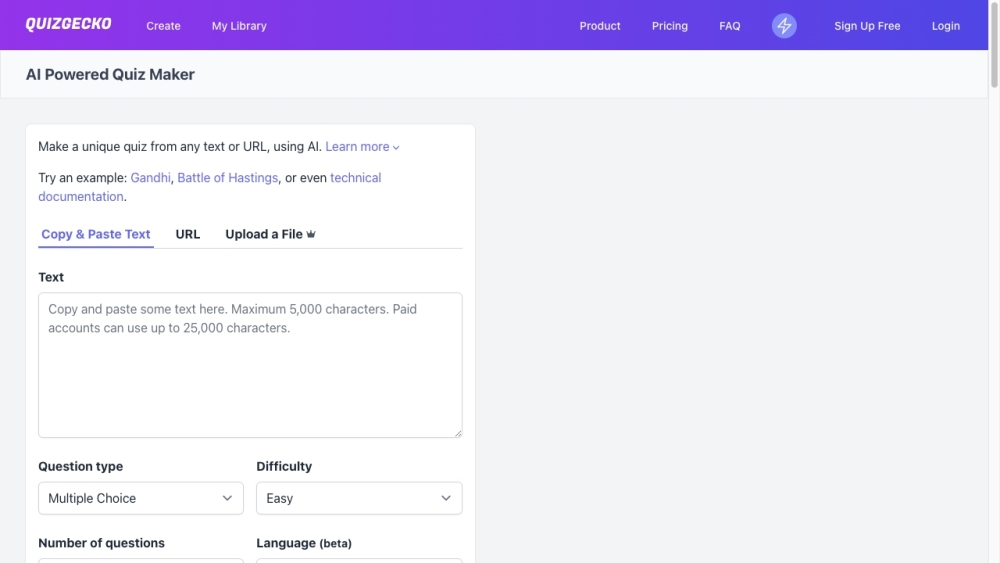
Quizgecko website preview

Quizgecko Website screenshot

What is Quizgecko?

Quizgecko is an advanced AI-driven platform designed to simplify the creation of quizzes and tests by automatically generating questions and answers from various content sources. This powerful tool can produce quizzes from text, URLs, or uploaded files, making it highly adaptable for different needs.

How to use Quizgecko?

Using Quizgecko is straightforward. Input the text, URL, or upload a file with the content you wish to convert into a quiz. The AI question generator will process the content and create relevant questions and answers. You have the option to customize the quiz by choosing different question formats, setting time limits, and randomizing questions. After creating the quiz, you can easily share it with others, export it, embed it on websites or LMS platforms, and track performance through detailed analytics.

Quizgecko's Core Features

AI Question Generator

Share, Export & Embed

Reporting & Analytics

Chrome Extension

Quizgecko's Use Cases

Business: Create assessments for training, courses, or certifications

Educators: Enhance teaching with AI-generated quizzes, assessments, and exams

Students: Learn efficiently with AI-generated quizzes, flashcards, and notes tailored to individual learning needs

Product source: Quizgecko official website. Check the provider for current plans, limits and availability.

FAQ

Quizgecko questions and answers

Product context and practical checks for evaluating Quizgecko.

What is Quizgecko used for?

Quizgecko: Effortlessly create quizzes from text, URLs & files with AI-driven question generation. Perfect for educators and trainers!

How do I get started with Quizgecko?

Using Quizgecko is straightforward. Input the text, URL, or upload a file with the content you wish to convert into a quiz. The AI question generator will process the content and create relevant questions and answers. You have the option to customize the quiz by choosing different question formats, setting time limits, and randomizing questions. After creating the quiz, you can easily share it with others, export it, embed it on websites or LMS platforms, and track performance through detailed analytics.

Which capabilities are described for Quizgecko?

AI Question GeneratorShare, Export & EmbedReporting & AnalyticsChrome Extension

What projects can I evaluate Quizgecko for?

Business: Create assessments for training, courses, or certificationsEducators: Enhance teaching with AI-generated quizzes, assessments, and examsStudents: Learn efficiently with AI-generated quizzes, flashcards, and notes tailored to individual learning needs Quizgecko Support Email & Customer Service Contact Contact Quizgecko support at: [email protected]. Quizgecko Login Login here: https://quizgecko.com/login Quizgecko Sign Up Sign up here: https://quizgecko.com/register Quizgecko Pricing View pricing plans: https://quizgecko.com/plans Quizgecko Facebook Follow us on Facebook: https://www.facebook.com/profile.php?id=61550782041398 Quizgecko Tiktok Follow us on Tiktok: https://www.tiktok.com/@quizgecko Quizgecko Twitter Follow us on Twitter: https://twitter.com/Quizgecko Quizgecko Instagram Follow us on Instagram: https://instagram.com/quizgecko

What should I compare before choosing a Quizgecko plan?

View pricing plans: https://quizgecko.com/plans Confirm current prices and allowances on the provider’s website before purchasing.

What inputs should I prepare for a Quizgecko trial?

Compare support for source documents, style instructions, outlines and length limits. Check whether citations link to real material rather than merely looking like references.

How can I check the quality of a Quizgecko result?

Verify names, dates, quotations and factual claims against the original sources. Edit tone, remove repetition and make sure the text answers the intended reader’s question.

Which export options should I check in Quizgecko?

Check export to plain text, Markdown, documents or your publishing system. Formatting, headings and working links matter when moving a draft into production.

What is a practical way to test Quizgecko against alternatives?

Use a real brief and a short source document. Compare factual accuracy, structure and editing time rather than accepting the longest or most confident draft.

Where is the official Quizgecko website?

The website linked from this profile is https://quizgecko.com. Use the provider’s own documentation, account area and support channels to confirm current product details.

Visit Quizgecko