AI Email Assistant

Ponyrun - Chrome Extension

Ponyrun - Chrome Extension: Automate prospecting tasks fast and efficiently. Boost productivity and streamline your lead generation effortlessly!

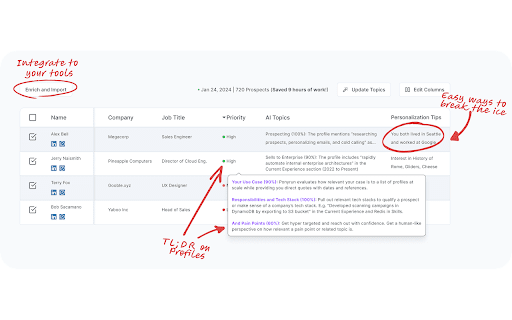
Ponyrun - Chrome Extension website preview

Ponyrun - Chrome Extension Website screenshot

What is Ponyrun - Chrome Extension?

Ponyrun is a powerful Chrome extension designed to automate the time-consuming process of prospecting, giving sales teams the tools they need to work faster and more efficiently.

How to use Ponyrun - Chrome Extension?

To get started with Ponyrun, simply install the Chrome extension, go to ponyrun.ai/automation, and follow the detailed setup guide to begin automating your prospecting workflow in minutes.

Core Features of Ponyrun - Chrome Extension

Prospecting Automation

Integrated Chrome Extension

Boost Workflow Efficiency for Sales Teams

Use Cases for Ponyrun - Chrome Extension

Optimizing Lead Generation Automation

Enhancing Sales Prospect Research Efficiency

Product source: Ponyrun - Chrome Extension official website. Check the provider for current plans, limits and availability.

FAQ

Ponyrun - Chrome Extension questions and answers

Product context and practical checks for evaluating Ponyrun - Chrome Extension.

What is Ponyrun - Chrome Extension used for?

Ponyrun - Chrome Extension: Automate prospecting tasks fast and efficiently. Boost productivity and streamline your lead generation effortlessly!

How do I get started with Ponyrun - Chrome Extension?

To get started with Ponyrun, simply install the Chrome extension, go to ponyrun.ai/automation, and follow the detailed setup guide to begin automating your prospecting workflow in minutes.

Which capabilities are described for Ponyrun - Chrome Extension?

Prospecting AutomationIntegrated Chrome ExtensionBoost Workflow Efficiency for Sales Teams

What projects can I evaluate Ponyrun - Chrome Extension for?

Optimizing Lead Generation AutomationEnhancing Sales Prospect Research Efficiency

What should I compare before choosing a Ponyrun - Chrome Extension plan?

Check Ponyrun - Chrome Extension’s current pricing page for included usage, renewal terms and any credit charges. Compare the cost of a usable result, including retries, rather than assuming that account registration includes free usage.

What inputs should I prepare for a Ponyrun - Chrome Extension trial?

Identify the files, text or account connections your task needs. Confirm that the product accepts those inputs and offers controls for reviewing its work.

How can I check the quality of a Ponyrun - Chrome Extension result?

Test one representative task and inspect the result for accuracy and completeness. Record where manual corrections or extra tools are needed.

Which export options should I check in Ponyrun - Chrome Extension?

Check export formats, integrations and whether you can keep using your work outside the service. Test a real export before committing to a longer plan.

What is a practical way to test Ponyrun - Chrome Extension against alternatives?

Choose one task with a clear success condition. Keep the input consistent, record the time spent reviewing and compare the complete workflow cost.

Where is the official Ponyrun - Chrome Extension website?

The website linked from this profile is https://chromewebstore.google.com/detail/ponyrun/ohfoafaaamjfbhmceahibpppkbnohaeg. Use the provider’s own documentation, account area and support channels to confirm current product details.

Visit Ponyrun - Chrome Extension