Table of contents
Piny: Visual Editor for Astro, React, Next.js & Tailwind CSS
Piny: Visual editor for Astro, React, Next.js & Tailwind—right in your IDE. Build faster, code smarter.
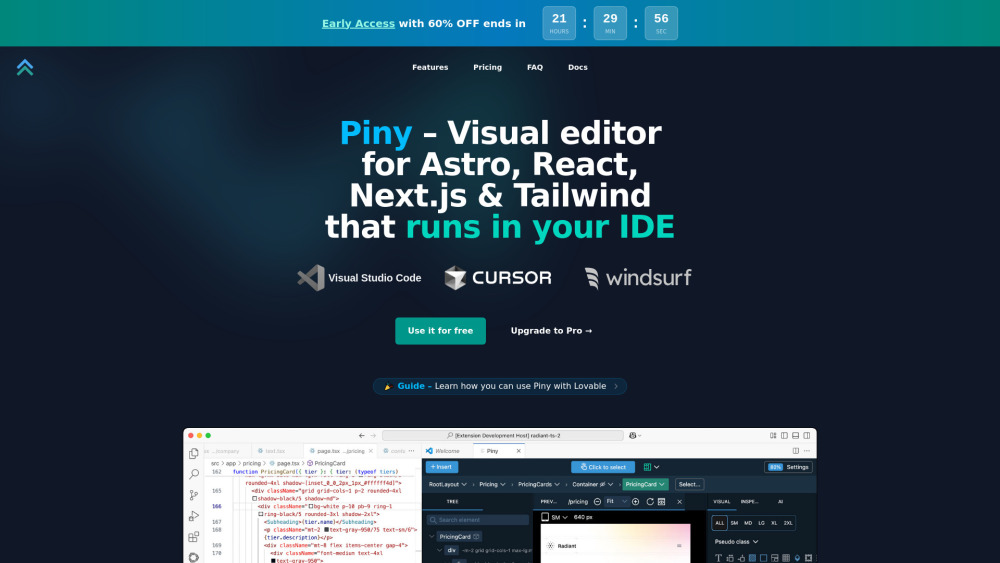
Introducing Piny: The Code-First Visual Editor for Modern Frontend Stacks
Piny is a tightly integrated visual editing layer built *inside* your editor—not as a separate app or cloud service, but as a native extension for VS Code, Cursor, and Windsurf. It empowers developers to visually style, inspect, and refactor UIs in real time—directly within Astro, React, Next.js, and Tailwind CSS projects. Every change you make reflects instantly in your source files. No proprietary wrappers. No hidden abstractions. No vendor lock-in. Just clean, human-readable code—enhanced with intuitive visual controls that accelerate iteration without sacrificing control.
Get Started in Under 30 Seconds
Install the Piny extension from the VS Code Marketplace (or your preferred compatible IDE). Open any `.astro`, `.tsx`, `.jsx`, or `.js` file in a supported project, right-click on an element or component, and choose “Edit in Piny”. Instantly launch a contextual visual panel—tailored to your framework and styling system—that lets you adjust spacing, colors, typography, responsiveness, and more—all while writing zero new classes or configuration.
What Makes Piny Different?
Real-Time Tailwind Class Builder
Intelligent Class Inspector & Debugger
Universal Tailwind Editing (Even in Strings & Dynamic Props)
Framework-Aware Component Explorer
AI-Augmented Drag-and-Drop Layout Refinement
One-Click Visual Element Selection
Bulk Styling Across Multiple DOM Nodes
Cross-File Project Navigation & Dependency Mapping
Full Support for Custom Tailwind Configs (theme, plugins, variants)
Who Uses Piny—and Why?
Frontend engineers streamlining Tailwind adoption across large teams
Design-system maintainers enforcing consistent, configurable styling rules
Astro developers building fast, component-driven static sites with zero runtime overhead
Next.js developers iterating rapidly on responsive layouts and dark-mode variants
React teams reducing context-switching between design tools and code editors
Solo devs who want visual precision without sacrificing code ownership or portability
Educators and mentors demonstrating modern CSS-in-JS and utility-first workflows
Teams migrating legacy UIs to Tailwind—refactoring styles safely, incrementally, and audibly
Frequently Asked Questions
-
Is the free tier truly open and unrestricted?
-
Why is early access priced lower than the future standard plan?
-
Does the early access price remain locked for life—or just year one?
-
How does Visual Select identify JSX elements from rendered output?
-
If Piny ceases development, will my code break or become obsolete?
-
How does Piny compare to Pinegrow Web Editor in scope and architecture?
-
Support & Contact
For help, feedback, or refund requests: [email protected]
-
About the Team
Piny is developed by Pinegrow Pte. Ltd., creators of trusted frontend tooling since 2012.
Learn more about our mission and engineering philosophy: https://pinegrow.com
-
Follow Us
Facebook: https://www.facebook.com/pinegrow/
-
Watch Tutorials
YouTube: https://www.youtube.com/c/pinegrow
-
Stay Updated
X (Twitter): https://twitter.com/pinegrow
FAQ from Piny
What is Piny?
Piny is a lightweight, editor-native visual layer for Tailwind-powered frameworks. It runs locally inside VS Code–compatible IDEs and edits real source files—never generating intermediate code or requiring external services. Designed for Astro, React, and Next.js developers who value speed, transparency, and full code ownership.
How do I start using Piny?
Install the extension from your IDE’s marketplace. Then, right-click any JSX, TSX, or Astro component node—and select “Edit in Piny”. A focused, context-aware visual toolbar appears instantly, letting you tweak classes, inspect inheritance, preview breakpoints, and navigate related files—without leaving your editor.
Is Piny Free actually free—no trials, no paywalls?
Yes. Piny Free includes full visual editing, Tailwind inspection, component navigation, and theme support—forever. No telemetry, no sign-in, no usage caps. Pro unlocks AI-assisted layout suggestions, team-wide config sync, and advanced debugging workflows.
Why offer an early access discount?
To collaborate closely with pioneers who help us stress-test edge cases, refine UX flows, and prioritize integrations. Your early feedback directly shapes Piny’s evolution—and your discounted rate honors that partnership long-term.
Is the early access pricing permanent?
Absolutely. Lock in your rate at purchase—and keep it for the lifetime of your subscription, regardless of future list-price changes.
How does Visual Select map pixels to code?
Using a minimal, dev-only runtime script injected into your local dev server, Piny establishes a secure, ephemeral bridge between rendered DOM and source AST. Click any element → instantly highlight its corresponding JSX node, props, and Tailwind class string—even across dynamic imports or conditional renders.
What happens to my code if Piny shuts down?
Nothing. Piny never modifies your build process, adds dependencies, or injects runtime code. All edits are direct writes to your `.tsx`, `.astro`, or `.jsx` files. Discontinue Piny? Keep coding exactly as before—your project remains 100% portable, deployable, and independent.
How is Piny different from Pinegrow Web Editor?
Pinegrow Web Editor is a desktop application optimized for static HTML, WordPress, and site-wide visual composition. Piny is an IDE extension purpose-built for dynamic, component-based frameworks—where visual editing must coexist seamlessly with TypeScript, SSR, client-side hydration, and complex state logic. They serve complementary, not overlapping, needs.