AI Content Generator

Paraphrasing Tool AI

Paraphrasing Tool AI: Effortlessly rephrase sentences, articles, and essays with advanced AI. Perfect for students, journalists, and writers to improve writing and avoid plagiarism.

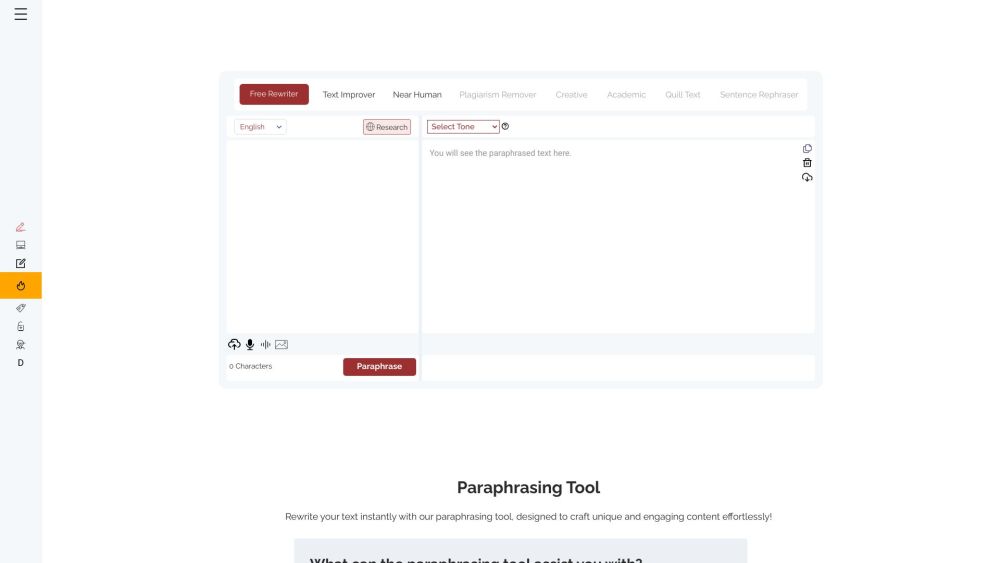
Paraphrasing Tool AI website preview

Paraphrasing Tool AI Website screenshot

What is Paraphrasing Tool AI?

Paraphrasing Tool AI is a sophisticated online application that assists users in rephrasing sentences, articles, and essays. Utilizing cutting-edge AI technology, it rewrites content while preserving the original meaning. It is particularly beneficial for students, journalists, and writers aiming to enhance their writing and avoid plagiarism.

How to Use Paraphrasing Tool AI?

Using Paraphrasing Tool AI is straightforward. Simply paste the text you wish to rephrase into the input box and select your preferred rewriting mode. Options include 'Free Rewriter' for basic paraphrasing, 'Text Improver' for refining writing style, and 'Near Human' for more natural-sounding rewrites. Click the 'Paraphrase' button to see the rephrased version. Additionally, the tool offers a built-in thesaurus, a research panel, and compatibility with various platforms.

Core Features of Paraphrasing Tool AI

Unlimited Word Paraphrasing

Plagiarism Avoidance

Enhanced Clarity and Readability

Time and Effort Saving

Integrated Research Panel

Compatibility with Major Browsers and Platforms

Eight Distinct AI Rewriting Modes

Additional Features like Thesaurus and Audio/Image Paraphrasing

Use Cases for Paraphrasing Tool AI

Students - Rephrase complex sentences, prevent plagiarism, and simplify ideas to improve assignments.

Writers - Enhance clarity, eliminate redundancy, and maintain a consistent writing style.

Bloggers - Simplify complex ideas and keep a consistent tone to create engaging content.

Marketers - Refine marketing messages for better audience targeting, higher conversion rates, and increased brand awareness.

Professionals - Clarify reports, proposals, and presentations by reorganizing and rephrasing text.

Researchers - Improve the readability and accessibility of research articles, abstracts, and summaries by rephrasing complex terms.

Product source: Paraphrasing Tool AI official website. Check the provider for current plans, limits and availability.

FAQ

Paraphrasing Tool AI questions and answers

Product context and practical checks for evaluating Paraphrasing Tool AI.

What is Paraphrasing Tool AI used for?

Paraphrasing Tool AI: Effortlessly rephrase sentences, articles, and essays with advanced AI. Perfect for students, journalists, and writers to improve writing and avoid plagiarism.

How do I get started with Paraphrasing Tool AI?

Using Paraphrasing Tool AI is straightforward. Simply paste the text you wish to rephrase into the input box and select your preferred rewriting mode. Options include 'Free Rewriter' for basic paraphrasing, 'Text Improver' for refining writing style, and 'Near Human' for more natural-sounding rewrites. Click the 'Paraphrase' button to see the rephrased version. Additionally, the tool offers a built-in thesaurus, a research panel, and compatibility with various platforms.

Which capabilities are described for Paraphrasing Tool AI?

Unlimited Word ParaphrasingPlagiarism AvoidanceEnhanced Clarity and ReadabilityTime and Effort SavingIntegrated Research PanelCompatibility with Major Browsers and PlatformsEight Distinct AI Rewriting ModesAdditional Features like Thesaurus and Audio/Image Paraphrasing

What projects can I evaluate Paraphrasing Tool AI for?

Students - Rephrase complex sentences, prevent plagiarism, and simplify ideas to improve assignments.Writers - Enhance clarity, eliminate redundancy, and maintain a consistent writing style.Bloggers - Simplify complex ideas and keep a consistent tone to create engaging content.Marketers - Refine marketing messages for better audience targeting, higher conversion rates, and increased brand awareness.Professionals - Clarify reports, proposals, and presentations by reorganizing and rephrasing text.Researchers - Improve the readability and accessibility of research articles, abstracts, and summaries by rephrasing complex terms. Paraphrasing Tool AI Support Email & Customer Service Contact & Refund Contact For customer service, contact Paraphrasing Tool AI support via email at [email protected]. For more contact information, visit the contact us page. About Paraphrasing Tool AI To learn more about Paraphrasing Tool AI, visit the about us page. Paraphrasing Tool AI Login Log in to Paraphrasing Tool AI at https://paraphrasingtool.ai/# Paraphrasing Tool AI Sign Up Sign up for Paraphrasing Tool AI at https://paraphrasingtool.ai/# Paraphrasing Tool AI on Facebook Follow Paraphrasing Tool AI on Facebook at https://www.facebook.com/paraphrasingtoolai/ Paraphrasing Tool AI on LinkedIn Connect with Paraphrasing Tool AI on LinkedIn at https://www.linkedin.com/company/free-paraphrasing-tool/ Paraphrasing Tool AI on Twitter Follow Paraphrasing Tool AI on Twitter at https://twitter.com/ParaphrasingAI Paraphrasing Tool AI on Instagram Find Paraphrasing Tool AI on Instagram at https://www.instagram.com/paraphrasingtool.ai/

What should I compare before choosing a Paraphrasing Tool AI plan?

Check Paraphrasing Tool AI’s current pricing page for included usage, renewal terms and any credit charges. Compare the cost of a usable result, including retries, rather than assuming that account registration includes free usage.

What inputs should I prepare for a Paraphrasing Tool AI trial?

Look for text prompts, image references, masks or sketches as appropriate. Compare composition control, supported upload types and the ability to revise a selected area.

How can I check the quality of a Paraphrasing Tool AI result?

Inspect text, hands, edges, reflections and repeated objects at full size. Check that important product or brand details survive editing.

Which export options should I check in Paraphrasing Tool AI?

Compare pixel dimensions, transparency, file formats and any enlargement options. Confirm that the downloaded result works in your design or publishing software.

What is a practical way to test Paraphrasing Tool AI against alternatives?

Prepare a brief with a subject, composition, lighting and required output size. Test a first generation and a targeted revision to see how much control you retain.

Where is the official Paraphrasing Tool AI website?

The website linked from this profile is https://paraphrasingtool.ai. Use the provider’s own documentation, account area and support channels to confirm current product details.

Visit Paraphrasing Tool AI