Copywriting

Notega

Notega: AI-driven tool for entrepreneurs that simplifies content creation, boosts digital engagement, and saves time with versatile templates. Your Sales & Marketing power tool!

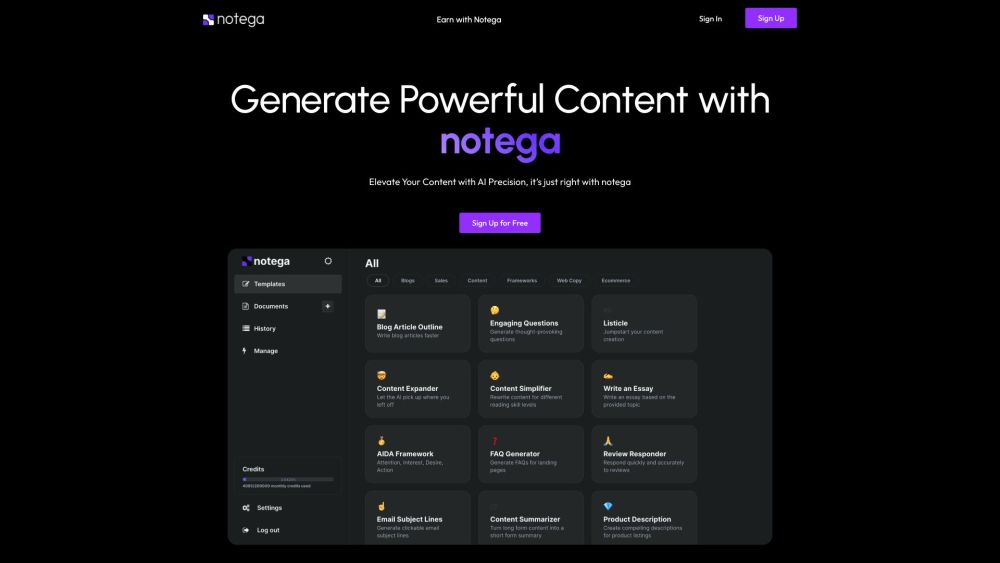
Notega website preview
html

Notega Website screenshot

What is Notega?

Notega is an AI-powered platform designed for entrepreneurs to streamline content creation and save time on daily tasks. By offering versatile templates and automating complex processes, Notega enhances digital engagement efficiently. This Sales & Marketing powerhouse leverages AI to simplify content creation, boost engagement, and save valuable time.

How to use Notega?

Start by signing up for free on the Notega website. After registration, users can generate impactful content with AI precision. Notega offers a wide range of tools and templates, including article ideas, cover letter formats, proposal writing support, video hooks, CSS building prompts, SEO optimization, cold email assistance, abstract writing, and script writing. Users can also store their creations in a personal repository for easy access.

Notega's Core Features

AI-generated prompts for overcoming writer's block

Continuous flow of innovative ideas

Assistance with proposals, videos, CSS, SEO, cold emails, abstracts, scripts, and cover letters

Interactive AI-generated articles

Built-in rewriter for natural context

Personal content repository

Notega's Use Cases

Overcoming writer's block

Generating fresh article ideas

Crafting compelling proposals

Creating engaging hooks for TikTok or short videos

Designing with CSS building prompts

Optimizing and rewriting SEO content

Enhancing email content for prospect outreach

Kickstarting academic writing with structured ideas

Producing professional scripts for content creators

Writing effective cover letters for job applications

Product source: Notega official website. Check the provider for current plans, limits and availability.

FAQ

Notega questions and answers

Product context and practical checks for evaluating Notega.

What is Notega used for?

Notega: AI-driven tool for entrepreneurs that simplifies content creation, boosts digital engagement, and saves time with versatile templates. Your Sales & Marketing power tool!

How do I get started with Notega?

Start by signing up for free on the Notega website. After registration, users can generate impactful content with AI precision. Notega offers a wide range of tools and templates, including article ideas, cover letter formats, proposal writing support, video hooks, CSS building prompts, SEO optimization, cold email assistance, abstract writing, and script writing. Users can also store their creations in a personal repository for easy access.

Which capabilities are described for Notega?

AI-generated prompts for overcoming writer's blockContinuous flow of innovative ideasAssistance with proposals, videos, CSS, SEO, cold emails, abstracts, scripts, and cover lettersInteractive AI-generated articlesBuilt-in rewriter for natural contextPersonal content repository

What projects can I evaluate Notega for?

Overcoming writer's blockGenerating fresh article ideasCrafting compelling proposalsCreating engaging hooks for TikTok or short videosDesigning with CSS building promptsOptimizing and rewriting SEO contentEnhancing email content for prospect outreachKickstarting academic writing with structured ideasProducing professional scripts for content creatorsWriting effective cover letters for job applications

What should I compare before choosing a Notega plan?

Check Notega’s current pricing page for included usage, renewal terms and any credit charges. Compare the cost of a usable result, including retries, rather than assuming that account registration includes free usage.

What inputs should I prepare for a Notega trial?

Compare support for source documents, style instructions, outlines and length limits. Check whether citations link to real material rather than merely looking like references.

How can I check the quality of a Notega result?

Verify names, dates, quotations and factual claims against the original sources. Edit tone, remove repetition and make sure the text answers the intended reader’s question.

Which export options should I check in Notega?

Check export to plain text, Markdown, documents or your publishing system. Formatting, headings and working links matter when moving a draft into production.

What is a practical way to test Notega against alternatives?

Use a real brief and a short source document. Compare factual accuracy, structure and editing time rather than accepting the longest or most confident draft.

Where is the official Notega website?

The website linked from this profile is https://www.notega.co. Use the provider’s own documentation, account area and support channels to confirm current product details.

Visit Notega