Summarizer

MeetGPT - Chrome Extension

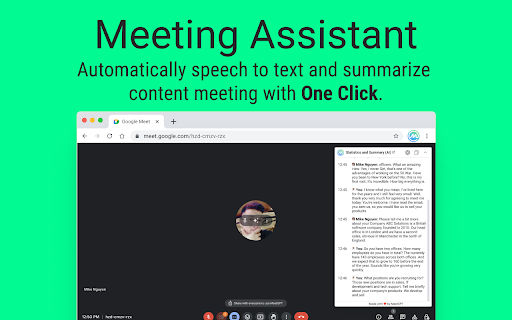
Boost productivity with MeetGPT - a free Chrome extension that effortlessly transcribes and summarizes your meetings. Get more done in less time!

MeetGPT - Chrome Extension website preview

MeetGPT - Chrome Extension Website screenshot

Introducing MeetGPT - Chrome Extension: Free Transcription & Summaries

Experience the power of MeetGPT, a cutting-edge Chrome extension designed to revolutionize your Google Meet sessions. MeetGPT is a free, time-saving tool that automatically transcribes and summarizes meeting content, boosting productivity and streamlining your workflow.

How does MeetGPT ai chrome extension work?

Utilizing the advanced capabilities of AI technology, MeetGPT provides a seamless transcription and summary generation process for your Google Meet meetings. Here's how to make the most of MeetGPT:

  1. Log in to https://chat.openai.com.
  2. Access https://meet.google.com and create a new meeting.
  3. During the initial setup, choose the language for the meeting.
  4. After the meeting concludes, effortlessly view the comprehensive meeting report and summary.
  5. With just a click, easily share the meeting report with your team.

Discover the Core Features of MeetGPT ai chrome extension

  • Automatic transcription on Google Meet
  • Statistical speaking time chart
  • Meeting history recording
  • Support for 18 languages
  • Content summarization using ChatGPT
  • Task list generation using ChatGPT
  • Meeting report sharing

Utilize MeetGPT ai chrome extension for Effortless Note-Taking

With MeetGPT, taking notes during your Google Meet sessions becomes effortless and efficient. Capture all the essential details without missing a beat. Focus on the conversation while MeetGPT handles the rest.

Product source: MeetGPT - Chrome Extension official website. Check the provider for current plans, limits and availability.

FAQ

MeetGPT - Chrome Extension questions and answers

Product context and practical checks for evaluating MeetGPT - Chrome Extension.

What is MeetGPT - Chrome Extension used for?

Boost productivity with MeetGPT - a free Chrome extension that effortlessly transcribes and summarizes your meetings. Get more done in less time!

How do I get started with MeetGPT - Chrome Extension?

Utilizing the advanced capabilities of AI technology, MeetGPT provides a seamless transcription and summary generation process for your Google Meet meetings. Here's how to make the most of MeetGPT: Log in to https://chat.openai.com. Access https://meet.google.com and create a new meeting. During the initial setup, choose the language for the meeting. After the meeting concludes, effortlessly view the comprehensive meeting report and summary. With just a click, easily share the meeting report with your team.

Which capabilities are described for MeetGPT - Chrome Extension?

Automatic transcription on Google Meet Statistical speaking time chart Meeting history recording Support for 18 languages Content summarization using ChatGPT Task list generation using ChatGPT Meeting report sharing

What should I compare before choosing a MeetGPT - Chrome Extension plan?

Check MeetGPT - Chrome Extension’s current pricing page for included usage, renewal terms and any credit charges. Compare the cost of a usable result, including retries, rather than assuming that account registration includes free usage.

What inputs should I prepare for a MeetGPT - Chrome Extension trial?

Compare support for source documents, style instructions, outlines and length limits. Check whether citations link to real material rather than merely looking like references.

How can I check the quality of a MeetGPT - Chrome Extension result?

Verify names, dates, quotations and factual claims against the original sources. Edit tone, remove repetition and make sure the text answers the intended reader’s question.

Which export options should I check in MeetGPT - Chrome Extension?

Check export to plain text, Markdown, documents or your publishing system. Formatting, headings and working links matter when moving a draft into production.

What is a practical way to test MeetGPT - Chrome Extension against alternatives?

Use a real brief and a short source document. Compare factual accuracy, structure and editing time rather than accepting the longest or most confident draft.

What should I review before uploading material to MeetGPT - Chrome Extension?

Read the provider’s rules on access, retention, deletion and use of uploaded material. Start with a non-confidential sample that you have permission to use.

Where is the official MeetGPT - Chrome Extension website?

The website linked from this profile is https://chromewebstore.google.com/detail/meetgpt-chatgpt-for-googl/fcleobipkomafbghinbalmdnokjnbbod. Use the provider’s own documentation, account area and support channels to confirm current product details.

Visit MeetGPT - Chrome Extension