AI Photo &amp Image Generator

**insMind AI Image Expander

Expand images in any direction with our insMind AI Image Expander. extend images and backgrounds while maintaining context, ensuring they fit any platform without stretching or losing quality.

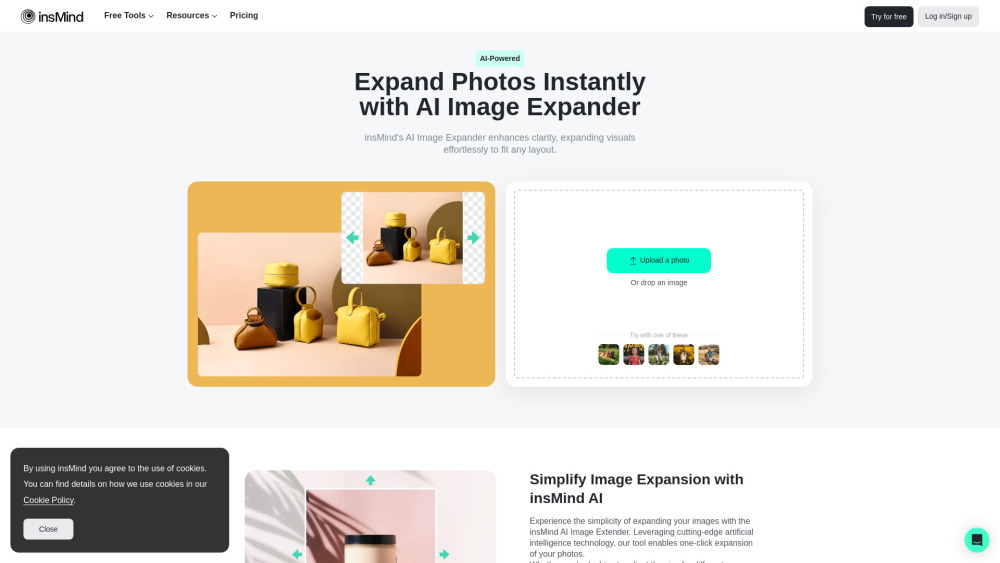
**insMind AI Image Expander website preview

insMind AI Image Expander Website screenshot

What is insMind AI Image Expander?

insMind AI Image Expander is a versatile, free-to-use online tool designed to expand and enhance images with ease. This tool allows users to adjust photos to any desired aspect ratio, ensuring that image quality and context remain intact. Whether you're resizing images for different formats or improving their visual appeal, insMind AI Image Expander offers a simple yet effective way to enhance your photos without compromising detail.

How to use insMind AI Image Expander?

Using insMind AI Image Expander is quick and straightforward. Just follow these three steps: upload your image, select the desired aspect ratio for expansion, and click "Start" to let the AI work its magic, producing a beautifully expanded image tailored to your needs.

Core Features of insMind AI Image Expander

Expand images to fit perfectly across various platforms

Enhance image quality using advanced AI technology

Ideal for landscape, portrait, and product photos

Achieve optimal quality when expanding images

Use Cases of insMind AI Image Expander

E-commerce Industry: Enhance product images for multiple platforms with insMind AI Image Expander, ensuring crisp and high-quality visuals that attract customers and boost sales.

Digital Marketing: Marketers can utilize this tool to resize images for diverse marketing campaigns, including social media, email newsletters, and advertisements, maintaining consistency and clarity.

Graphic Design: Designers can easily adjust image sizes to fit specific project dimensions, allowing for seamless background extensions and high-quality visuals without distortion.

Product source: **insMind AI Image Expander official website. Check the provider for current plans, limits and availability.

FAQ

**insMind AI Image Expander questions and answers

Product context and practical checks for evaluating **insMind AI Image Expander.

What is **insMind AI Image Expander used for?

Expand images in any direction with our insMind AI Image Expander. extend images and backgrounds while maintaining context, ensuring they fit any platform without stretching or losing quality.

How do I get started with **insMind AI Image Expander?

Using insMind AI Image Expander is quick and straightforward. Just follow these three steps: upload your image, select the desired aspect ratio for expansion, and click "Start" to let the AI work its magic, producing a beautifully expanded image tailored to your needs.

Which capabilities are described for **insMind AI Image Expander?

Expand images to fit perfectly across various platformsEnhance image quality using advanced AI technologyIdeal for landscape, portrait, and product photosAchieve optimal quality when expanding images

What projects can I evaluate **insMind AI Image Expander for?

E-commerce Industry: Enhance product images for multiple platforms with insMind AI Image Expander, ensuring crisp and high-quality visuals that attract customers and boost sales.Digital Marketing: Marketers can utilize this tool to resize images for diverse marketing campaigns, including social media, email newsletters, and advertisements, maintaining consistency and clarity.Graphic Design: Designers can easily adjust image sizes to fit specific project dimensions, allowing for seamless background extensions and high-quality visuals without distortion. insMind AI Image Expander Discord Join the insMind AI Image Expander community on Discord: https://discord.com/invite/jUNj5J3Ugg. For additional messages, click here(/discord/junj5j3ugg-2). Customer Support and Contact Information For support and inquiries, contact insMind AI Image Expander at: [email protected]. About insMind AI Image Expander Learn more about the company behind insMind AI Image Expander by visiting the About Us page. insMind AI Image Expander Pricing For details on pricing, visit: https://www.insmind.com/pricing/. insMind AI Image Expander on Social Media Stay connected with insMind AI Image Expander on various platforms: Facebook: https://www.facebook.com/insmindAI/ YouTube: https://www.youtube.com/@insMindAI/ TikTok: https://www.tiktok.com/@insmind.ai Twitter: https://twitter.com/insmind_com Pinterest: https://www.pinterest.com/insmind/

What should I compare before choosing a **insMind AI Image Expander plan?

For details on pricing, visit: https://www.insmind.com/pricing/. Confirm current prices and allowances on the provider’s website before purchasing.

What inputs should I prepare for a **insMind AI Image Expander trial?

Look for text prompts, image references, masks or sketches as appropriate. Compare composition control, supported upload types and the ability to revise a selected area.

How can I check the quality of a **insMind AI Image Expander result?

Inspect text, hands, edges, reflections and repeated objects at full size. Check that important product or brand details survive editing.

Which export options should I check in **insMind AI Image Expander?

Compare pixel dimensions, transparency, file formats and any enlargement options. Confirm that the downloaded result works in your design or publishing software.

What is a practical way to test **insMind AI Image Expander against alternatives?

Prepare a brief with a subject, composition, lighting and required output size. Test a first generation and a targeted revision to see how much control you retain.

Where is the official **insMind AI Image Expander website?

The website linked from this profile is https://www.insmind.com/ai-image-expander. Use the provider’s own documentation, account area and support channels to confirm current product details.

Visit **insMind AI Image Expander