Text&ampWriting

ImagePromptGuru.net

ImagePromptGuru.net: Free AI prompt generator—turn images or text into stunning, model-ready prompts for Midjourney, DALL-E, Stable Diffusion & Flux. Unlimited. Zero cost.

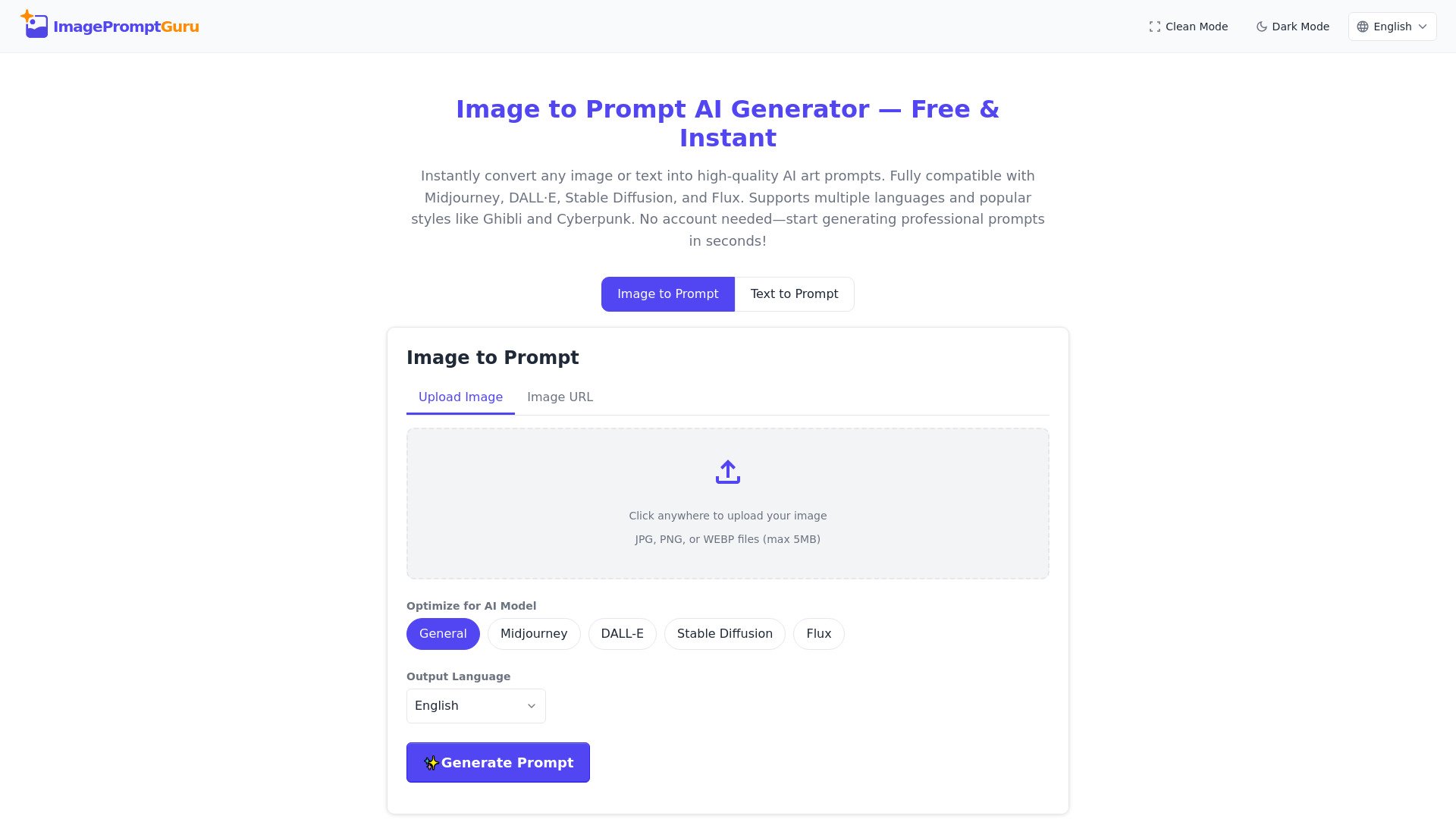
ImagePromptGuru.net website preview

What is ImagePromptGuru.net?

ImagePromptGuru.net is a next-generation, browser-based AI prompt engine designed to bridge the gap between creative intent and AI art execution. Unlike generic prompt helpers, it functions as an intelligent co-pilot—transforming raw images or simple text descriptions into rich, production-ready prompts tailored for Midjourney, DALL-E, Stable Diffusion, and Flux. Built from the ground up for accessibility and precision, it requires zero signups, imposes no usage quotas, and delivers studio-grade prompt engineering instantly—free of charge and fully functional in any modern web browser.

How to Use ImagePromptGuru.net

Getting started with ImagePromptGuru.net takes seconds. Choose your input method: upload a JPG, PNG, or WEBP file (under 5MB), or paste a publicly accessible image URL. Then select your target platform—General, Midjourney, DALL-E, Stable Diffusion, or Flux—and pick your preferred output language. Within moments, the system interprets lighting dynamics, spatial composition, texture fidelity, stylistic cues, and even subtle mood indicators to craft a nuanced, ready-to-use prompt.

For conceptual ideation, use the text-to-prompt mode: enter a brief idea—like “a lone astronaut tending solar panels on Mars at sunset”—and apply a style preset such as *Studio Ghibli*, *Cyberpunk Noir*, *Photorealistic Cinematic*, or *Anime Line Art*. The AI enriches your description with platform-specific syntax, artistic modifiers, quality boosters, and contextual depth—turning vague notions into reproducible, high-fidelity AI art instructions.

Key Features of ImagePromptGuru.net

  • Smart Visual Deconstruction: Leveraging state-of-the-art vision-language models, ImagePromptGuru.net dissects uploaded images with surgical accuracy—identifying dominant hues, brushstroke patterns, perspective rules, ambient light sources, and genre signatures to produce prompts that mirror visual nuance down to the pixel level.
  • Cross-Platform Prompt Intelligence: Each AI art model speaks its own dialect. ImagePromptGuru.net doesn’t just translate—it *localizes*: adjusting parameter placement, weight notation (e.g., :: for Midjourney vs. ( ) for Stable Diffusion), aspect ratio hints, and negative prompt framing to match each platform’s native grammar and best practices.
  • Truly Unlimited & Zero-Cost Access: No freemium tiers. No watermarked outputs. No forced logins. Every feature—including batch-style enhancements, multilingual exports, and style-layered prompting—is available free, forever, for creators at every stage—from students to agencies.
  • Global Language Readiness: Generate prompts in English, Spanish, French, German, Japanese, Korean, Portuguese, and more. Language selection applies not only to output text but also to semantic interpretation—ensuring culturally grounded style terms and idiomatic artistic references are preserved.
  • Preset-Driven Creative Amplification: Go beyond keywords. Apply intelligent style filters that inject genre-specific vocabulary: *Ghibli* adds soft diffusion, hand-drawn warmth, and nature-infused whimsy; *Cyberpunk* layers neon gradients, dystopian textures, and retro-futuristic tech jargon; *Photorealistic* prioritizes lens physics, material realism, and environmental storytelling.

These capabilities converge to cut prompt iteration cycles by up to 80%, reduce platform-specific learning overhead, and empower users to focus on vision—not syntax.

Why Choose ImagePromptGuru.net?

In a landscape crowded with one-size-fits-all prompt tools, ImagePromptGuru.net stands apart through intentionality: it’s engineered not just to generate words, but to *interpret intent*. Its dual-input architecture—supporting both visual reference and textual abstraction—makes it uniquely adaptable: sketch artists convert doodles into production briefs; marketers align AI visuals with brand voice; educators demonstrate prompt logic in real time. Backed by lightweight, privacy-first infrastructure, it runs entirely client-side where possible and never retains user data post-processing.

There’s no software to install, no API keys to manage, and no compatibility concerns—just a responsive interface that works flawlessly on desktop, tablet, or touchscreen. Whether you're iterating on a logo concept, building a game asset pipeline, or generating social media visuals at scale, ImagePromptGuru.net adapts to your workflow—not the other way around.

Use Cases and Applications

Fashion designers feed fabric swatches and mood boards into ImagePromptGuru.net to generate consistent textile renderings across AI platforms. Architects import floor plans and elevation sketches to produce photorealistic interior visualizations with precise lighting and material tags. Educators use the tool to teach AI literacy—comparing how the same sketch yields divergent yet coherent outputs when optimized for Stable Diffusion versus DALL-E. As featured on top-tier curation sites like aitop-tools.com, ImagePromptGuru.net supports use cases spanning editorial illustration, NFT concept development, advertising campaign ideation, and indie game prototyping—where prompt fidelity directly determines creative ROI and stakeholder alignment.

Product source: ImagePromptGuru.net official website. Check the provider for current plans, limits and availability.

FAQ

ImagePromptGuru.net questions and answers

Product context and practical checks for evaluating ImagePromptGuru.net.

What is ImagePromptGuru.net used for?

ImagePromptGuru.net: Free AI prompt generator—turn images or text into stunning, model-ready prompts for Midjourney, DALL-E, Stable Diffusion & Flux. Unlimited. Zero cost.

How do I get started with ImagePromptGuru.net?

Getting started with ImagePromptGuru.net takes seconds. Choose your input method: upload a JPG, PNG, or WEBP file (under 5MB), or paste a publicly accessible image URL. Then select your target platform—General, Midjourney, DALL-E, Stable Diffusion, or Flux—and pick your preferred output language. Within moments, the system interprets lighting dynamics, spatial composition, texture fidelity, stylistic cues, and even subtle mood indicators to craft a nuanced, ready-to-use prompt.For conceptual ideation, use the text-to-prompt mode: enter a brief idea—like “a lone astronaut tending solar panels on Mars at sunset”—and apply a style preset such as *Studio Ghibli*, *Cyberpunk Noir*, *Photorealistic Cinematic*, or *Anime Line Art*. The AI enriches your description with platform-specific syntax, artistic modifiers, quality boosters, and contextual depth—turning vague notions into reproducible, high-fidelity AI art instructions.

Which capabilities are described for ImagePromptGuru.net?

Smart Visual Deconstruction: Leveraging state-of-the-art vision-language models, ImagePromptGuru.net dissects uploaded images with surgical accuracy—identifying dominant hues, brushstroke patterns, perspective rules, ambient light sources, and genre signatures to produce prompts that mirror visual nuance down to the pixel level. Cross-Platform Prompt Intelligence: Each AI art model speaks its own dialect. ImagePromptGuru.net doesn’t just translate—it *localizes*: adjusting parameter placement, weight notation (e.g., :: for Midjourney vs. ( ) for Stable Diffusion), aspect ratio hints, and negative prompt framing to match each platform’s native grammar and best practices. Truly Unlimited & Zero-Cost Access: No freemium tiers. No watermarked outputs. No forced logins. Every feature—including batch-style enhancements, multilingual exports, and style-layered prompting—is available free, forever, for creators at every stage—from students to agencies. Global Language Readiness: Generate prompts in English, Spanish, French, German, Japanese, Korean, Portuguese, and more. Language selection applies not only to output text but also to semantic interpretation—ensuring culturally grounded style terms and idiomatic artistic references are preserved. Preset-Driven Creative Amplification: Go beyond keywords. Apply intelligent style filters that inject genre-specific vocabulary: *Ghibli* adds soft diffusion, hand-drawn warmth, and nature-infused whimsy; *Cyberpunk* layers neon gradients, dystopian textures, and retro-futuristic tech jargon; *Photorealistic* prioritizes lens physics, material realism, and environmental storytelling. These capabilities converge to cut prompt iteration cycles by up to 80%, reduce platform-specific learning overhead, and empower users to focus on vision—not syntax.

What projects can I evaluate ImagePromptGuru.net for?

Fashion designers feed fabric swatches and mood boards into ImagePromptGuru.net to generate consistent textile renderings across AI platforms. Architects import floor plans and elevation sketches to produce photorealistic interior visualizations with precise lighting and material tags. Educators use the tool to teach AI literacy—comparing how the same sketch yields divergent yet coherent outputs when optimized for Stable Diffusion versus DALL-E. As featured on top-tier curation sites like aitop-tools.com, ImagePromptGuru.net supports use cases spanning editorial illustration, NFT concept development, advertising campaign ideation, and indie game prototyping—where prompt fidelity directly determines creative ROI and stakeholder alignment.

How does ImagePromptGuru.net handle smart visual deconstruction?

Smart Visual Deconstruction: Leveraging state-of-the-art vision-language models, ImagePromptGuru.net dissects uploaded images with surgical accuracy—identifying dominant hues, brushstroke patterns, perspective rules, ambient light sources, and genre signatures to produce prompts that mirror visual nuance down to the pixel level.

How does ImagePromptGuru.net handle cross-platform prompt intelligence?

Cross-Platform Prompt Intelligence: Each AI art model speaks its own dialect. ImagePromptGuru.net doesn’t just translate—it *localizes*: adjusting parameter placement, weight notation (e.g., :: for Midjourney vs. ( ) for Stable Diffusion), aspect ratio hints, and negative prompt framing to match each platform’s native grammar and best practices.

What should I compare before choosing a ImagePromptGuru.net plan?

Check ImagePromptGuru.net’s current pricing page for included usage, renewal terms and any credit charges. Compare the cost of a usable result, including retries, rather than assuming that account registration includes free usage.

What inputs should I prepare for a ImagePromptGuru.net trial?

Look for text prompts, image references, masks or sketches as appropriate. Compare composition control, supported upload types and the ability to revise a selected area.

How can I check the quality of a ImagePromptGuru.net result?

Inspect text, hands, edges, reflections and repeated objects at full size. Check that important product or brand details survive editing.

Where is the official ImagePromptGuru.net website?

The website linked from this profile is https://imagepromptguru.net. Use the provider’s own documentation, account area and support channels to confirm current product details.

Visit ImagePromptGuru.net