AI Image Enhancer

Glasses Gone

Glasses Gone is an AI-powered photo retouching service that specializes in removing eyeglasses or spectacles from portrait photos. It offers a quick and easy solution to eliminate glasses and enhance the appearance of subjects.

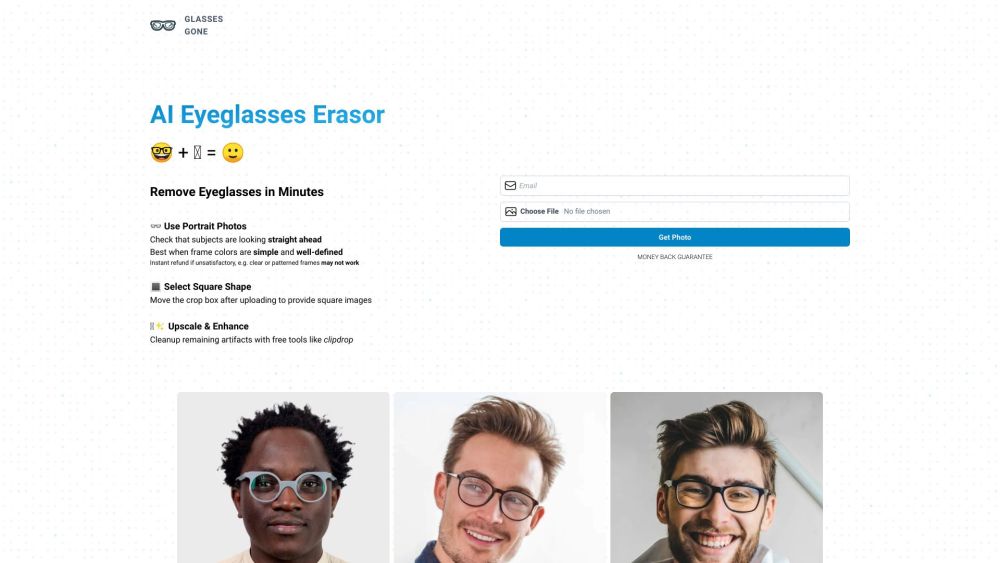
Glasses Gone website preview

Glasses Gone Website screenshot

What is Glasses Gone?

Glasses Gone is an innovative AI-driven photo editing service that specializes in removing eyeglasses from portrait photos. It provides a fast and simple solution to enhance photos by eliminating glasses, ensuring a polished and refined look for the subjects.

How to Use Glasses Gone?

1. Upload Your Photo: Choose a portrait photo featuring subjects wearing eyeglasses.
2. Adjust to Square Shape: Use the crop tool after uploading to create square images.
3. AI Processing: The AI will remove the eyeglasses, ensuring the subjects face forward.
4. Enhance the Image: Post-removal, upscale the image and clear any artifacts using tools like Clipdrop.
5. Download Your Photo: After finalizing the edits, provide your email to receive the retouched photo.
6. Satisfaction Guaranteed: If you're not happy with the results, request an immediate refund.

Key Features of Glasses Gone

AI-Powered Eyeglass Removal

Professional Portrait Retouching

Ideal for Various Photo Types (Wedding, Party, Children, Graduation, Passport, Studio)

Instant Refund Policy

Square Image Selection

Image Upscaling and Enhancement

Artifact Cleanup

Money-Back Guarantee

Use Cases for Glasses Gone

Wedding Photo Retouching

Removing Glasses from Event Photos

Enhancing Children's Portraits

Improving Graduation Photos

Preparing Passport Photos

Studio Photo Enhancements

Product source: Glasses Gone official website. Check the provider for current plans, limits and availability.

FAQ

Glasses Gone questions and answers

Product context and practical checks for evaluating Glasses Gone.

What is Glasses Gone used for?

Glasses Gone is an AI-powered photo retouching service that specializes in removing eyeglasses or spectacles from portrait photos. It offers a quick and easy solution to eliminate glasses and enhance the appearance of subjects.

How do I get started with Glasses Gone?

1. Upload Your Photo: Choose a portrait photo featuring subjects wearing eyeglasses. 2. Adjust to Square Shape: Use the crop tool after uploading to create square images. 3. AI Processing: The AI will remove the eyeglasses, ensuring the subjects face forward. 4. Enhance the Image: Post-removal, upscale the image and clear any artifacts using tools like Clipdrop. 5. Download Your Photo: After finalizing the edits, provide your email to receive the retouched photo. 6. Satisfaction Guaranteed: If you're not happy with the results, request an immediate refund.

Which capabilities are described for Glasses Gone?

AI-Powered Eyeglass RemovalProfessional Portrait RetouchingIdeal for Various Photo Types (Wedding, Party, Children, Graduation, Passport, Studio)Instant Refund PolicySquare Image SelectionImage Upscaling and EnhancementArtifact CleanupMoney-Back Guarantee

What projects can I evaluate Glasses Gone for?

Wedding Photo RetouchingRemoving Glasses from Event PhotosEnhancing Children's PortraitsImproving Graduation PhotosPreparing Passport PhotosStudio Photo Enhancements Glasses Gone Pricing For detailed pricing information, visit: https://www.glassesgone.com/account

What should I compare before choosing a Glasses Gone plan?

For detailed pricing information, visit: https://www.glassesgone.com/account Confirm current prices and allowances on the provider’s website before purchasing.

What inputs should I prepare for a Glasses Gone trial?

Look for text prompts, image references, masks or sketches as appropriate. Compare composition control, supported upload types and the ability to revise a selected area.

How can I check the quality of a Glasses Gone result?

Inspect text, hands, edges, reflections and repeated objects at full size. Check that important product or brand details survive editing.

Which export options should I check in Glasses Gone?

Compare pixel dimensions, transparency, file formats and any enlargement options. Confirm that the downloaded result works in your design or publishing software.

What is a practical way to test Glasses Gone against alternatives?

Prepare a brief with a subject, composition, lighting and required output size. Test a first generation and a targeted revision to see how much control you retain.

Where is the official Glasses Gone website?

The website linked from this profile is https://www.glassesgone.com. Use the provider’s own documentation, account area and support channels to confirm current product details.

Visit Glasses Gone