Table of contents
DocsOrb : AI Document Management for Families, Students & Expats
DocsOrb: AI-powered document management for families, students & expats—automatically organize, find, and secure life’s essential papers.
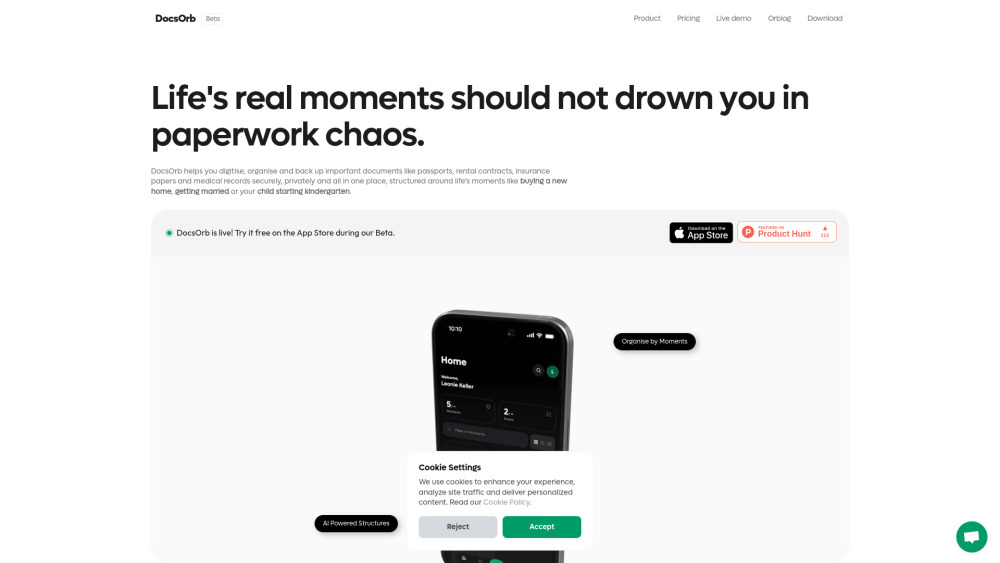
DocsOrb: Your AI-Powered Life Organizer
DocsOrb reimagines document management—not as a static archive, but as a living, intelligent companion for life’s pivotal transitions. Built specifically for families juggling school enrollments and medical forms, students navigating visas and loan agreements, and expats managing residency renewals and cross-border paperwork, DocsOrb transforms chaotic stacks of paper into structured, searchable, and secure digital vaults. Using context-aware AI, it anticipates what documents you’ll need *before* the deadline—whether it’s a child’s vaccination record for kindergarten registration, a notarized lease for visa submission, or proof of address for banking. Every file is encrypted, private by design, and stored exclusively on your device—or synced only to your personal cloud account—ensuring full control over sensitive identity documents, financial records, and family health histories.
Getting Started in Three Intuitive Steps
First, choose or create a ‘Life Moment’—a smart container tailored to real-world events (e.g., “Moving Abroad,” “Graduation & Job Hunt,” or “Welcoming a New Baby”). DocsOrb’s AI suggests relevant document types and deadlines based on your location, age group, and role. Second, capture documents effortlessly: use your phone camera with intelligent edge detection, auto-enhancement, and OCR-ready clarity—or import PDFs and images directly from Files, Photos, or email attachments. Third, refine your collection: let AI analyze your scans to auto-tag, categorize, and surface missing items—like reminding you that a certified translation is required alongside your foreign diploma.
What Makes DocsOrb Different
Contextual AI Checklists
Moment-Based Search (find “my son’s immunization docs for Berlin school enrollment” in one tap)
One-Tap Secure Sharing (with expiration, password, and view limits)
Professional-Grade Scanning (shadow removal, glare reduction, multi-page PDF stitching)
Zero-Knowledge Privacy Architecture (no server-side storage; no third-party access)
‘Life Moment’ Framework (documents organized by event—not folder names or dates)
AI-Generated Document Blueprints (custom templates built from your real-world needs)
Shared Family Workspace (role-based access for parents, guardians, or adult dependents — Premium)
Export-as-Required Formats (officially compliant PDF/A, ZIP bundles, or printable checklists — Premium)
Real People, Real Pain Points—Solved
A bilingual parent repeatedly re-scanning expired residence permits because they couldn’t locate the original digital copy.
An international student missing scholarship application deadlines due to scattered bank statements, transcripts, and language certificates across five apps.
A remote-working couple struggling to jointly manage mortgage documents, utility bills, and insurance policies without version confusion or accidental deletion.
An elderly parent relying on adult children to retrieve decades-old birth certificates or pension letters—only to discover files were misnamed or lost in generic folders.
A freelancer losing tax deductions because receipts for co-working space rentals weren’t categorized or backed up before their laptop failed.
Digitizing high-stakes documents—passports, marriage certificates, power-of-attorney forms—with military-grade encryption and offline accessibility.
Mapping documentation needs to life milestones: starting university, applying for citizenship, adopting a pet, or planning end-of-life directives.
Your Questions—Answered Clearly
-
What problem does DocsOrb solve—and who needs it most?
-
How does DocsOrb protect my most sensitive documents?
-
Why isn’t a general-purpose cloud drive enough?
-
Can I trust DocsOrb with my passport, ID card, or bank details?
-
Where does AI processing happen—and what data leaves my device?
-
Can I assign documents to specific people—like my spouse, teen, or aging parent?
-
How do sharing and collaboration work across devices and users?
-
When will new features like multi-language support or official eID integration launch?
-
Support & Contact
For assistance, refunds, or technical queries, visit the official support portal: https://docsorb.com/?utm_source=toolify#arcade
-
About DocsOrb
DocsOrb UG (haftungsbeschränkt) is a German-based privacy-first tech company founded on the belief that personal documentation should be empowering—not burdensome. Born from real family challenges—like reconstructing lost immigration paperwork during a move abroad—the platform merges human-centered design with responsible AI.
Learn our story: From Chaos to Clarity: How a Shared Album Inspired DocsOrb
DocsOrb FAQ Highlights
What is DocsOrb?
DocsOrb is an AI-augmented document organizer built for life’s transitions—not just storage. It helps families, students, and expats proactively collect, verify, and safeguard critical documents through intelligent, moment-driven workflows—all while keeping data under your sole control.
How do I begin using DocsOrb?
Start by selecting a Life Moment (e.g., “Starting University Abroad”) → scan or import documents with precision-enhancing tools → let DocsOrb’s AI suggest gaps, generate labels, and build shareable checklists. No setup, no subscriptions required to get started.
What problem does DocsOrb solve—and who needs it most?
It solves *document latency*: the costly delay between needing a document and finding it. Families preparing for school enrollment, students submitting visa applications, and expats renewing residency permits all face time-sensitive, high-stakes documentation tasks—where DocsOrb acts as both memory and compliance assistant.
How does DocsOrb protect my most sensitive documents?
By design: DocsOrb never uploads your raw documents to any server. All processing—including AI analysis—is performed locally on-device or within your encrypted cloud environment. Your passport scan stays on your phone unless you explicitly choose to sync it to your own iCloud or Dropbox.
Why isn’t a general-purpose cloud drive enough?
Because Google Drive stores files. DocsOrb understands *intent*. It knows that “rental agreement” means different things when applying for a visa vs. filing taxes—and surfaces the right version, with the right metadata, at the right moment—without manual tagging or folder digging.
Can I trust DocsOrb with my passport, ID card, or bank details?
Absolutely—if you trust your own device. DocsOrb operates on a zero-data-retention model: no screenshots, no telemetry, no cloud backups unless you initiate them. Your biometric data, passwords, and document contents remain invisible to DocsOrb’s infrastructure.
Where does AI processing happen—and what data leaves my device?
AI structure generation, checklist suggestions, and smart tagging run entirely on-device for Free users. Premium subscribers may opt into limited, anonymized cloud-based AI enhancements—but only after explicit consent and with strict data minimization (e.g., sending only document type + country + event context—not image data).
Can I assign documents to specific people—like my spouse, teen, or aging parent?
Yes—through Family Workspace (Premium). You can designate document ownership, set visibility rules (“visible only to Mom & Pediatrician”), and receive automated alerts when documents expire or require renewal—tailored per person and role.
How do sharing and collaboration work across devices and users?
Share securely via time-limited, password-protected links—or invite trusted contacts into your Family Workspace for real-time co-management. All shared exports are audit-trail enabled, with optional watermarking and download restrictions.
When will new features like multi-language support or official eID integration launch?
Our public roadmap—updated quarterly—is available at docsorb.com/roadmap. Upcoming includes EU eIDAS-compliant verification, Arabic & Spanish UI/localization, and offline-first sync for low-connectivity regions.