AI Productivity Tools

Core

Core is an efficient AI-powered communication platform for small teams with streamlined features.

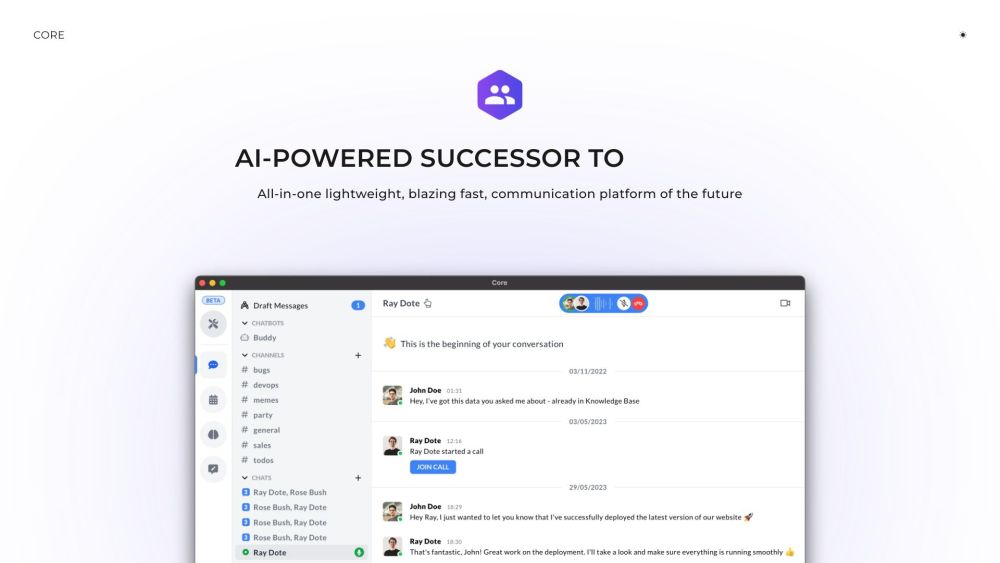
Core website preview

Core Website screenshot

Understanding Core

Core is an innovative AI-driven communication platform designed to revolutionize the way teams collaborate, providing a modern alternative to established tools like Slack, Microsoft Teams, and Zoom. Its intuitive interface and powerful features are tailored for small teams aiming to enhance their productivity. Core offers an integrated solution for improved visibility, seamless communication, and effective collaboration, all within a lightweight framework. Key features include video calls, app integrations, multiple group chats, calendar syncing, a knowledge base, and more, all in a user-friendly, high-performance package.

Getting Started with Core

To begin using Core, sign up for an account on their website. After logging in, you can create or join teams and invite colleagues to collaborate. Use the chat to connect with team members individually or in groups, organize discussions into channels, and take advantage of the AI-powered Buddy Bot for assistance. The platform also allows for easy meeting scheduling through its calendar integration, access to key company information via an intelligent chatbot, and streamlined team collaboration with all your documents and surveys centralized.

Core's Standout Features

AI-enhanced communication

User-friendly interface for optimal productivity

Enhanced work visibility and management

Effortless team communication and collaboration

Integrated video conferencing

Supports external app integrations

Facilitates multiple group interactions

Embedded calendar for scheduling

Comprehensive knowledge base

Feedback engine for team insights

Lightweight and fast, approximately 5Mb in size

AI assistant (Buddy Bot) for guidance, summaries, feedback, and scheduling

24/7 access to essential company data

Enterprise-level security and privacy

All team documentation, surveys, and security features in one hub

Ideal Use Cases for Core

Small teams focusing on productivity with streamlined tools

Large organizations needing scalable communication solutions

Teams that require enhanced visibility and control over tasks

Companies prioritizing strong data privacy and security

Users seeking an AI assistant for efficient task management

Product source: Core official website. Check the provider for current plans, limits and availability.

FAQ

Core questions and answers

Product context and practical checks for evaluating Core.

What is Core used for?

Core is an efficient AI-powered communication platform for small teams with streamlined features.

How do I get started with Core?

To begin using Core, sign up for an account on their website. After logging in, you can create or join teams and invite colleagues to collaborate. Use the chat to connect with team members individually or in groups, organize discussions into channels, and take advantage of the AI-powered Buddy Bot for assistance. The platform also allows for easy meeting scheduling through its calendar integration, access to key company information via an intelligent chatbot, and streamlined team collaboration with all your documents and surveys centralized.

Which capabilities are described for Core?

AI-enhanced communicationUser-friendly interface for optimal productivityEnhanced work visibility and managementEffortless team communication and collaborationIntegrated video conferencingSupports external app integrationsFacilitates multiple group interactionsEmbedded calendar for schedulingComprehensive knowledge baseFeedback engine for team insightsLightweight and fast, approximately 5Mb in sizeAI assistant (Buddy Bot) for guidance, summaries, feedback, and scheduling24/7 access to essential company dataEnterprise-level security and privacyAll team documentation, surveys, and security features in one hub

What projects can I evaluate Core for?

Small teams focusing on productivity with streamlined toolsLarge organizations needing scalable communication solutionsTeams that require enhanced visibility and control over tasksCompanies prioritizing strong data privacy and securityUsers seeking an AI assistant for efficient task management Core Support Email & Customer Service For customer support, contact Core via email at: [email protected]. For additional contact options, please visit the contact us page(mailto:[email protected]). Core Company Information The company behind Core is Core Labs. Core Login To access Core, log in here: https://web.getcore.app. Follow Core on Twitter Stay updated by following Core on Twitter: https://twitter.com/simon_makes.

What should I compare before choosing a Core plan?

Check Core’s current pricing page for included usage, renewal terms and any credit charges. Compare the cost of a usable result, including retries, rather than assuming that account registration includes free usage.

What inputs should I prepare for a Core trial?

Identify the files, text or account connections your task needs. Confirm that the product accepts those inputs and offers controls for reviewing its work.

How can I check the quality of a Core result?

Test one representative task and inspect the result for accuracy and completeness. Record where manual corrections or extra tools are needed.

Which export options should I check in Core?

Check export formats, integrations and whether you can keep using your work outside the service. Test a real export before committing to a longer plan.

What is a practical way to test Core against alternatives?

Choose one task with a clear success condition. Keep the input consistent, record the time spent reviewing and compare the complete workflow cost.

Where is the official Core website?

The website linked from this profile is https://getcore.app. Use the provider’s own documentation, account area and support channels to confirm current product details.

Visit Core