Writing Assistants

ContentTool - Chrome Extension

ContentTool Chrome Extension: Instantly boost article comprehension and readability with AI-powered insights, helping you write and edit content more effectively!

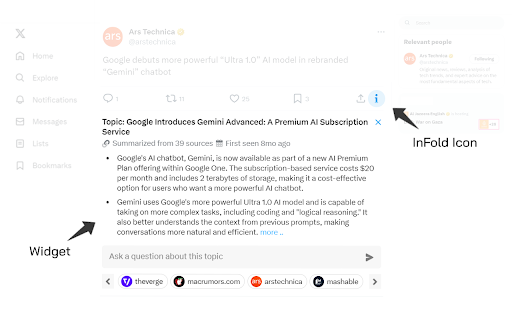
ContentTool - Chrome Extension website preview

ContentTool - Chrome Extension Website screenshot

What is ContentTool - Chrome Extension?

Enhance your article reading experience by accessing relevant information and contextual insights directly within your browser.

How to Use ContentTool - Chrome Extension?

Simply paste the article’s URL into the extension to instantly retrieve enhanced context and related content.

Key Features of ContentTool - Chrome Extension

Comprehensive topic outlines with related articles

AI-powered chatbot for tailored assistance on each topic

Chronological timeline of relevant sources

Contextual keyword integration with knowledge bases

Use Cases for ContentTool - Chrome Extension

Deepen comprehension of intricate subjects

Validate the accuracy of information presented

Generate new perspectives and insights for research

Product source: ContentTool - Chrome Extension official website. Check the provider for current plans, limits and availability.

FAQ

ContentTool - Chrome Extension questions and answers

Product context and practical checks for evaluating ContentTool - Chrome Extension.

What is ContentTool - Chrome Extension used for?

ContentTool Chrome Extension: Instantly boost article comprehension and readability with AI-powered insights, helping you write and edit content more effectively!

How do I get started with ContentTool - Chrome Extension?

Simply paste the article’s URL into the extension to instantly retrieve enhanced context and related content.

Which capabilities are described for ContentTool - Chrome Extension?

Comprehensive topic outlines with related articlesAI-powered chatbot for tailored assistance on each topicChronological timeline of relevant sourcesContextual keyword integration with knowledge bases

What projects can I evaluate ContentTool - Chrome Extension for?

Deepen comprehension of intricate subjectsValidate the accuracy of information presentedGenerate new perspectives and insights for research

What should I compare before choosing a ContentTool - Chrome Extension plan?

Check ContentTool - Chrome Extension’s current pricing page for included usage, renewal terms and any credit charges. Compare the cost of a usable result, including retries, rather than assuming that account registration includes free usage.

What inputs should I prepare for a ContentTool - Chrome Extension trial?

Look for text prompts, image references, masks or sketches as appropriate. Compare composition control, supported upload types and the ability to revise a selected area.

How can I check the quality of a ContentTool - Chrome Extension result?

Inspect text, hands, edges, reflections and repeated objects at full size. Check that important product or brand details survive editing.

Which export options should I check in ContentTool - Chrome Extension?

Compare pixel dimensions, transparency, file formats and any enlargement options. Confirm that the downloaded result works in your design or publishing software.

What is a practical way to test ContentTool - Chrome Extension against alternatives?

Prepare a brief with a subject, composition, lighting and required output size. Test a first generation and a targeted revision to see how much control you retain.

Where is the official ContentTool - Chrome Extension website?

The website linked from this profile is https://chromewebstore.google.com/detail/infold/dfmmanoiegndhgdjendeidcakajifnlb. Use the provider’s own documentation, account area and support channels to confirm current product details.

Visit ContentTool - Chrome Extension