Writing Assistants

ChatGPT Voice Master

ChatGPT Voice Master - Chrome Extension: Experience communication with a neural network voice assistant. Easy, fast, and intuitive chatting on Chrome!

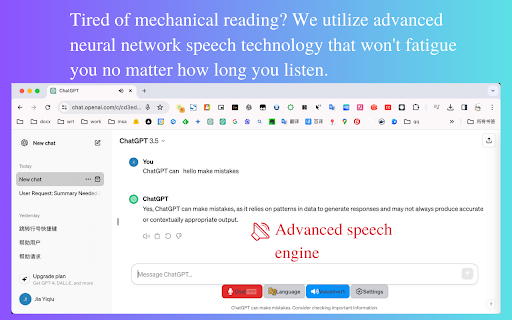
ChatGPT Voice Master website preview

ChatGPT Voice Master - Chrome Extension Website screenshot

What is ChatGPT Voice Master AI Chrome Extension?

Revolutionizing Communication with Neural Network-Powered Voice Interaction

How to Use ChatGPT Voice Master AI Chrome Extension?

Easily install the ChatGPT Voice Master extension from the Chrome Web Store, activate it, and seamlessly interact with your AI chatbot via voice commands for enhanced, real-time communication.

Core Features of ChatGPT Voice Master AI Chrome Extension

Smooth Conversation Flow

Advanced Error Handling

Instant Activation

Sidebar Accessibility

Data Security

Segmented Voice Input

AI-Assisted Reading

Support for Multiple Languages

Automated Language Translation

Shortcut Keys for English

Floating Window Interface

Chat Session Export

Fast Search Functionality

Content Screening

Sentence Count Reset

Query History Lookup

Speed and Volume Adjustments

Keyboard Shortcuts

Full Compatibility with ChatGPT Plus

Use Cases for ChatGPT Voice Master AI Chrome Extension

Improved Interaction with AI Assistants

Precise Voice Command Recognition for Productivity

Product source: ChatGPT Voice Master official website. Check the provider for current plans, limits and availability.

FAQ

ChatGPT Voice Master questions and answers

Product context and practical checks for evaluating ChatGPT Voice Master.

What is ChatGPT Voice Master used for?

ChatGPT Voice Master - Chrome Extension: Experience communication with a neural network voice assistant. Easy, fast, and intuitive chatting on Chrome!

How do I get started with ChatGPT Voice Master?

Easily install the ChatGPT Voice Master extension from the Chrome Web Store, activate it, and seamlessly interact with your AI chatbot via voice commands for enhanced, real-time communication.

Which capabilities are described for ChatGPT Voice Master?

Smooth Conversation FlowAdvanced Error HandlingInstant ActivationSidebar AccessibilityData SecuritySegmented Voice InputAI-Assisted ReadingSupport for Multiple LanguagesAutomated Language TranslationShortcut Keys for EnglishFloating Window InterfaceChat Session ExportFast Search FunctionalityContent ScreeningSentence Count ResetQuery History LookupSpeed and Volume AdjustmentsKeyboard ShortcutsFull Compatibility with ChatGPT Plus

What projects can I evaluate ChatGPT Voice Master for?

Improved Interaction with AI AssistantsPrecise Voice Command Recognition for Productivity

What should I compare before choosing a ChatGPT Voice Master plan?

Check ChatGPT Voice Master’s current pricing page for included usage, renewal terms and any credit charges. Compare the cost of a usable result, including retries, rather than assuming that account registration includes free usage.

What inputs should I prepare for a ChatGPT Voice Master trial?

Compare recording length, file types, language support and speaker handling. For voice generation, check pronunciation controls and permission to use any reference voice.

How can I check the quality of a ChatGPT Voice Master result?

Listen for mispronounced names, unnatural pauses, clipped words and noise. For transcripts, compare the text with the recording and correct speaker labels.

Which export options should I check in ChatGPT Voice Master?

Check audio format, sample rate, separate tracks, captions and timestamp exports. Confirm that the result works in your editing or accessibility workflow.

What is a practical way to test ChatGPT Voice Master against alternatives?

Use a short recording with names, numbers and more than one speaker, or a script with difficult pronunciation. Review the exported audio or transcript in full.

Where is the official ChatGPT Voice Master website?

The website linked from this profile is https://chromewebstore.google.com/detail/voice-master-for-chatgpt/enfppaopagmlfmfpkfilnnoojkcclnom. Use the provider’s own documentation, account area and support channels to confirm current product details.

Visit ChatGPT Voice Master