AI Content Generator

BestRegards

BestRegards: AI-powered Chrome extension for crafting personalized, professional email responses effortlessly. Boost productivity with a few clicks!

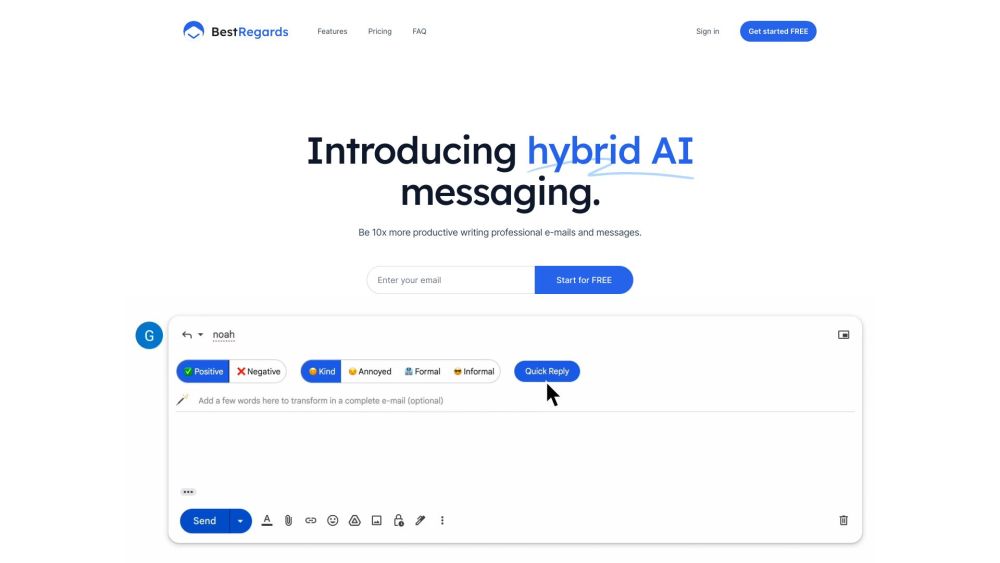
BestRegards website preview

BestRegards Website screenshot

What is BestRegards?

BestRegards is a revolutionary Chrome extension powered by AI, designed to help users craft personalized and professional email responses with minimal effort.

How to use BestRegards?

To get started with BestRegards, install the Chrome extension and activate it while composing an email or message. The AI will assess the context of the conversation and generate a reply tailored to your chosen tone and interest level. You have the option to review and tweak the generated response before sending it out.

BestRegards's Core Features

Contextual understanding: BestRegards analyzes the content of the email or message you're replying to, ensuring a contextually appropriate response.

Magic reply: Provide a few key points, and BestRegards will generate a comprehensive response for you.

Multilingual capabilities: BestRegards can respond in the language of your correspondent, supporting all major languages.

Universal access: Open the pop-up from any website and generate replies with ease, no matter where you are online.

BestRegards's Use Cases

Save valuable time by quickly creating personalized and professional email responses.

Enhance productivity by streamlining the process of writing emails and messages.

Effortlessly communicate in various languages with BestRegards's multilingual support.

Leverage AI technology to improve the quality of your email and message responses.

Utilize BestRegards from any website to generate replies on the fly.

Product source: BestRegards official website. Check the provider for current plans, limits and availability.

FAQ

BestRegards questions and answers

Product context and practical checks for evaluating BestRegards.

What is BestRegards used for?

BestRegards: AI-powered Chrome extension for crafting personalized, professional email responses effortlessly. Boost productivity with a few clicks!

How do I get started with BestRegards?

To get started with BestRegards, install the Chrome extension and activate it while composing an email or message. The AI will assess the context of the conversation and generate a reply tailored to your chosen tone and interest level. You have the option to review and tweak the generated response before sending it out.

Which capabilities are described for BestRegards?

Contextual understanding: BestRegards analyzes the content of the email or message you're replying to, ensuring a contextually appropriate response.Magic reply: Provide a few key points, and BestRegards will generate a comprehensive response for you.Multilingual capabilities: BestRegards can respond in the language of your correspondent, supporting all major languages.Universal access: Open the pop-up from any website and generate replies with ease, no matter where you are online.

What projects can I evaluate BestRegards for?

Save valuable time by quickly creating personalized and professional email responses.Enhance productivity by streamlining the process of writing emails and messages.Effortlessly communicate in various languages with BestRegards's multilingual support.Leverage AI technology to improve the quality of your email and message responses.Utilize BestRegards from any website to generate replies on the fly. BestRegards Login BestRegards Login Link: https://bestregards.app/auth/signin BestRegards Pricing BestRegards Pricing Link: https://bestregards.app/#pricing

What should I compare before choosing a BestRegards plan?

BestRegards Pricing Link: https://bestregards.app/#pricing Confirm current prices and allowances on the provider’s website before purchasing.

What inputs should I prepare for a BestRegards trial?

Compare support for source documents, style instructions, outlines and length limits. Check whether citations link to real material rather than merely looking like references.

How can I check the quality of a BestRegards result?

Verify names, dates, quotations and factual claims against the original sources. Edit tone, remove repetition and make sure the text answers the intended reader’s question.

Which export options should I check in BestRegards?

Check export to plain text, Markdown, documents or your publishing system. Formatting, headings and working links matter when moving a draft into production.

What is a practical way to test BestRegards against alternatives?

Use a real brief and a short source document. Compare factual accuracy, structure and editing time rather than accepting the longest or most confident draft.

Where is the official BestRegards website?

The website linked from this profile is https://bestregards.app. Use the provider’s own documentation, account area and support channels to confirm current product details.

Visit BestRegards