Table of contents
AI Image to Image Generator: Edit, Enhance & Reimagine Photos
Transform photos instantly with AI! Describe your vision in text—our Image to Image Generator edits, enhances & reimagines visuals effortlessly.
Directory : AI Photo Restoration, AI Background Remover, Image to Image, AI Colorize, AI Image Generator, AI Photo Editor, AI Style Transfer, Object Remover AI
What Is an AI Image to Image Generator?
An AI Image to Image Generator is a next-generation creative tool that transforms your existing photos using intelligent, language-guided editing. Instead of manual retouching or complex software, you describe what you want — whether it’s swapping skies, adding cinematic lighting, converting portraits to oil paintings, or restoring faded family snapshots — and the AI delivers photorealistic, high-fidelity results in seconds. No design experience needed.
How to Use the AI Image to Image Generator
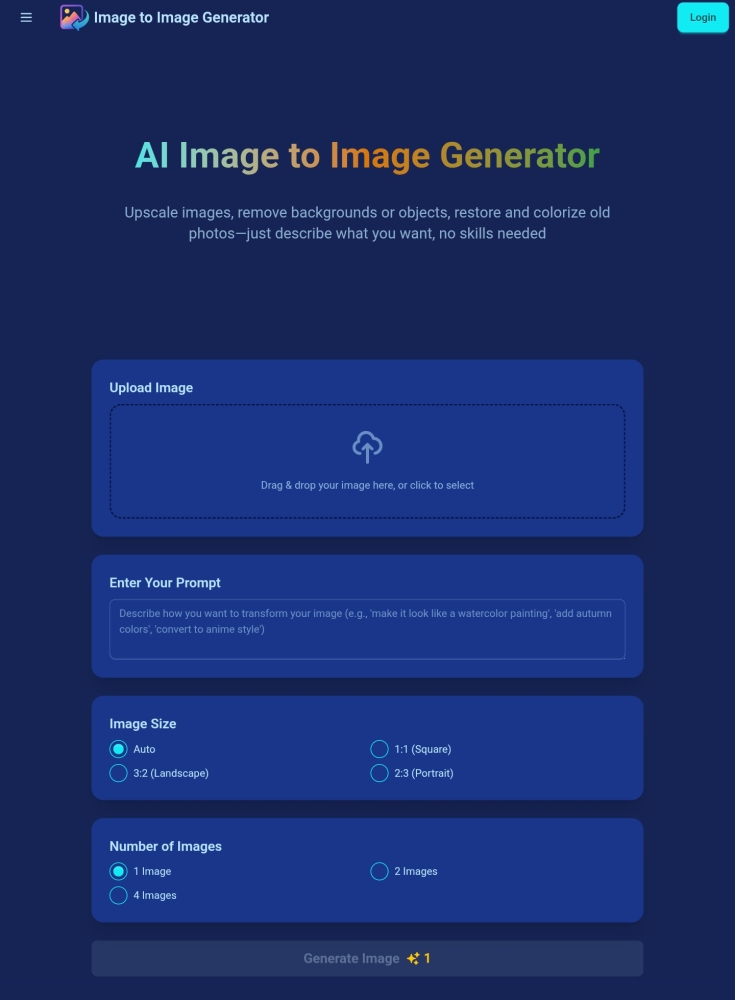
Start by uploading any photo from your device — no size limits beyond optimal performance (up to 10MB recommended). Then, craft a clear, descriptive prompt: “Make this beach sunset photo look like a vintage Polaroid with soft grain and warm tones.” Hit ‘Generate’, and watch as AI interprets your vision into a refined, editable image — instantly downloadable in your preferred format.
Key Capabilities of Our AI Image to Image Generator
Intelligent Prompt-Based Transformation
Photorealistic Output with Adaptive Upscaling
Lightning-Fast Generation — Under 60 Seconds
Full Format Flexibility: JPG, PNG, WebP (with transparency support)
Intuitive, Zero-Learning-Curve Interface
Commercial-Ready Outputs — Full Usage Rights Included
Real-World Applications
Creative Style Conversion (e.g., turn a selfie into a Van Gogh sketch)
Precision Object Erasure (e.g., delete photobombers or clutter)
One-Click Background Replacement or Removal
Historic Photo Revival — Restore, Sharpen & Colorize Aging Images
Context-Aware Scene Editing (e.g., “Add rain reflections on pavement” or “Change winter scene to summer”)
Frequently Asked Questions
-
What exactly does an AI image to image generator do?
-
Which file types can I upload?
-
How quickly will my edited image be ready?
-
Are generated images licensed for business use?
-
What makes a strong editing prompt?
-
How is my privacy protected during processing?
-
Do my credits expire or roll over?
-
Is credit refund available if unused?
-
What happens when my monthly quota is depleted?
-
Do you offer satisfaction guarantees or refunds?
-
How can I update or cancel my subscription?
-
What content policies apply to AI-generated outputs?
-
Support & Contact Information
For assistance, reach our dedicated support team at [email protected]. For faster resolution, visit our Contact Page.
-
About the AI Image to Image Generator Platform
Platform Name: Image to Image Generator
Developer: TYY AI Labs
Headquarters: San Francisco, CA (Remote-First Team)
Learn more about our mission and technology on the About Us page. -
AI Image to Image Generator Login
Access your account securely: https://imgtoimggenerator.com/login
-
Get Started — Sign Up Today
Create your free account in under 30 seconds: https://imgtoimggenerator.com/signup
-
Transparent & Scalable Pricing
Explore flexible plans — from free trials to pro-tier subscriptions — all with fair usage terms: https://imgtoimggenerator.com/pricing
FAQ from AI Image to Image Generator
What is AI Image to Image Generator?
An AI Image to Image Generator bridges human creativity with machine intelligence — turning simple text instructions into powerful visual edits. It doesn’t just filter or crop; it understands context, composition, and aesthetics to transform your images meaningfully and authentically.
How to use AI Image to Image Generator?
Three steps: Upload → Describe → Generate. Whether you’re refining product photos for e-commerce or breathing life into archival scans, our interface adapts to your workflow — not the other way around.
What is an image to image generator?
It’s a generative AI system trained to map pixel-level relationships between input images and textual intent — enabling precise, controllable, and expressive visual reworking without coding or design expertise.
What image formats are supported?
We accept JPG, PNG, and WebP files up to 10MB. High-resolution uploads yield better detail retention — especially for upscale and restoration tasks.
How long does image generation take?
Typical turnaround is 25–55 seconds. Complex prompts (e.g., multi-object scene edits) may require slightly longer — but we prioritize speed *without* sacrificing fidelity.
Can I use the generated images commercially?
Absolutely. All outputs belong to you — royalty-free, license-free, and cleared for use in marketing, publishing, merchandise, SaaS platforms, and more.
How do I write effective prompts?
Think like a director: specify subject, style, lighting, mood, and key changes (“Replace the background with Tokyo at night, neon-lit, shallow depth of field”). Avoid vague terms like “better” — instead, say “more vibrant colors, studio lighting, clean white background.”
Is my uploaded data secure?
Yes. Files are encrypted in transit and at rest. They’re automatically purged from servers within 2 hours of generation — no storage, no sharing, no third-party access.
How long do my credits last?
Monthly subscription credits renew on your billing date. Pay-as-you-go credits never expire — they remain active indefinitely until used.
Can I get a refund for unused credits?
Unused credits in prepaid packs are non-refundable per our Terms of Service. However, we’ll gladly assist with credit transfers or plan upgrades upon request.
What happens when I run out of credits?
Subscribers regain full access at renewal. Non-subscribers can purchase instant top-up bundles — or upgrade to a plan with unlimited generations.
Can I get a refund if I'm not satisfied with the results?
While final output depends on prompt clarity and source image quality, our support team offers personalized guidance, prompt optimization tips, and free retries — ensuring you achieve your vision.
How do I manage or cancel my subscription?
Web users: Visit your Account Settings > Billing. iOS/Android users: Manage via App Store or Google Play subscriptions. Cancellation takes effect at the end of your current cycle — no prorated charges.
How do you handle NSFW or adult content?
We enforce strict ethical AI guidelines. Our model includes multi-layered content safety filters — blocking generation attempts involving violence, explicit material, hate symbols, or illegal activity. Violations result in immediate account review.