
Proganize: AI-powered tool for lightning-fast document creation & collaboration. Explore use cases, pricing, reviews, features & alternatives.
Explore a specific workflow
Explore template management tools through the product profiles below. The collection groups applications around a shared task. Product scope can overlap, so compare the specific workflow each tool describes rather than the category name alone.
Identify the files, text or account connections your task needs. Confirm that the product accepts those inputs and offers controls for reviewing its work.
Test one representative task and inspect the result for accuracy and completeness. Record where manual corrections or extra tools are needed.
Proganize: AI-powered tool for lightning-fast document creation & collaboration. Explore use cases, pricing, reviews, features & alternatives.

Boost productivity with TemplateIn Chrome extension. Customize templates, automate repetitive tasks, and streamline your workflow.
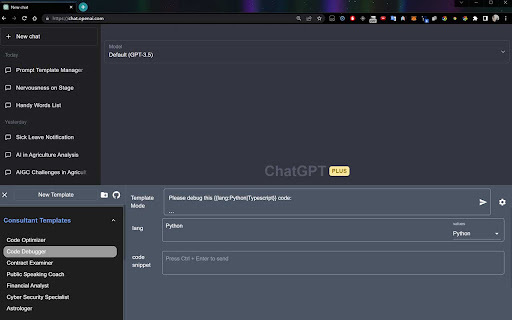
Effortlessly manage prompts with TemplateTool - Chrome Extension. Boost efficiency and streamline your workflow with prompt management made easy.

KOMETA AI Chrome Extension: Instantly answer any query with ease. Boost productivity and get quick, accurate responses directly in your browser!

RevertGPT Chrome Extension: Save and insert templates instantly with custom shortcuts. Boost productivity and streamline repetitive tasks with ease!
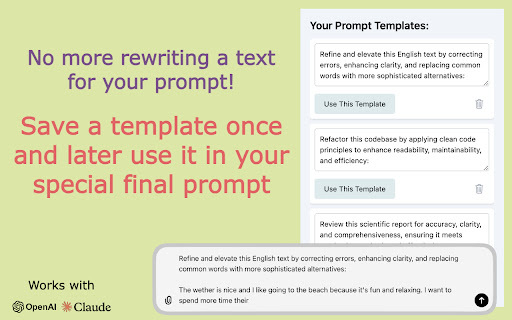
ParaPrompt Chrome Extension: Effortlessly streamline interactions with large language models, boosting productivity and enhancing AI-driven workflows.
FAQ
Practical answers to help you take the next step.
The collection groups applications around a shared task. Product scope can overlap, so compare the specific workflow each tool describes rather than the category name alone.
Identify the files, text or account connections your task needs. Confirm that the product accepts those inputs and offers controls for reviewing its work.
Test one representative task and inspect the result for accuracy and completeness. Record where manual corrections or extra tools are needed.
Choose one task with a clear success condition. Keep the input consistent, record the time spent reviewing and compare the complete workflow cost.
Proganize: AI-powered tool for lightning-fast document creation & collaboration. Explore use cases, pricing, reviews, features & alternatives.
Read about ProganizeBoost productivity with TemplateIn Chrome extension. Customize templates, automate repetitive tasks, and streamline your workflow.
Read about TemplateIn - Chrome ExtensionEffortlessly manage prompts with TemplateTool - Chrome Extension. Boost efficiency and streamline your workflow with prompt management made easy.
Read about TemplateTool - Chrome ExtensionKOMETA AI Chrome Extension: Instantly answer any query with ease. Boost productivity and get quick, accurate responses directly in your browser!
Read about KOMETA AI - Chrome ExtensionRevertGPT Chrome Extension: Save and insert templates instantly with custom shortcuts. Boost productivity and streamline repetitive tasks with ease!
Read about RevertGPT - Chrome ExtensionParaPrompt Chrome Extension: Effortlessly streamline interactions with large language models, boosting productivity and enhancing AI-driven workflows.
Read about ParaPrompt - Chrome Extension