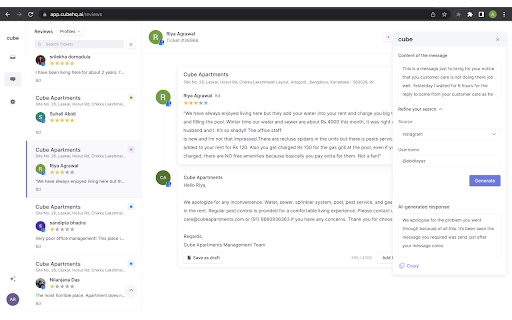
Enhance your browsing experience with Cube Browser Extension, the AI context generator powered by GPT-3. Get personalized replies like never before!
Explore a specific workflow
Explore social engagement tools through the product profiles below. The collection groups applications around a shared task. Product scope can overlap, so compare the specific workflow each tool describes rather than the category name alone.
Identify the files, text or account connections your task needs. Confirm that the product accepts those inputs and offers controls for reviewing its work.
Test one representative task and inspect the result for accuracy and completeness. Record where manual corrections or extra tools are needed.
Enhance your browsing experience with Cube Browser Extension, the AI context generator powered by GPT-3. Get personalized replies like never before!

Witty Comments Generator - Chrome Extension: Instantly boost social interaction with AI-generated humor. Make every post funnier and more engaging!

One Click Reply: Boost your productivity & engagement on social media with ease. Supercharge interactions and streamline responses instantly!

Commenter.ai is a platform designed to help users generate more effective comments, save valuable time and effort, and reach a wider audience for their brand visibility.
FAQ
Practical answers to help you take the next step.
The collection groups applications around a shared task. Product scope can overlap, so compare the specific workflow each tool describes rather than the category name alone.
Identify the files, text or account connections your task needs. Confirm that the product accepts those inputs and offers controls for reviewing its work.
Test one representative task and inspect the result for accuracy and completeness. Record where manual corrections or extra tools are needed.
Choose one task with a clear success condition. Keep the input consistent, record the time spent reviewing and compare the complete workflow cost.
Enhance your browsing experience with Cube Browser Extension, the AI context generator powered by GPT-3. Get personalized replies like never before!
Read about Cube Browser ExtensionWitty Comments Generator - Chrome Extension: Instantly boost social interaction with AI-generated humor. Make every post funnier and more engaging!
Read about Witty Comments GeneratorOne Click Reply: Boost your productivity & engagement on social media with ease. Supercharge interactions and streamline responses instantly!
Read about One Click ReplyCommenter.ai is a platform designed to help users generate more effective comments, save valuable time and effort, and reach a wider audience for their brand visibility.
Read about Commenter.aiCheck export formats, integrations and whether you can keep using your work outside the service. Test a real export before committing to a longer plan.
Run the same small task in each shortlisted product. Compare the price per usable result, usage limits, regeneration costs and time spent correcting the output. Confirm current terms with the provider.