AI Advertising Assistant

Zubtitle

Zubtitle is an online video editing tool powered by AI that makes it easy to subtitle videos and get them ready for social media. Resize, trim, and animate videos in minutes.

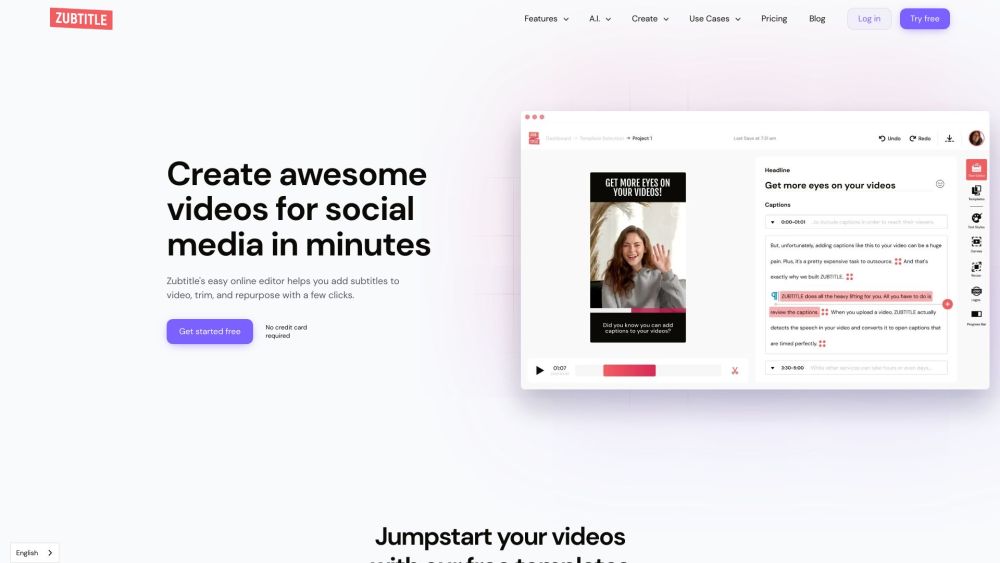
Zubtitle website preview
html

Zubtitle Website screenshot

What is Zubtitle?

Zubtitle is an AI-driven online video editing tool designed to simplify the process of adding subtitles and preparing videos for social media. With Zubtitle, you can resize, trim, and animate videos quickly and effortlessly.

How to use Zubtitle?

Zubtitle offers a user-friendly online video editor that enables users to easily add subtitles, resize and crop videos, animate captions, and create social media posts with AI-generated text and titles. Users can also upload their own logos and customize the video styles. Getting started with Zubtitle is simple: create an account, upload your video, and begin editing.

Zubtitle's Core Features

Automatically add captions or subtitles to videos

Utilize brand-specific fonts and colors with custom templates

Add video headlines using the built-in text editor

Animate video captions

Resize and crop videos

Trim videos

Upload custom logos or watermarks

Add progress bars to videos

Generate social media post text using AI

Generate video titles and headlines using AI

Automatically generate hashtags and video descriptions using AI

Create YouTube video chapters quickly using AI

Zubtitle's Use Cases

Business Owners

Insurance Companies

SaaS Companies

Startup Companies

Consulting Companies

Law Firms

Life Coaches

Real Estate Companies

Content Creators

YouTube Shorts

Facebook Reels

Pinterest Videos

Instagram Reels

TikToks

YouTube Videos

Agencies

Video Editing Agencies

Digital Marketing Agencies

Social Media Agencies

Video Production Agencies

Product source: Zubtitle official website. Check the provider for current plans, limits and availability.

FAQ

Zubtitle questions and answers

Product context and practical checks for evaluating Zubtitle.

What is Zubtitle used for?

Zubtitle is an online video editing tool powered by AI that makes it easy to subtitle videos and get them ready for social media. Resize, trim, and animate videos in minutes.

How do I get started with Zubtitle?

Zubtitle offers a user-friendly online video editor that enables users to easily add subtitles, resize and crop videos, animate captions, and create social media posts with AI-generated text and titles. Users can also upload their own logos and customize the video styles. Getting started with Zubtitle is simple: create an account, upload your video, and begin editing.

Which capabilities are described for Zubtitle?

Automatically add captions or subtitles to videosUtilize brand-specific fonts and colors with custom templatesAdd video headlines using the built-in text editorAnimate video captionsResize and crop videosTrim videosUpload custom logos or watermarksAdd progress bars to videosGenerate social media post text using AIGenerate video titles and headlines using AIAutomatically generate hashtags and video descriptions using AICreate YouTube video chapters quickly using AI

What projects can I evaluate Zubtitle for?

Business OwnersInsurance CompaniesSaaS CompaniesStartup CompaniesConsulting CompaniesLaw FirmsLife CoachesReal Estate CompaniesContent CreatorsYouTube ShortsFacebook ReelsPinterest VideosInstagram ReelsTikToksYouTube VideosAgenciesVideo Editing AgenciesDigital Marketing AgenciesSocial Media AgenciesVideo Production Agencies Zubtitle Support Email & Customer Service Contact & Refund Contact For more contact information, visit the contact us page. Zubtitle Company Company Name: Zubtitle LLC Zubtitle Login Login here: Zubtitle Login Zubtitle Sign Up Sign up here: Zubtitle Sign Up Zubtitle Pricing Check pricing here: Zubtitle Pricing Zubtitle Facebook Follow on Facebook: Zubtitle Facebook Zubtitle TikTok Follow on TikTok: Zubtitle TikTok Zubtitle LinkedIn Connect on LinkedIn: Zubtitle LinkedIn Zubtitle Twitter Follow on Twitter: Zubtitle Twitter Zubtitle Instagram Follow on Instagram: Zubtitle Instagram

What should I compare before choosing a Zubtitle plan?

Check pricing here: Zubtitle Pricing Confirm current prices and allowances on the provider’s website before purchasing.

What inputs should I prepare for a Zubtitle trial?

Compare text prompts, reference frames, source footage and audio support. Check duration, aspect ratio and whether the tool lets you keep a subject consistent between shots.

How can I check the quality of a Zubtitle result?

Watch the entire clip for motion errors, distorted objects, changing identities, lip-sync problems and abrupt transitions. Inspect the downloaded file as well as the preview.

Which export options should I check in Zubtitle?

Check export resolution, frame rate, aspect ratio, audio tracks and watermark rules. A good preview is not a substitute for an export that fits your publishing channel.

What is a practical way to test Zubtitle against alternatives?

Use a short shot with one subject and one camera movement. Keep the prompt and duration constant, then compare usable seconds and the number of regenerations.

Where is the official Zubtitle website?

The website linked from this profile is https://zubtitle.com. Use the provider’s own documentation, account area and support channels to confirm current product details.

Visit Zubtitle