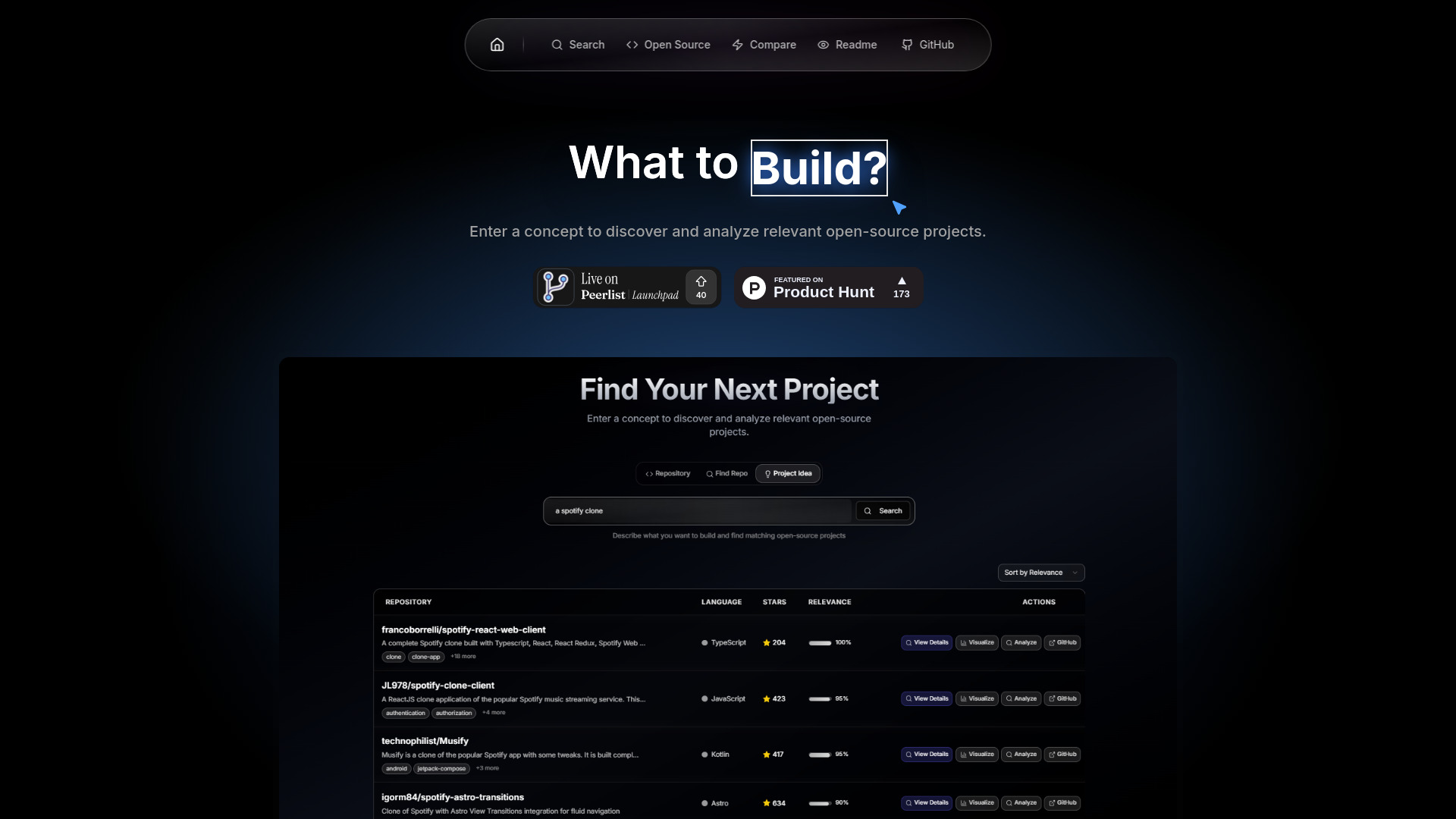
What Is What To Build?
What To Build is an AI-powered development companion created to help programmers turn ideas into practical, well-organized projects. By combining project ideation, GitHub repository analysis, open-source discovery, developer comparisons, and README creation in one workspace, the platform supports the complete journey from an initial concept to a publishable repository. Whether you are searching for your next portfolio project, evaluating an unfamiliar codebase, or preparing documentation for a new release, What To Build provides structured guidance for each stage of the process.
Instead of moving between multiple research, planning, and documentation tools, developers can use What To Build online to explore possibilities and make informed decisions more quickly. Its AI-focused workflow is particularly useful for people who want to understand how existing repositories are organized, identify suitable contribution opportunities, or build a clear plan before writing code. The result is a more focused approach to software development that connects inspiration, analysis, and implementation.
How to Use What To Build
Getting started with What To Build is simple. Enter a project description, describe the type of application you want to create, or provide a GitHub repository URL for analysis. Based on the information supplied, the platform can help shape an idea into a more detailed concept, outline possible features, and suggest a practical development direction. This makes it useful for both early-stage brainstorming and projects that already have a defined technical goal.
When working with an existing repository, users can submit the relevant GitHub link or identify the project using its owner/repository format. What To Build then presents useful information about the codebase, organization, and development activity in an easier-to-understand format. This can help developers review unfamiliar projects, prepare for contributions, or compare different technical approaches before choosing a solution.
The README creation workflow is equally straightforward. Add the repository details, review the generated content, and use the live preview to refine the result before publishing it. Developers can also use the visual planning tools to outline folders, features, milestones, and implementation steps. By turning a broad concept into a structured plan, What To Build helps reduce uncertainty at the beginning of a project.
Main Features of What To Build
- AI-Based Project Brainstorming: Receive tailored software project suggestions based on your interests, preferred technologies, and development goals. The platform helps transform a vague thought into a realistic concept with a clearer purpose.
- Visual Project Planning: Organize an idea into features, technical components, milestones, and possible repository structures. This gives developers a practical reference before implementation begins.
- GitHub Repository Insights: Examine repository organization, activity, contributors, and other relevant information to better understand how a project works and how actively it is maintained.
- README Generator with Preview: Produce structured project documentation that can include an overview, installation guidance, usage instructions, features, and contribution information. A preview helps users review the document before adding it to GitHub.
- Open-Source Project Exploration: Discover repositories that may match your skills, interests, or learning objectives, making it easier to locate worthwhile projects to study or contribute to.
- Developer Comparison Tools: Review GitHub activity and contribution information across multiple developers to identify patterns, evaluate collaboration possibilities, or track progress over time.
These capabilities are designed to support productivity without removing developer judgment. AI suggestions can provide a starting point, while repository information and visual plans help users decide which ideas are practical. The platform is therefore useful for brainstorming, research, project organization, and documentation rather than being limited to a single development task.
Why Use What To Build for Your GitHub Workflow?
Many developers lose time during the planning stages of a project. They may have an interesting idea but no clear feature list, repository structure, or implementation sequence. Others may find it difficult to understand an unfamiliar GitHub project or locate open-source repositories that are appropriate for their current experience. What To Build brings these related tasks together, helping users move from uncertainty to a more organized action plan.
Another benefit is the ability to create consistent documentation without writing every section manually. A well-prepared README can explain what a project does, how it should be installed, and how others can use or contribute to it. What To Build helps establish that foundation quickly, while the live preview allows developers to make adjustments and maintain control over the final content.
The service can be useful for individual programmers, students, open-source maintainers, technical teams, and aspiring contributors. Beginners can use it to explore suitable project ideas and learn from public repositories, while experienced developers can use its analysis and planning functions to evaluate concepts or prepare new initiatives. By combining AI assistance with GitHub-focused features, What To Build supports a more efficient and connected development process.
Practical Use Cases
A developer building a portfolio can describe a preferred technology stack and use What To Build to generate project directions that demonstrate relevant skills. The visual planning process can then be used to define the main pages, backend services, data models, and future improvements. Once the repository has been created, the README generator can help present the project professionally to recruiters, collaborators, and other visitors.
Open-source contributors can use the platform before submitting a pull request. Repository analysis may provide a helpful overview of the project’s structure and activity, while discovery tools can reveal related repositories or alternatives with contribution opportunities. This preparation can make it easier to decide whether a project matches a contributor’s knowledge and interests.
Maintainers can also benefit from automated documentation support. When launching a new repository or updating an existing one, they can create a clearer README that explains the project’s purpose and usage. Teams may use developer comparison features to review public activity patterns, identify potential collaborators, or understand how contributions are distributed across a community. These use cases make What To Build relevant throughout the lifecycle of a software project.