Introducing Wraith Docs
Wraith Docs is a powerful AI assistant integrated with Google Docs™, designed to enhance your writing and editing efficiency. With its advanced AI tools, you can create and refine documents more quickly and effectively.
Getting Started with Wraith Docs
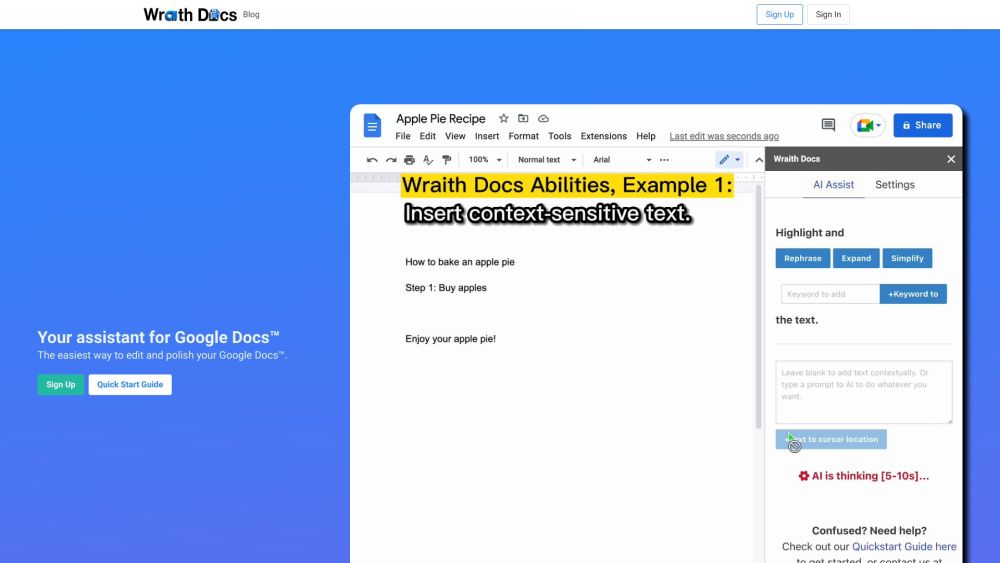
Begin by registering on the Wraith Docs website. Once your account is set up, you can access the AI tools within your Google Docs™. Highlight the text you wish to modify and select from options such as paraphrasing, expanding, simplifying, and keyword optimization. The AI also offers a context-aware feature for quick text addition and supports custom prompts for tailored content generation.
Key Features of Wraith Docs
Wraith Docs includes the following essential tools: 1. Paraphrasing: Effortlessly rephrase selected text. 2. Idea Expansion: Elaborate on concepts to enhance detail and clarity. 3. Text Simplification: Simplify complex text for better readability. 4. SEO Optimization: Integrate keywords to improve search engine rankings. 5. Quick Text Addition: Instantly insert text at the cursor position. 6. Custom Prompts: Provide specific instructions for AI-generated content.
Applications of Wraith Docs
Wraith Docs can be utilized in numerous scenarios, such as: 1. Content Creation: Boost your writing productivity and quality with AI-powered tools for paraphrasing, expanding, and simplifying text. 2. SEO Enhancement: Use the keyword optimization feature to improve your content's SEO performance. 3. Editing and Proofreading: Efficiently edit and refine your Google Docs™ documents with the AI assistant's capabilities.
About Wraith Docs
Company: Wraith Docs
Wraith Docs Login
Login Link: https://wraithdocs.com/accounts/login/
Wraith Docs Sign Up
Sign Up Link: https://wraithdocs.com/accounts/signup/