AI Product Description Generator

Wildberries Sales Analytics - Chrome Extension

Unlock the power of sales analytics with Wildberries Sales Analytics - a free Chrome extension that provides invaluable insights and niche tools.

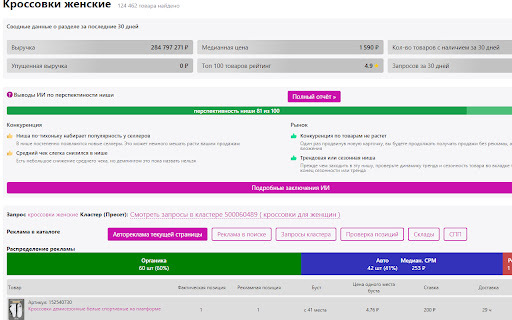
Wildberries Sales Analytics - Chrome Extension website preview

Wildberries Sales Analytics - Chrome Extension Website screenshot

Introducing Wildberries Sales Analytics - Chrome Extension: Free Sales Analytics

Are you looking for a powerful tool to boost your sales on Wildberries? Look no further! Wildberries Sales Analytics - Chrome Extension is here to revolutionize your selling experience. With our free sales analytics, you'll gain unique tools for niche selection and stay ahead of the competition. Track your competitors' sales effortlessly and analyze inventory, revenue, and missed revenue for any product. Unleash the potential of your business with our comprehensive sales dynamics analysis and discover profitable items like never before.

How to Utilize Wildberries Sales Analytics - Chrome Extension?

Using Wildberries Sales Analytics - Chrome Extension is as easy as it gets. Simply install the Getdata plugin and instantly access sales analytics directly on Wildberries' product page. No more hassle, just seamless insights to drive your sales to new heights.

Unleash the Power of Wildberries Sales Analytics - Chrome Extension

AI-powered Niche Analysis

Search Positions

Query Clusters

Ad Rates

Revenue Tracking

Missed Revenue Tracking

Sales Quantity

Average Daily Sales

Current Inventory

Average Daily Inventory

Days in Stock

Revenue Change Compared to Previous Period

Sales Change Compared to Previous Period

Competitor Inventory Alerts

Boost Your Sales with Wildberries Sales Analytics - Chrome Extension

Analyze Sales for 7, 30, or 60 Days

View Sales Graph, Price Changes, and Stock Levels

Product source: Wildberries Sales Analytics - Chrome Extension official website. Check the provider for current plans, limits and availability.

FAQ

Wildberries Sales Analytics - Chrome Extension questions and answers

Product context and practical checks for evaluating Wildberries Sales Analytics - Chrome Extension.

What is Wildberries Sales Analytics - Chrome Extension used for?

Unlock the power of sales analytics with Wildberries Sales Analytics - a free Chrome extension that provides invaluable insights and niche tools.

How do I get started with Wildberries Sales Analytics - Chrome Extension?

Using Wildberries Sales Analytics - Chrome Extension is as easy as it gets. Simply install the Getdata plugin and instantly access sales analytics directly on Wildberries' product page. No more hassle, just seamless insights to drive your sales to new heights.

What should I compare before choosing a Wildberries Sales Analytics - Chrome Extension plan?

Check Wildberries Sales Analytics - Chrome Extension’s current pricing page for included usage, renewal terms and any credit charges. Compare the cost of a usable result, including retries, rather than assuming that account registration includes free usage.

What inputs should I prepare for a Wildberries Sales Analytics - Chrome Extension trial?

Check supported documents, datasets and source access. Establish whether the product can inspect your actual material rather than answer from general knowledge.

How can I check the quality of a Wildberries Sales Analytics - Chrome Extension result?

Follow citations to the original source, recalculate important numbers and check the date and scope of the evidence. Distinguish an explanation from a verified result.

Which export options should I check in Wildberries Sales Analytics - Chrome Extension?

Look for usable citations, tables, downloadable data and reproducible steps. A clear answer should let another person inspect how the conclusion was reached.

What is a practical way to test Wildberries Sales Analytics - Chrome Extension against alternatives?

Choose a question with known sources and a checkable result. Compare citation accuracy, omissions and reproducibility rather than response length.

What should I review before uploading material to Wildberries Sales Analytics - Chrome Extension?

Read the provider’s rules on access, retention, deletion and use of uploaded material. Start with a non-confidential sample that you have permission to use.

How can I check whether Wildberries Sales Analytics - Chrome Extension fits my existing workflow?

List the steps before and after using Wildberries Sales Analytics - Chrome Extension, including preparation, review and export. Test that complete sequence and check whether handoffs require manual conversion or another paid service.

Where is the official Wildberries Sales Analytics - Chrome Extension website?

The website linked from this profile is https://chromewebstore.google.com/detail/getdata-бесплатная-аналит/pdjmlconaebjejlihlddbilgkmlkgonm. Use the provider’s own documentation, account area and support channels to confirm current product details.

Visit Wildberries Sales Analytics - Chrome Extension