AI Email Assistant

WhatsApp Web Scheduler

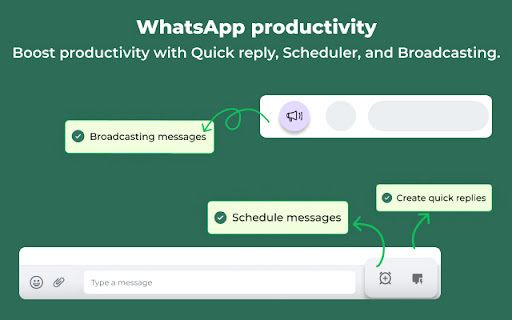
Schedule WhatsApp messages with our Chrome Extension! Boost productivity with CRM & ChatGPT integration for automated, smart communication.

WhatsApp Web Scheduler website preview

WhatsApp Web Scheduler - Chrome Extension Website screenshot

What is WhatsApp Web Scheduler: CRM & ChatGPT Integrated Chrome Extension Tool?

The WhatsApp Web Scheduler is an innovative Chrome extension designed to streamline communication by allowing users to schedule messages, send quick replies, and manage customer relationships through CRM integration. In addition, the tool is equipped with ChatGPT for automated responses and enhanced privacy settings to ensure user data security.

How to Use WhatsApp Web Scheduler: CRM & ChatGPT Integrated Chrome Extension?

To get started, simply connect your WhatsApp Web account to the extension. Once connected, you can begin scheduling messages, access your CRM system to manage client data, and use ChatGPT for generating automated replies—all from one central platform.

Key Features of WhatsApp Web Scheduler: CRM & ChatGPT Integrated Chrome Extension

Message Scheduling

Plan and schedule messages to be sent at optimal times, ensuring timely communication with clients and team members.

Quick Replies

Save time by creating quick, pre-set responses for common queries and follow-ups.

CRM Access

Seamlessly integrate with your CRM system to manage and track customer interactions in real-time.

ChatGPT Integration

Leverage the power of AI through ChatGPT to automate responses and deliver instant customer support.

Enhanced Privacy Features

Enjoy secure communication with encrypted data storage and privacy-focused features.

Use Cases of WhatsApp Web Scheduler: CRM & ChatGPT Integrated Chrome Extension

Schedule Messages for Marketing Campaigns

Plan your promotional messages in advance to drive engagement and sales during key periods.

Automate Customer Support Using ChatGPT

Provide fast, AI-generated responses to frequently asked questions and customer queries.

Manage Client Relationships Through CRM Integration

Keep track of customer interactions and ensure seamless communication with built-in CRM capabilities.

Product source: WhatsApp Web Scheduler official website. Check the provider for current plans, limits and availability.

FAQ

WhatsApp Web Scheduler questions and answers

Product context and practical checks for evaluating WhatsApp Web Scheduler.

What is WhatsApp Web Scheduler used for?

Schedule WhatsApp messages with our Chrome Extension! Boost productivity with CRM & ChatGPT integration for automated, smart communication.

How do I get started with WhatsApp Web Scheduler?

To get started, simply connect your WhatsApp Web account to the extension. Once connected, you can begin scheduling messages, access your CRM system to manage client data, and use ChatGPT for generating automated replies—all from one central platform.

Which capabilities are described for WhatsApp Web Scheduler?

Message SchedulingPlan and schedule messages to be sent at optimal times, ensuring timely communication with clients and team members.Quick RepliesSave time by creating quick, pre-set responses for common queries and follow-ups.CRM AccessSeamlessly integrate with your CRM system to manage and track customer interactions in real-time.ChatGPT IntegrationLeverage the power of AI through ChatGPT to automate responses and deliver instant customer support.Enhanced Privacy FeaturesEnjoy secure communication with encrypted data storage and privacy-focused features.

What projects can I evaluate WhatsApp Web Scheduler for?

Schedule Messages for Marketing CampaignsPlan your promotional messages in advance to drive engagement and sales during key periods.Automate Customer Support Using ChatGPTProvide fast, AI-generated responses to frequently asked questions and customer queries.Manage Client Relationships Through CRM IntegrationKeep track of customer interactions and ensure seamless communication with built-in CRM capabilities.

What should I compare before choosing a WhatsApp Web Scheduler plan?

Check WhatsApp Web Scheduler’s current pricing page for included usage, renewal terms and any credit charges. Compare the cost of a usable result, including retries, rather than assuming that account registration includes free usage.

What inputs should I prepare for a WhatsApp Web Scheduler trial?

Look for text prompts, image references, masks or sketches as appropriate. Compare composition control, supported upload types and the ability to revise a selected area.

How can I check the quality of a WhatsApp Web Scheduler result?

Inspect text, hands, edges, reflections and repeated objects at full size. Check that important product or brand details survive editing.

Which export options should I check in WhatsApp Web Scheduler?

Compare pixel dimensions, transparency, file formats and any enlargement options. Confirm that the downloaded result works in your design or publishing software.

What is a practical way to test WhatsApp Web Scheduler against alternatives?

Prepare a brief with a subject, composition, lighting and required output size. Test a first generation and a targeted revision to see how much control you retain.

Where is the official WhatsApp Web Scheduler website?

The website linked from this profile is https://chromewebstore.google.com/detail/eazybe-best-whatsapp-web/clgficggccelgifppbcaepjdkklfcefd. Use the provider’s own documentation, account area and support channels to confirm current product details.

Visit WhatsApp Web Scheduler