General Writing

WhatsAid - AI Assistant

WhatsAid - Chrome Extension: Your AI assistant for smarter, faster WhatsApp chats. Boost communication, craft replies, and save time effortlessly!

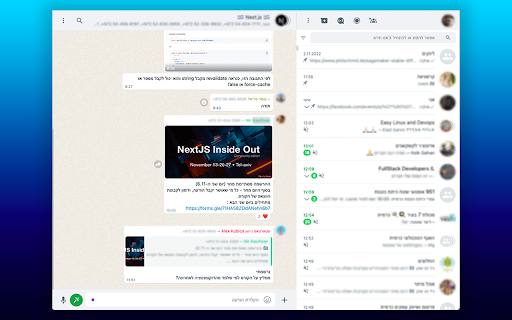
WhatsAid - AI Assistant website preview

WhatsAid - Chrome Extension Website screenshot

What is WhatsAid - AI Assistant for WhatsApp?

WhatsAid is a powerful Chrome extension designed specifically for WhatsApp users who want to take their messaging experience to the next level. With its AI-driven smart features, it helps users streamline their conversations, offering insightful suggestions and speeding up communication.

How to Get Started with WhatsAid AI Assistant?

1. Download and install the WhatsAid Chrome extension from the Chrome Web Store. 2. Link it securely to your WhatsApp account. 3. Allow WhatsAid to analyze your messages and provide smart recommendations. 4. Use the AI-suggested replies to respond quickly and more effectively.

Key Features of WhatsAid AI Chrome Extension

AI-Powered Message Analysis

Instant Reply Suggestions

Boosted Efficiency in Chats

Tailored Response Generation

Top-Notch Privacy and Data Security

Always Up-to-Date with the Latest Features

Best Uses for WhatsAid AI Assistant

Optimizing Professional Conversations

Enhancing Casual Chats with Friends and Family

Maximizing Communication Efficiency

Product source: WhatsAid - AI Assistant official website. Check the provider for current plans, limits and availability.

FAQ

WhatsAid - AI Assistant questions and answers

Product context and practical checks for evaluating WhatsAid - AI Assistant.

What is WhatsAid - AI Assistant used for?

WhatsAid - Chrome Extension: Your AI assistant for smarter, faster WhatsApp chats. Boost communication, craft replies, and save time effortlessly!

How do I get started with WhatsAid - AI Assistant?

1. Download and install the WhatsAid Chrome extension from the Chrome Web Store. 2. Link it securely to your WhatsApp account. 3. Allow WhatsAid to analyze your messages and provide smart recommendations. 4. Use the AI-suggested replies to respond quickly and more effectively.

Which capabilities are described for WhatsAid - AI Assistant?

AI-Powered Message AnalysisInstant Reply SuggestionsBoosted Efficiency in ChatsTailored Response GenerationTop-Notch Privacy and Data SecurityAlways Up-to-Date with the Latest Features

What should I compare before choosing a WhatsAid - AI Assistant plan?

Check WhatsAid - AI Assistant’s current pricing page for included usage, renewal terms and any credit charges. Compare the cost of a usable result, including retries, rather than assuming that account registration includes free usage.

What inputs should I prepare for a WhatsAid - AI Assistant trial?

Look for text prompts, image references, masks or sketches as appropriate. Compare composition control, supported upload types and the ability to revise a selected area.

How can I check the quality of a WhatsAid - AI Assistant result?

Inspect text, hands, edges, reflections and repeated objects at full size. Check that important product or brand details survive editing.

Which export options should I check in WhatsAid - AI Assistant?

Compare pixel dimensions, transparency, file formats and any enlargement options. Confirm that the downloaded result works in your design or publishing software.

What is a practical way to test WhatsAid - AI Assistant against alternatives?

Prepare a brief with a subject, composition, lighting and required output size. Test a first generation and a targeted revision to see how much control you retain.

What should I review before uploading material to WhatsAid - AI Assistant?

Read the provider’s rules on access, retention, deletion and use of uploaded material. Start with a non-confidential sample that you have permission to use.

Where is the official WhatsAid - AI Assistant website?

The website linked from this profile is https://chromewebstore.google.com/detail/whatsaid/jhkopmongilekggogkkjbmaobnoehppk. Use the provider’s own documentation, account area and support channels to confirm current product details.

Visit WhatsAid - AI Assistant