Table of contents
VSCO: Photo & Video Editing, Creative Community, Pro Tools
VSCO: Edit photos & videos like a pro, join a vibrant creative community, and unlock powerful tools—all in one app. 📸✨
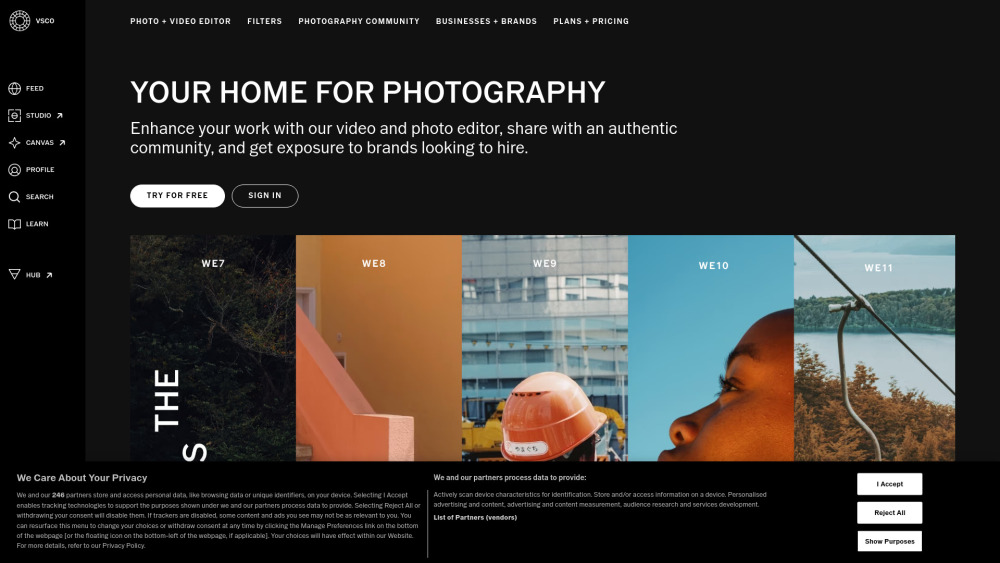
VSCO: Photo & Video Editing, Creative Community, Pro Tools
VSCO is more than an editing app—it’s a creative ecosystem built for visual storytellers. Designed for photographers, filmmakers, and emerging artists, VSCO delivers professional-grade photo and video editing tools across mobile (iOS and Android) and desktop (Mac and Windows), all unified by a vibrant, values-driven global community. Its signature preset library—curated with film-inspired authenticity—sits alongside powerful AI-enhanced features like intelligent object removal and dynamic grain simulation. But VSCO goes beyond pixels: it fosters connection through Spaces, empowers self-expression via Blogs and Galleries, and bridges talent with opportunity through its Brand Engagement Platform—including VSCO Hub, where creators are matched with brands for paid collaborations, campaigns, and creative commissions.
How VSCO Empowers Your Creative Workflow
Start capturing in-app or import from your device—then refine with precision. Apply over 200+ expressive presets, layer adjustments using HSL, depth-aware Film FX, and tactile Grain controls, or leverage AI Remove to effortlessly clean backgrounds. Edit videos frame-by-frame with color grading, speed ramps, and cinematic overlays. Once polished, publish to your public profile, organize work into thematic Galleries, draft narrative-rich Blogs, or assemble mood-driven Canvas boards. Join Spaces to exchange feedback, repost inspiration, and grow alongside peers. For professionals, VSCO Sites lets you launch a custom portfolio website in minutes—and with the Pro plan, sync edits seamlessly across devices, share password-protected Client Galleries, and access real-time Profile Insights to track engagement and audience growth.
VSCO’s Integrated Creative Suite
Cross-Platform Photo Editor (Mobile + Desktop)
Professional Video Editor with Color Grading & Effects
200+ Curated Presets — Including Film Emulations & Branded Collections
Advanced Controls: Film FX, Grain, AI Remove, HSL, Layered Collages, and More
Creative Community Hub: Spaces, Galleries, Blogs, Reposting & Discovery
VSCO Canvas — Visual Moodboard Builder for Planning & Ideation
VSCO Sites — One-Click Portfolio Websites with Custom Domains (Pro)
Brand Engagement Ecosystem: VSCO Hub, Brand Challenges, Sponsored Presets & Talent Matching
Adobe Lightroom Integration — Sync & Export RAW Files (Pro)
End-to-End Cloud Sync — Edit Anywhere, Never Lose Progress (Pro)
Client Galleries — Share Private, Branded, Password-Protected Collections (Pro)
Profile Analytics — Track Views, Saves, Follower Growth & Audience Demographics (Pro)
Who Uses VSCO — And Why
Social Creators optimizing content for Instagram, TikTok, and Pinterest with cohesive aesthetics.
Professional photographers building client-ready portfolios and landing brand partnerships.
Students and hobbyists learning composition, color theory, and visual storytelling through guided tools.
Filmmakers and content producers editing short-form video with cinematic polish—no complex software required.
Art directors and stylists curating visual references via Canvas before shoots or campaigns.
Brands seeking authentic, vetted creators for influencer campaigns, product launches, and visual assets.
Educators and mentors sharing tutorials, critiques, and inspiration inside a trusted creative space.
Frequently Asked Questions
-
What makes VSCO different from other photo editors?
-
What’s included in each VSCO membership tier?
-
Is VSCO suitable for professional commercial work?
-
Can I use VSCO for video editing on desktop?
-
How does VSCO Hub help creators get hired?
-
Do I need a subscription to use VSCO’s core editing tools?
-
Support & Contact
For help with billing, technical issues, or account questions, visit the official support portal: VSCO Help Center (https://support.vsco.co/hc/en-us)
-
About VSCO
Founded in 2011 as Visual Supply Company, VSCO remains committed to empowering creativity—not consumption. Learn about our mission, team, and values at vsco.co/about.
-
Log In to Your Account
Access your presets, galleries, and projects: VSCO Login
-
Join the Creative Community
Start your free Starter account today: Sign Up for VSCO
FAQ from VSCO
What makes VSCO different from other photo editors?
VSCO blends intuitive, film-rooted editing with purpose-built community infrastructure. Unlike standalone editors or social-first platforms, VSCO unifies high-fidelity creative tools, portfolio publishing, collaborative discovery, and professional pathways—all within one ethical, ad-free environment designed for long-term artistic growth.
What’s included in each VSCO membership tier?
VSCO offers three tiers: Starter (free), Plus ($2.50/month, billed annually), and Pro ($5.00/month, billed annually). Starter gives access to 15 presets and core editing; Plus unlocks all 200+ presets, video editing, Canvas, and Sites; Pro adds cloud sync, Client Galleries, Profile Insights, Adobe Lightroom integration, and priority support.
Is VSCO suitable for professional commercial work?
Absolutely. With Pro-tier features—including RAW export, client-facing galleries, custom domain portfolio sites, and direct brand collaboration via VSCO Hub—VSCO supports end-to-end professional workflows, from concept to commission to delivery.
Can I use VSCO for video editing on desktop?
Yes. The desktop app supports full video editing functionality—including timeline-based trimming, color grading, audio ducking, and effects—with parity across Plus and Pro plans. Desktop users benefit from larger canvas space, keyboard shortcuts, and faster rendering.
How does VSCO Hub help creators get hired?
VSCO Hub uses AI-powered matching to surface creators’ best work to brands actively seeking talent. It surfaces opportunities like sponsored challenges, campaign briefs, and direct hiring requests—while maintaining creator control over visibility, permissions, and compensation terms.
Do I need a subscription to use VSCO’s core editing tools?
No. The free Starter plan includes essential editing tools, 15 presets, and basic sharing—ideal for beginners and casual creators. Premium features unlock deeper creative control, cross-device continuity, and professional exposure—but the foundation of great editing is always accessible.