AI Trip Planner

TripPlanner

Discover adventures with TripPlanner: An AI-powered travel tool that personalizes your journey, fully integrated with Google Maps for effortless navigation.

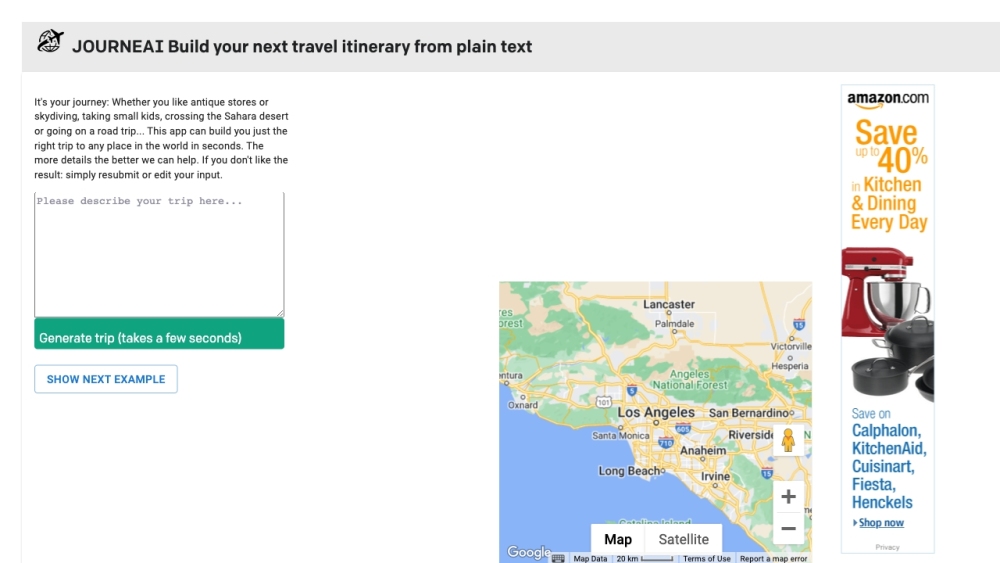
TripPlanner website preview

TripPlanner Website screenshot

What is TripPlanner?

TripPlanner is an innovative travel planning tool that leverages AI to create customized travel itineraries. Seamlessly integrating with Google Maps, it allows users to generate detailed travel plans for any destination around the globe within moments.

How to use TripPlanner?

To start planning with TripPlanner, input your travel preferences, such as your interests and desired activities. The platform will quickly analyze this data and produce a tailor-made itinerary for you. Your personalized trip plans can also be saved for later use and easily shared with others.

Key Features of TripPlanner

Personalized itinerary creation powered by AI

Integration with Google Maps

2D and 3D mapping with street view capabilities

Visa and currency details for your destination

Current weather updates for your chosen location

Option to save and share trip plans

Available in 9 different languages

Who Can Benefit from TripPlanner?

Family vacation planners

Adventurous travelers

People exploring new locations

Road trip enthusiasts

International travelers

  • Join the TripPlanner Discord

    Connect with other travelers through the TripPlanner Discord: https://discord.gg/uhByAB9EaE. For more Discord details, please click here(/discord/uhbyab9eae).

  • TripPlanner Customer Support

    For customer service or refund inquiries, reach out to us at: [email protected].

Product source: TripPlanner official website. Check the provider for current plans, limits and availability.

FAQ

TripPlanner questions and answers

Product context and practical checks for evaluating TripPlanner.

What is TripPlanner used for?

Discover adventures with TripPlanner: An AI-powered travel tool that personalizes your journey, fully integrated with Google Maps for effortless navigation.

How do I get started with TripPlanner?

To start planning with TripPlanner, input your travel preferences, such as your interests and desired activities. The platform will quickly analyze this data and produce a tailor-made itinerary for you. Your personalized trip plans can also be saved for later use and easily shared with others.

Which capabilities are described for TripPlanner?

Personalized itinerary creation powered by AIIntegration with Google Maps2D and 3D mapping with street view capabilitiesVisa and currency details for your destinationCurrent weather updates for your chosen locationOption to save and share trip plansAvailable in 9 different languages

What should I compare before choosing a TripPlanner plan?

TripPlanner is an innovative travel planning tool that leverages AI to create customized travel itineraries. Seamlessly integrating with Google Maps, it allows users to generate detailed travel plans for any destination around the globe within moments. Confirm current prices and allowances on the provider’s website before purchasing.

What inputs should I prepare for a TripPlanner trial?

Identify the files, text or account connections your task needs. Confirm that the product accepts those inputs and offers controls for reviewing its work.

How can I check the quality of a TripPlanner result?

Test one representative task and inspect the result for accuracy and completeness. Record where manual corrections or extra tools are needed.

Which export options should I check in TripPlanner?

Check export formats, integrations and whether you can keep using your work outside the service. Test a real export before committing to a longer plan.

What is a practical way to test TripPlanner against alternatives?

Choose one task with a clear success condition. Keep the input consistent, record the time spent reviewing and compare the complete workflow cost.

What should I review before uploading material to TripPlanner?

Read the provider’s rules on access, retention, deletion and use of uploaded material. Start with a non-confidential sample that you have permission to use.

Where is the official TripPlanner website?

The website linked from this profile is https://journeai.com. Use the provider’s own documentation, account area and support channels to confirm current product details.

Visit TripPlanner